
惯性聚合 高效追踪和阅读你感兴趣的博客、新闻、科技资讯
阅读原文 在惯性聚合中打开

推荐订阅源

Google DeepMind News
Stack Overflow Blog
Stack Overflow Blog
Hugging Face - Blog
Hugging Face - Blog
博客园_首页
T
The Blog of Author Tim Ferriss
博客园 - 叶小钗
N
Netflix TechBlog - Medium
腾讯CDC
C
Check Point Blog
P
Proofpoint News Feed
Engineering at Meta
Engineering at Meta
GbyAI
GbyAI
S
SegmentFault 最新的问题
F
Fortinet All Blogs
美团技术团队
U
Unit 42
freeCodeCamp Programming Tutorials: Python, JavaScript, Git & More
博客园 - 司徒正美
F
Full Disclosure
Recorded Future
Recorded Future
D
DataBreaches.Net
博客园 - 【当耐特】
Martin Fowler
Martin Fowler
J
Java Code Geeks
I
InfoQ
Y
Y Combinator Blog
A
About on SuperTechFans
AI
AI
爱范儿
爱范儿
Exploit-DB.com RSS Feed
Forbes - Security
Forbes - Security
W
WeLiveSecurity
M
MIT News - Artificial intelligence
雷峰网
雷峰网
cs.CV updates on arXiv.org
Simon Willison's Weblog
Schneier on Security
The GitHub Blog
The GitHub Blog
Security Archives - TechRepublic
aimingoo的专栏
aimingoo的专栏
Cyber Security Advisories - MS-ISAC
G
GRAHAM CLULEY
Know Your Adversary
Know Your Adversary
Latest news
Latest news
Threat Intelligence Blog | Flashpoint
D
Docker
Recent Commits to openclaw:main
量子位
V2EX - 技术
V2EX - 技术
Project Zero
Project Zero

博客园 - Stanley.Luo

CentOS 7+nginx+PHP+php-fpm Linux 的系统目录介绍 C++与Java,C#的异同(一):值,地址,引用 Loom工具类:Unity3D巧妙处理多线程 3Dmax 创建物体 3DMax 物体选择方法 3DMax 常用快捷键 Groovy与Gradle在Android中的应用 VR的UI、UX设计原则 为什么带网格(mesh)的模型添加了刚体Rigidbody和MeshCollider,还是会从地板穿过去? Mecanim动画模型规范 Mecanim动画系统 制作流程 HTC Vive 体验的折腾经历 OpenGLES 2.0 可编程渲染管线 【VR视频播放】解决Unity模型贴图反转的问题 Lua语言的特别之处 Unity3D 的摄像机 iptables 的使用 CentOS安装Nginx
HTC Vive 与Leap Motion 出现位置错误的问题
Stanley.Luo · 2016-10-01 · via 博客园 - Stanley.Luo

Leap Motion已经支持VR, 但是官方没有支持HTC Vive的例子。

按照官方的文档, 其实是有问题的:

https://developer.leapmotion.com/documentation/unity/unity/Unity_Custom_Rig.html

Add the LeapVRTemporalWarping script component to the LeapSpace component you just created. Double check that the Head Transform property has been set to your MainCamera and that TrackingAnchor has been set to the TrackingAnchor game object you created a few steps earlier. Apply the following settings to the script:

Set Tween Rotational Warping to 1.
Set Sync Mode to LOW_LATENCY.

问题在于这句话:“Head Transform property has been set to your MainCamera”

如果你按照官方这样设置, 两只手的模型, 永远都会在你脑袋上方, 而不是在你前方。
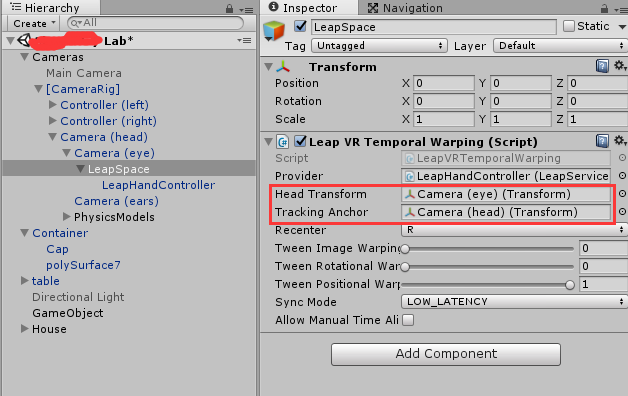
正确的是什么呢?

 是这样的:
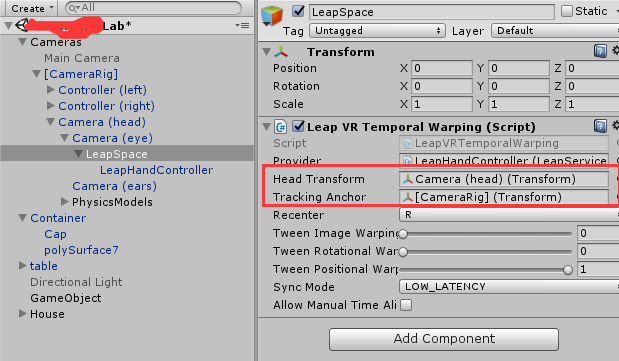
因为对steamVR来说, 有点特别, head 是一个Camera, eye也是一个Camera, 而实际上,这里Head tranform用Camera(head)才是正确的。

对应的, Tracking Anchor就是Camera(head)的父对象了。