惯性聚合 高效追踪和阅读你感兴趣的博客、新闻、科技资讯
阅读原文 在惯性聚合中打开

推荐订阅源

The Register - Security
云风的 BLOG
云风的 BLOG
U
Unit 42
F
Fortinet All Blogs
The GitHub Blog
The GitHub Blog
cs.CV updates on arXiv.org
D
Docker
Cyber Security Advisories - MS-ISAC
S
Secure Thoughts
Hacker News: Ask HN
Hacker News: Ask HN
Vercel News
Vercel News
S
Security @ Cisco Blogs
GbyAI
GbyAI
Stack Overflow Blog
Stack Overflow Blog
Exploit-DB.com RSS Feed
I
Intezer
MongoDB | Blog
MongoDB | Blog
AI
AI
MyScale Blog
MyScale Blog
Engineering at Meta
Engineering at Meta
Y
Y Combinator Blog
Threat Intelligence Blog | Flashpoint
P
Proofpoint News Feed
钛媒体:引领未来商业与生活新知
钛媒体:引领未来商业与生活新知
W
WeLiveSecurity
博客园 - 叶小钗
S
SegmentFault 最新的问题
N
News | PayPal Newsroom
WordPress大学
WordPress大学
freeCodeCamp Programming Tutorials: Python, JavaScript, Git & More
D
DataBreaches.Net
小众软件
小众软件
Microsoft Azure Blog
Spread Privacy
Spread Privacy
H
Help Net Security
美团技术团队
博客园 - 司徒正美
T
Threat Research - Cisco Blogs
cs.AI updates on arXiv.org
K
Kaspersky official blog
Application and Cybersecurity Blog
K
KPMG report finds enterprise disconnect between AI and its ROI | CIO
V
Vulnerabilities – Threatpost
TaoSecurity Blog
TaoSecurity Blog
N
Netflix TechBlog - Medium
L
Lohrmann on Cybersecurity
J
Java Code Geeks
量子位
Martin Fowler
Martin Fowler
博客园_首页

博客园 - 桂圆

经典语句(人生经典语句 爱情经典语句) 我对GOOGLE MAP API 的一些简单调用 - 桂圆 关于FileUpload上传大文件的问题解决办法 搁浅了我也 无法启动IIS服务解决办法 我对FreeTextBox简单使用 C#格式化数据结果表 - 桂圆 - 博客园 使用JavaScript 为GridView 行添加淡入淡出效果 C#文件操作 - 桂圆 - 博客园 获取GridView中指定的控件 - 桂圆 - 博客园 ScriptManager调用 无参数WebService 通用不间断滚动JS封装类 prototype 轻量级WEB开发的首选ajax框架 使用UrlRewritingNet.Dll实现URL 重写 【软件设计精要与模式】到手 JS应用(资料很全) SQLServer Transact SQL全集(转) JavaScript基础知识 使用ICSharpCode.TextEditor.dll 做的一个代码高亮记事本
WinForm控件开发【转载】
桂圆 · 2007-05-18 · via 博客园 - 桂圆

http://www.cnblogs.com/luqingfei/archive/2007/03/1...

用VS建两个项目(CustomControlSample, TestControl), 项目类型分别是类库(不是内裤!!!), Windows应用程序.

using System.Windows.Forms;
 using System.Drawing;
 
 namespace CustomControlSample
 {
   public class FirstControl : Control
   {
       private int simpleField;
 
        public int SimpleProperty
        {
            get { return simpleField; }
            set { simpleField = value; }
        }
 
        protected override void OnPaint(PaintEventArgs e)
        {
            base.OnPaint(e);
            e.Graphics.DrawRectangle(Pens.Red, new Rectangle(Point.Empty, new Size(Width - 1, Height - 1)));
        }
    }
}
 
写完后 生成 DLL 文件 
然后在 WINFORM 窗体 引用这个DLL 文件 


只有一个属性的控件!!!
拖到windows 窗体上:

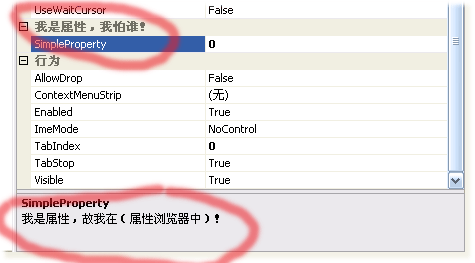
在属性浏览器中可以看到该控件的唯一属性:

一个最最简单的Dot net winform控件做好了.

     在这里用到 属性(Attribute),  属性(Attribute)与属性(Property)不同, 前者是用来描述编程元素的,后都是用来描述对象的. 简单地说, 错了不要骂我!!!
将上代码稍稍改动了一点:

 using System.ComponentModel;
 using System.Windows.Forms;
 using System.Drawing;
 
 namespace CustomControlSample
 {
public class FirstControl : Control
{
private int simpleField;
 
        [Category("我是属性,我怕谁!")]
        [Description("我是属性,故我在(属性浏览器中)!")]
 public int SimpleProperty
 {
 get { return simpleField; }
 set { simpleField = value; }
        }
 
 protected override void OnPaint(PaintEventArgs e)
 {
 base.OnPaint(e);
            e.Graphics.DrawRectangle(Pens.Red, new Rectangle(Point.Empty, new Size(Width - 1, Height - 1)));
        }
    }
}