


惯性聚合 高效追踪和阅读你感兴趣的博客、新闻、科技资讯
阅读原文 在惯性聚合中打开

推荐订阅源

Recent Announcements
奇客Solidot–传递最新科技情报
奇客Solidot–传递最新科技情报
MongoDB | Blog
MongoDB | Blog
H
Help Net Security
钛媒体:引领未来商业与生活新知
钛媒体:引领未来商业与生活新知
人人都是产品经理
人人都是产品经理
freeCodeCamp Programming Tutorials: Python, JavaScript, Git & More
The GitHub Blog
The GitHub Blog
V
V2EX
Microsoft Security Blog
V
Visual Studio Blog
A
About on SuperTechFans
博客园_首页
L
LangChain Blog
量子位
雷峰网
雷峰网
Cyber Security Advisories - MS-ISAC
Jina AI
Jina AI
月光博客
月光博客
阮一峰的网络日志
阮一峰的网络日志
博客园 - 聂微东
Microsoft Azure Blog
M
MIT News - Artificial intelligence
N
Netflix TechBlog - Medium

Latest news

LG G6 vs. LG G5: I compared the latest OLED TV models, and it's a surprisingly tough choice I saw the 'MacBook Pro for Linux users' for the first time, and it's a legit Windows threat I'm putting Motorola above Samsung when it comes to flip phones - and won't think twice I got an early look at ChatGPT Images 2.0, and it's impressive - with one exception I tested Surfshark's new Dausos VPN protocol - here's how it compares to WireGuard How to easily encrypt your files on an Android phone - for free I'm not giving up on DJI cameras yet - not when they can upset my GoPro like this The best website builders for small businesses in 2026: Expert tested and reviewed Why I'm recommending last year's phones over 2026 models - with one exception This powerful Gemini setting made my AI results way more personal and accurate After testing this HP laptop, I get why its 'boring' design is adored by business users The best TV antenna of 2026: Expert tested Your old iPad or Android tablet can be your new smart home panel - here's how Apple's original AirTag still tracks effectively, and you can get a 4-pack for its best price ever T-Mobile will give you an iPad for $99 when you sign up for a new line - here's how How to qualify for Apple's education discount - and get a $499 MacBook Neo for school T-Mobile will give you a Samsung Galaxy Watch 8 for free - how to get yours Prolonged AI use can be hazardous to your health and work: 4 ways to stay safe Verizon will give you a free iPad or Apple Watch with your next iPhone - how the deal works The best laptops of 2026: Expert tested and reviewed I hid 4 Bluetooth trackers (including AirTags) to test their reliability - here's how Android rivals compared I stopped using my iPhone's hotspot after testing this 5G router - and that won't change The best Kindles in 2026: Expert recommended Does Best Buy price match? Everything to know about matching prices online and in-store The best WordPress hosting services of 2026: Expert tested and reviewed The best Apple Watch of 2026: Expert tested and reviewed The best TV screen cleaners of 2026: Expert recommended The best 50-inch TVs of 2026: Expert tested I traded my Sonos Era 300 for Denon's new home speaker - and see no reason to go back AI-powered website builders have come a long way - here's your best option in 2026
I automated my home's most unexpected electronics - here ...
Maria Diaz · 2026-05-11 · via Latest news
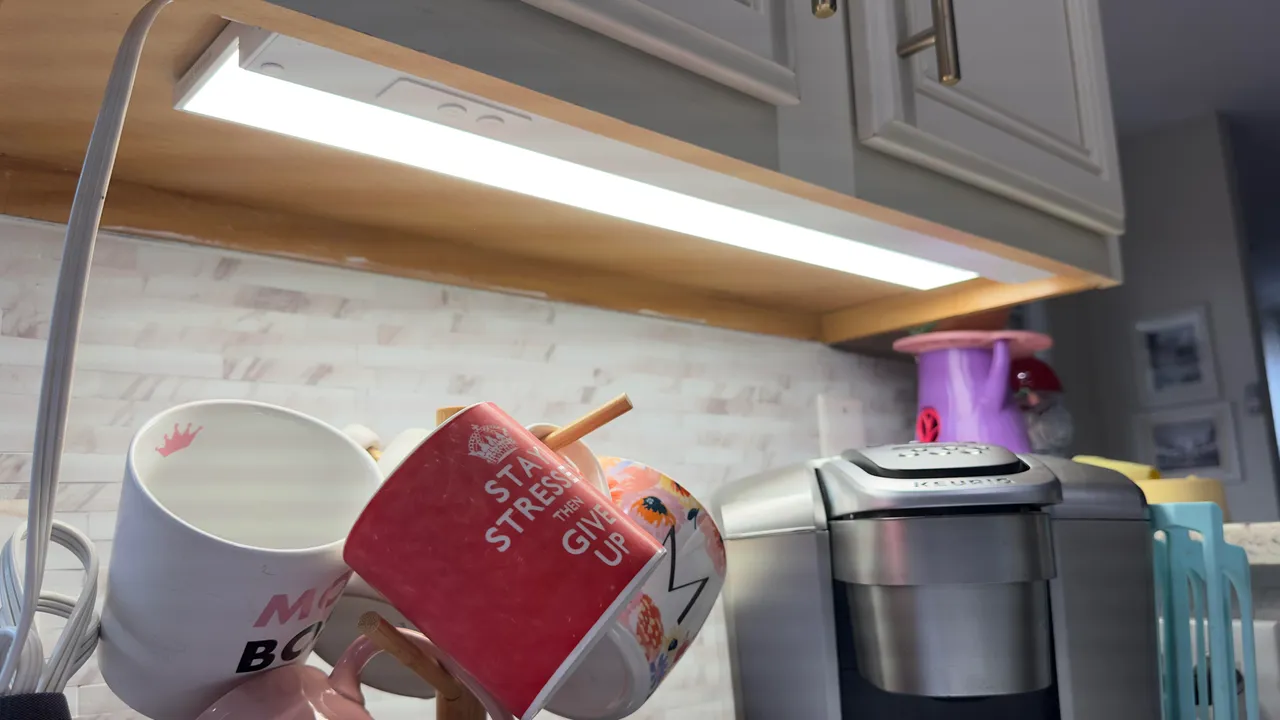
Cync Reveal HD+ Undercabinet lights by GE Lighting

The 24-inch Cync Reveal HD+ undercabinet light bar above my coffeemaker.

Maria Diaz/ZDNET

Follow ZDNET: Add us as a preferred source on Google.


Updating your home with smart devices sounds enticing, especially given the convenience they offer. However, there are some devices that may not immediately come to mind when you think of automating your home, but that still deserve some hype.

Also: Your old iPad or Android tablet can be your new smart home panel - here's how

The best way to make the most of your smart setup is to have your devices handle tasks you forget to do or can't stay on top of, eliminate small, repetitive actions, and use real-world triggers to perform actions. Automating these devices makes your smart home work for you, not the other way around.

Home gadgets you should automate - and why

Automating pantry and closet lights to immediately turn on when you open the doors is one of the best conveniences you can get. It's the kind of convenience that you never really think about until you finally stop feeling around for switches in the dark.

You'll need a smart bulb and a motion or presence sensor for your closet or pantry. If the space doesn't have an outlet, you can add a smart LED light strip and run an extension cord from the nearest outlet. You can use cable clips to tuck the wire along the door frame for a more subtle look.

Also: 10 useful smart home gadgets that make life so much easier (and most are discounted)

Install the motion or presence sensor where you will be standing when you want the light to switch on. If it's a closet, you can put it inside the door or on a wall.

I created an Alexa routine using the presence sensor on my kitchen's Echo Show. Whenever someone is detected in the kitchen, the pantry light turns on. If no one has been detected in 10 minutes, it turns off. This ensures that the pantry is never dark when one of us is around.

My favorite smart home devices for this:

Show more

People often forget to turn off exhaust fans, and if you're one of my kids, you also often forget to turn them on when you're taking a shower. While there are smart exhaust fans, a relatively inexpensive smart setup can automatically control your bathroom's humidity to prevent mold formation.

Also: I compared Thread, Zigbee, and Matter - here's the best smart home setup for you

A smart switch to replace your exhaust fan's wall switch lets you control it remotely and works with automations. Adding a smart humidity sensor to your bathroom lets you connect the two to create an automation or routine that triggers the fan to switch on when a specific humidity percentage is reached. You can also have the switch automatically turn off when the humidity sensor detects a lower value.

My favorite smart home devices for this:

Show more

Coffee makers can be one of the biggest vampire devices in a home. Vampire devices consume power even when not in use, raising your utility costs. When on, some coffee makers keep a certain amount of water hot at all times, so you end up paying for energy consumption that you're not using.

A smart plug can run on a schedule to turn on your coffee maker for a set amount of time in the mornings, giving everyone at home a chance to grab a cup of joe. The schedule can then switch off the coffee maker, so you don't have to worry about it drawing power when not in use.

Also: Your smart plug is seriously underutilized: 7 ways I've programmed mine to automate my home

If you want to go further than a smart plug, you can also add a SwitchBot button pusher to turn it on and make your coffee for you. This little robot only serves one purpose: to push your buttons. But it works with the SwitchBot app, so you can control it remotely or schedule it.

My favorite smart home devices for this:

Show more

All pet owners are too aware of how repetitive pet care routines can become. Waking up early to let the dog out, then refill water and serve food, then let the dog out again later. You've probably heard of robotic litter beds for cats, which take a lot of the dirty work out of cleaning cat waste. However, there are other things you can do to smarten up your home and take some of your pet's care off your plate.

Also: I tested every 'allergy-friendly' smart home gadget - these 6 actually keep the pollen out

I have a smart pet door that only unlocks for my dog when he's wearing a proprietary collar. It also lets you create schedules to keep your pets inside at certain times. I also love automating feeding schedules with a smart pet feeder and keeping track of my dog with a pan/tilt camera.

My favorite smart home devices for this:

Show more

The most common bedtime automation or voice command is one that automatically turns off all your lights, but there are ways to get the most out of your other smart devices. A single command can automatically turn off the pertinent lights, sure, but it can also lock all your smart locks, close the garage if open, shut down idle devices, ensure that devices in common areas turn off, and close your smart blinds.

Also: How I cut my power bill with IFTTT automation - in 4 simple steps

The best bedtime automation is one that replaces your ritual of walking around the house, switching off lights, and locking the doors. I have a few devices that I forget to switch off, so I've added them to my bedtime routine. When I call the routine, my smart home doesn't just turn off my lights; it performs the following actions with a single command:

Single command turns off:

  • Lights in the bedroom and living area
  • Air purifier in my office
  • Outdoor string lights (with a smart plug)
  • Kitchen smart plugs and undercabinet lights
  • All the TVs (dumb ones have a smart plug)

And turns on:

  • Kids' night lights
  • Kids' white noise machine (with a smart plug)
  • Pedestal fan
  • Air purifier in my room
  • Smart humidifier
  • Robot vacuum cleans living areas

Show more

  • Control the temperature in specific rooms: Add a smart temperature sensor to the rooms you want to keep at a specific temperature, and it can work in tandem with a smart thermostat. Just create a routine or automation to adjust the thermostat's temperature when the sensor detects a high or low temperature.
  • Prevent frozen pipes: The same type of smart temperature sensor can be installed in a crawl space or garage where your pipes are most at risk of freezing. If you add a space heater with a smart plug, you can create an automation to turn it on when the sensor detects a temperature below 25 degrees.
  • Know when your laundry's done: There are a lot of smart washers and dryers available that send you a notification when your load is done, but not all of us are ready to change working appliances, even if they're older. Adding a smart vibration sensor to your washer and dryer can detect when the machine stops running, so you can attend to it.
  • Catch a leak before a disaster: If the chance of a water leak keeps you up at night, a smart water leak detector can tell you when water is detected before it sets in and causes damage or, worse, your home floods.
  • Water your yard automatically: I use a Meross WiFi Water Timer connected to my hose so I can water my lawn after seeding. It's one of the most reliable smart devices I own, and it makes it easy to create schedules and skip watering as needed.

Show more

Editorial standards