








Follow ZDNET: Add us as a preferred source on Google.
KDE Plasma is one of the best desktop environments on the planet. It's smooth, beautiful, user-friendly, and highly configurable. I would go so far as to say that KDE Plasma has surpassed GNOME as the most popular desktop environment for Linux.
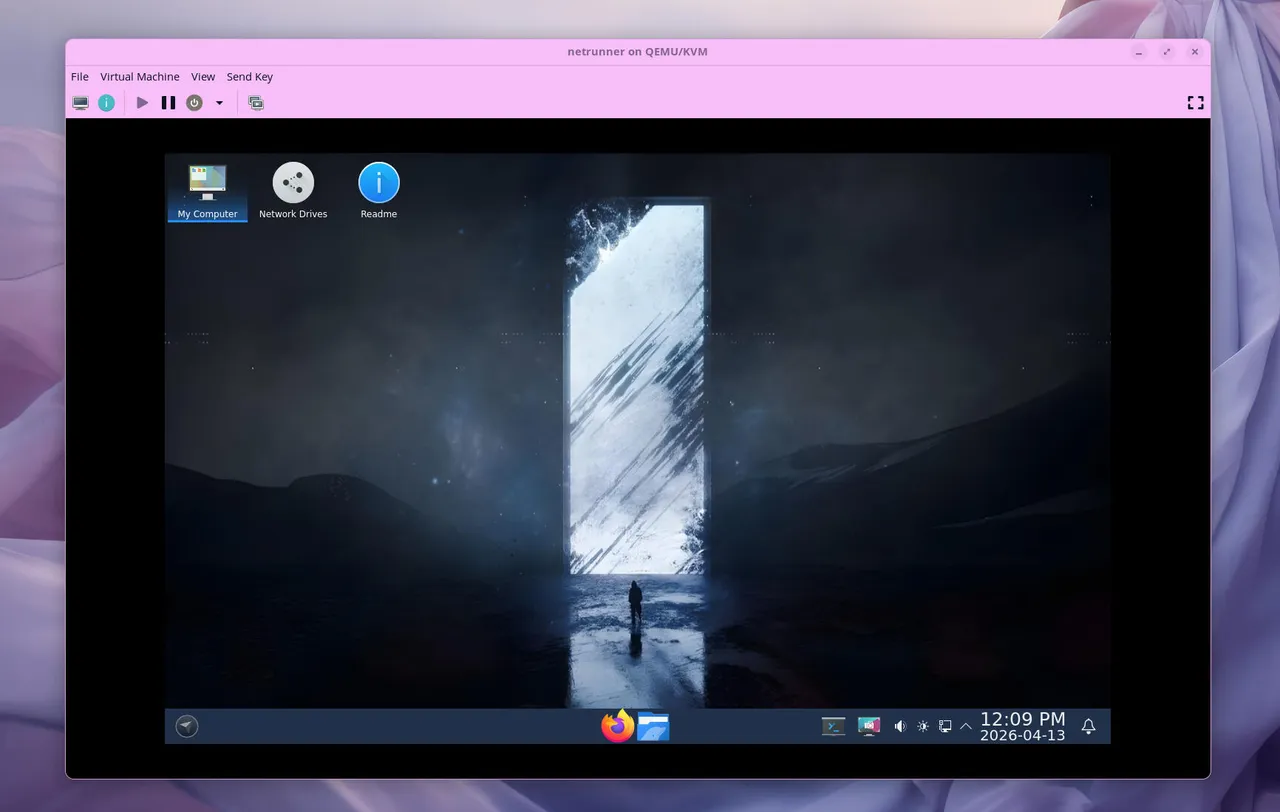
Some Linux distros, such as KDE Linux, ship with a fairly untouched version of KDE Plasma, whereas other distros ship with customized versions. Netrunner takes KDE Plasma and bends it into a hybrid of KDE Plasma, GNOME, and Windows 11. As a result, the Netrunner desktop distribution should be immediately familiar to anyone who has used a PC over the past decade. Some might consider that a bold statement, but it really is true.
Also: KDE Linux is the purest form of Plasma I've used in months - but there's a catch
The developers of Netrunner have done a great job of designing a Linux distribution that looks great, is easy to use, and performs quite well. I tested a previous iteration of Netrunner and proclaimed it to be a Linux distribution ready for productivity and gaming. How does Netrunner 23 stack up? Let's dive in.
According to the Netrunner site, "Netrunner is a complete Linux operating system for PCs, laptops/netbooks and ARM microcomputers, that makes exclusive use of the KDE Plasma desktop environment."
Pretty, generic description, right? Let's go deeper.
And what has Netrunner done to KDE Plasma? It includes Dash and Simplemenu, a task manager with expanding icons and a show desktop hotspot. Customizations are moved from System Settings to Plasma Tweaks. There's a unified look for both KDE and non-KDE apps, GTK apps without client-side decorations (so they look like native KDE Plasma apps), Kvantum theme engine, an advance Dolphin (file manager) toolbar, and more.
Also: How much RAM does Linux really need in 2026? My sweet spot after decades of use
Netrunner's minimum system requirements are:
You'll find Netrunner versions for both Intel and ARM architectures.
During my testing period, I didn't run into a single issue. Netrunner installed and performed to perfection. Out of the box, there were no updates available, which was somewhat surprising; I assume they were downloaded during installation.
The first thing that caught my attention was the desktop menu, which is a result of having Simplemenu installed. This is where Netrunner looks to take a nod from the GNOME desktop. Simplemenu takes an overview approach to the desktop menu, which is also configurable. From within the Application Dashboard Settings, you can configure how apps are displayed, sorted, categorized, and viewed.
It's unique yet simple to use.
You can also customize the hot key for opening Simplemenu.
Also: The 5 best Linux distros for beginners
If you don't like Simplemenu, right-click the menu icon, select View Alternatives, and choose a different option.
On the Netrunner desktop, you'll see an icon titled Network Drives. If you click that icon, you can set up a network folder share. All you have to do is locate the folder you want to share, set up a password, and save it.
I love a distribution that makes setting up Samba shares simple.
If you tend to share folders over your LAN, this will be a very welcome feature.
Also: I tried a command-line-only distro that can seriously improve your Linux skills
For preinstalled applications, you'll find LibreOffice (including the Base database tool), Firefox, Audacious (music player), Frozen Bubble (my favorite Linux game), GIMP, Grub Customizer, Handbrake, Stacher (YouTube Download GUI), Thunderbird, Telegram, vokosreenNG (screen recorder), VLC media player, WhatsApp, Yakuake (drop-down terminal), and more. There's also an icon in the Games category that simplifies the installation of Steam.
If you want gaming, install Steam.
The curated collection of apps means you can be productive and creative from the jump.
The only caveat: Although Flatpak is installed, it's not enabled in KDE Discover. Fortunately, all you have to do is open Discover, go to Settings, and click Add Flatpak. Once you've taken care of that, you can install even more apps (including proprietary options like Slack and Spotify).
Add Flatpak immediately, so you gain access to even more apps.
Every once in a while, a Linux distro crosses my path that makes it a bit challenging to determine who it is for. Netrunner falls into that category.
However, anyone who wants a Linux distribution that meets traditional daily needs for productivity, entertainment, and gaming should consider Netrunner a rock-solid option. Does that mean it's ideal for gamers? No. Is it the best option for entertainment and multimedia? Not really. What about productivity? Now, we're talking.
Also: My proven way to speed up Linux when RAM upgrades aren't worth it (and it's free to do)
Netrunner is kind of generic, in the sense that it's a Linux distribution that won't trip anyone up. You log in and think, "OK, this is a desktop operating system," and not, "Oh, this is so cool!" That's not to say Netrunner is boring, but it is boring in the sense that it doesn't do anything too radical, which means it'll be immediately familiar and usable by just about anyone.
此内容由惯性聚合(RSS阅读器)自动聚合整理,仅供阅读参考。 原文来自 — 版权归原作者所有。