


Recently I got a bug report from marketing (don’t all bug reports come from there?  ), about an unexpected problem in Firefox in Mac OS X. The end users had problems tabbing through the web page, and especially through forms. Since I, at the time, sat on a PC, I couldn’t test with my settings, although I knew I hadn’t seen the problem on my Mac at home.
Not resorting to the option of having the code riddled with tabindex attributes, since it didn’t seem like the best way to go, I instead did some online research to see if it was due to any setting in Firefox or something similar. The solution I found to the problem was somewhat unexpected. How to address this is that the end user have to turn on Full keyboard access > All controls in System Preferences for it to work as expected. Like this:
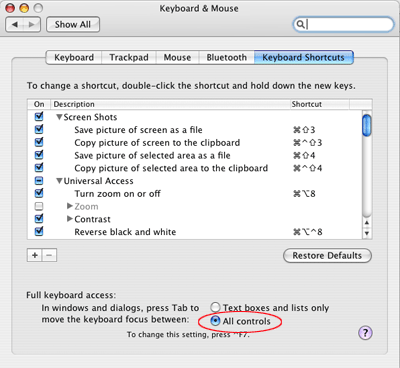
The interesting thing to note here is that this behavior doesn’t occur in Safari, so it’s a Firefox-specific problem. I’m not sure why they’d implement it this way in the first place, either. Kind of hard to have a web site with support e-mails coming in, and the reply is that they have to change their system settings…
此内容由惯性聚合(RSS阅读器)自动聚合整理,仅供阅读参考。 原文来自 — 版权归原作者所有。