

惯性聚合 高效追踪和阅读你感兴趣的博客、新闻、科技资讯
阅读原文 在惯性聚合中打开

推荐订阅源

酷 壳 – CoolShell
酷 壳 – CoolShell
H
Hacker News: Front Page
P
Palo Alto Networks Blog
T
ThreatConnect
Apple Machine Learning Research
博客园_首页
T
True Tiger Recordings
P
Privacy & Cybersecurity Law Blog
B
Blog
IT之家
IT之家
Last Week in AI
Last Week in AI
F
Full Disclosure
Hacker News: Ask HN
Hacker News: Ask HN
C
Comments on: Blog
Microsoft Azure Blog
C
Cybersecurity and Infrastructure Security Agency CISA
Microsoft Security Blog
博客园 - 【当耐特】
N
News and Events Feed by Topic
NISL@THU
NISL@THU
腾讯CDC
雷峰网
雷峰网
Security Latest
Security Latest
李成银的技术随笔
M
Microsoft Research Blog - Microsoft Research
L
LangChain Blog
L
Lohrmann on Cybersecurity
cs.CL updates on arXiv.org
C
Check Point Blog
Y
Y Combinator Blog
Recent Announcements
博客园 - Franky
N
News | PayPal Newsroom
V
V2EX
A
About on SuperTechFans
The Register - Security
月光博客
月光博客
奇客Solidot–传递最新科技情报
奇客Solidot–传递最新科技情报
Google Online Security Blog
MyScale Blog
MyScale Blog
Cisco Talos Blog
Cisco Talos Blog
Vercel News
Vercel News
WordPress大学
WordPress大学
C
Cyber Attacks, Cyber Crime and Cyber Security
The Hacker News
The Hacker News
IntelliJ IDEA : IntelliJ IDEA – the Leading IDE for Professional Development in Java and Kotlin | The JetBrains Blog
爱范儿
爱范儿
A
Arctic Wolf
L
LINUX DO - 最新话题
freeCodeCamp Programming Tutorials: Python, JavaScript, Git & More

博客园 - 两耳不闻窗外事、一心只做程序员

转发 关于Windows安装解压版MySQL出现服务正在启动-服务无法启动的问题 CentOS 安装 jdk1.8 转:MyBatis 日志打印 转:APP开发浅谈-Fiddler抓包详解 C#中用DateTime的ParseExact方法解析日期时间(excel中使用系统默认的日期格式) java程序中的乱码方案 - 两耳不闻窗外事、一心只做程序员 转: 解决Setting property 'source' to 'org.eclipse.jst.jee.server的问题 - 两耳不闻窗外事、一心只做程序员 google chrome 浏览器去掉 XHR finished loading.... [转]AJAX POST请求中参数以form data和request payload形式在servlet中的获取方式 SpringMVC Controller接收前台ajax的GET或POST请求返回各种参数 下载Tomcat时Tomcat网站上的core和deployer的区别 vmware 修改IP 提示子网掩码错误~ android ImageView 中的ScaleType - 两耳不闻窗外事、一心只做程序员 vs文件属性(生成操作)各选项功能(发布Web项目时使用) - 两耳不闻窗外事、一心只做程序员 导入 RecyclerView 控件 的过程(Android 6.0) Android RelativeLayout用到的一些重要的属性 Andriod中textview垂直水平居中及LinearLayout内组件的垂直布局 requestWindowFeature(Window.FEATURE_NO_TITLE)无效解决方法 - 两耳不闻窗外事、一心只做程序员 使用VS2013逆向生成UML类图
转:Eclipse中web项目部署至Tomcat步骤
两耳不闻窗外事、一心只做 · 2017-04-22 · via 博客园 - 两耳不闻窗外事、一心只做程序员

原址:http://blog.csdn.net/lucklq/article/details/7621807

Eclipse的web工程至Tomcat默认的部署目录是在工程空间下,本文旨在将部署目录改为Tomcat安装目录,并解决依赖包输出问题。

1.在Eclipse中添加Tomcat服务器。
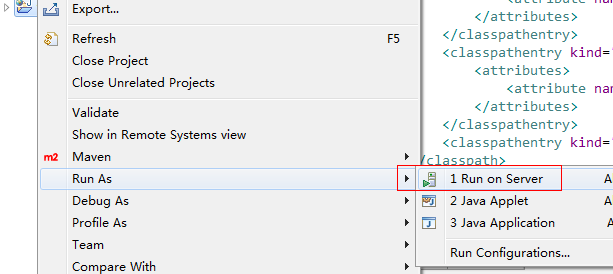
2.将web工程发布至tomcat:

选择刚添加的Tomcat:
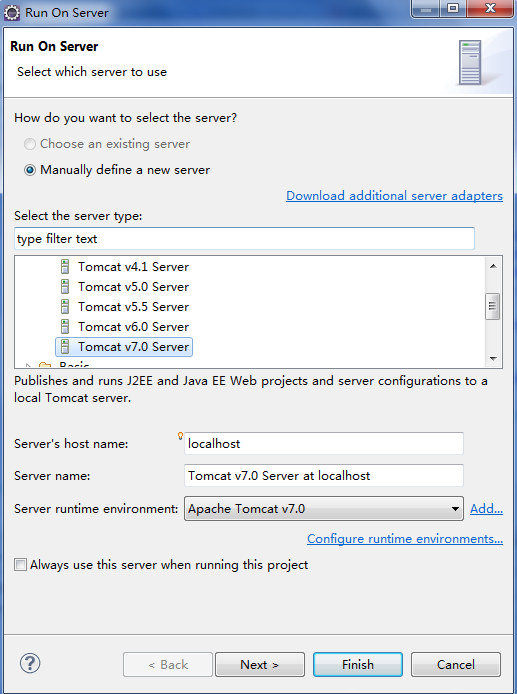
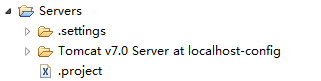
此时Eclipse将自动生成Servers工程:
3.在Servers视图,Remove删除刚刚发布的项目:

4.打开Tomcat服务器配置项:
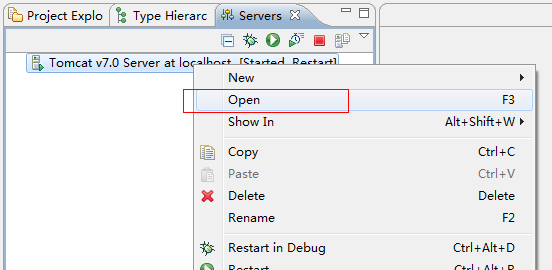
5.修改以下两个配置项,Tomcat保持启动状态,否则Server Locations一栏变灰色,不可用:
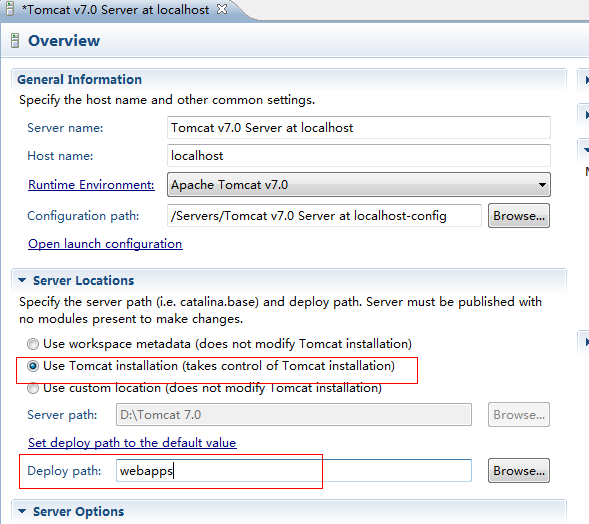
6.配置lib输出。

项目右键:
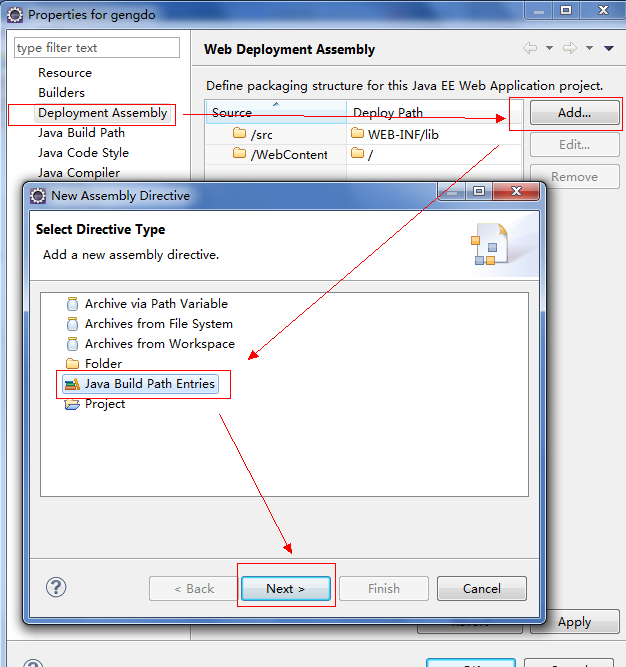
点击下一步,选中需要随项目发布到tomcat的包,完成确认操作。
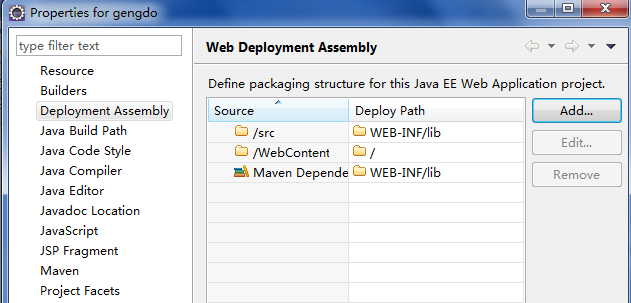
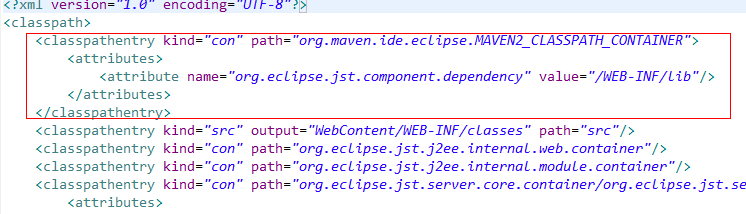
7.修改工程下的.classpath文件,将如下配置项提至最前面,否则发布项目时,先前发布到WEB-INF里面的文件将被覆盖:
8.重新发布项目即可。