
惯性聚合 高效追踪和阅读你感兴趣的博客、新闻、科技资讯
阅读原文 在惯性聚合中打开

推荐订阅源

S
Securelist
O
OpenAI News
Threat Intelligence Blog | Flashpoint
T
Threat Research - Cisco Blogs
D
Darknet – Hacking Tools, Hacker News & Cyber Security
Google Online Security Blog
C
CXSECURITY Database RSS Feed - CXSecurity.com
N
News and Events Feed by Topic
S
Security Affairs
SecWiki News
SecWiki News
Project Zero
Project Zero
L
Lohrmann on Cybersecurity
P
Proofpoint News Feed
P
Palo Alto Networks Blog
L
LINUX DO - 最新话题
H
Hacker News: Front Page
Recent Commits to openclaw:main
I
Intezer
Simon Willison's Weblog
W
WeLiveSecurity
T
The Exploit Database - CXSecurity.com
K
Kaspersky official blog
The GitHub Blog
The GitHub Blog
I
InfoQ
云风的 BLOG
云风的 BLOG
雷峰网
雷峰网
B
Blog
IT之家
IT之家
AWS News Blog
AWS News Blog
Jina AI
Jina AI
freeCodeCamp Programming Tutorials: Python, JavaScript, Git & More
Google DeepMind News
Spread Privacy
Spread Privacy
N
News and Events Feed by Topic
Security Latest
Security Latest
美团技术团队
C
Check Point Blog
WordPress大学
WordPress大学
T
Tenable Blog
S
Security @ Cisco Blogs
Last Week in AI
Last Week in AI
博客园 - 聂微东
月光博客
月光博客
博客园 - 【当耐特】
S
Schneier on Security
OSCHINA 社区最新新闻
OSCHINA 社区最新新闻
S
Secure Thoughts
Schneier on Security
C
Cisco Blogs
Cyberwarzone
Cyberwarzone

博客园 - 牛啊牛

我的程序优化-尽量减少数据库连接操作 程序员最郁闷的十件事 varchar和nvarchar的区别 架构师向左,项目经理向右?? 由布局学习CSS——IE6,7,8(Q)的浮动行内元素在某些情况下发生折行的bug Microsoft Document Explorer 2005安装失败解决方案 . 关于.NET的探针 学习之路九:深入剖析Web分页原理 HTTP 错误 500.21 - Internal Server Error DataTable导出到Excel时身份证号信息自动转换为科学计数法的解决方案 肌肉男MuscleNerd宣告全新iPad越狱成功 windows 2003 server iis6.0 完整安装包 带无法复制解决方法 用jquery刷新aspx中的iframe的src并进行刷新 C结构入门 【原译】什么是TCHAR,WCHAR,LPSTR,LPWSTR,LPCTSTR.等等 8个2012年值得关注的社会化营销趋势 电商价格战有望收敛:行业或将整体走向冷静 谈谈新站初期做优化的一些误区 提高你开发效率的十五个 Visual Studio 使用技巧
SQL SERVER 2005无法远程连接
牛啊牛 · 2012-03-13 · via 博客园 - 牛啊牛

问题

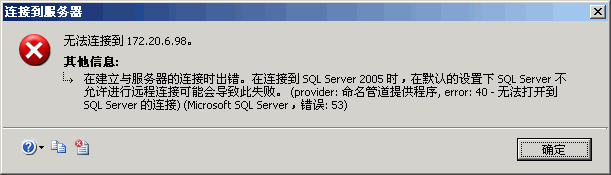
使用SQL Server Management Studio无法连接远程服务器,提示以下错误:
解决方法一:

使用其它可用端口,方法是

1、在服务器上打开SQL Server Configuration Manager。选择SQL Server配置管理器->SQL Server 2005网络配置->MSSQLSERVER的协议->TCP/IP,在弹出对话框中选择IP地址->IPALL->TCP端口,设置为可用端口。
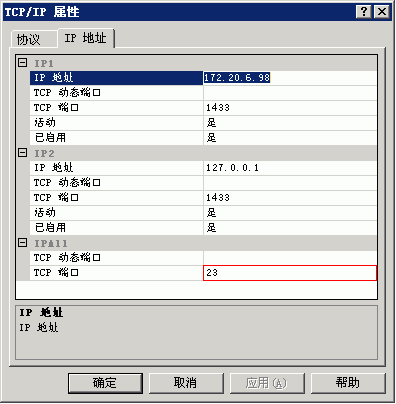
2、在同一程序中,选择SQL Server配置管理器->SQL Server 2005 服务->SQL Server (MSSQLSERVER),右键菜单中选择重新启动。

3、在客户端登录框的服务器名称中输入:IP,端口
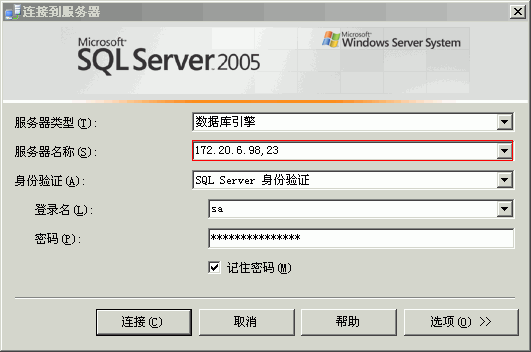
4、连接成功。

解决方法二:

1.此时需要开启sql2005远程连接功能

  开始 -- Microsoft SQL Server 2005 -- 配置工具-- SQL Server 外围应用配置器 -- 远程控制 ---- 服务和连接外围应用配置器 SQLEXPRESS -- Database Engine

  勾选 本地连接和远程连接,同时使用TCP/IP和name pipes ,确定 。 如下图

2.登陆设置改为SQL Server身份验证

  开始 -- Microsoft SQL Server 2005 -- SQL Server Management Studio Express,选择Windows 身份验证 连接 ,进去后在左边的 对象资源管理器 的第一项 就是你的服务器名 点右键 属性,选择 安全 选择SQL Server和windows验证模式 如下图:

 3.设置一个SQL server方式的用户名和密码

  开始 -- Microsoft SQL Server 2005 -- SQL Server Management Studio Express,选择Windows 身份验证 连接 ,点上面的新建立查询 在右面输入 sp_password null,'123456','sa' ,点上面的执行,这样就设置了一个用户名为sa ,密码为:123456的用户,但是现在还不能用用户名sa登陆 如下图:

 4.开启sa帐号

  开始 -- Microsoft SQL Server 2005 -- SQL Server Management Studio Express ,选择Windows 身份验证 连接,点左面的 对象资源管理器 -- 安全性 -- 登陆名 -- sa 右键属性,点状态 登陆 勾选启用 如下图

5.启用 SQLServer 浏览器服务
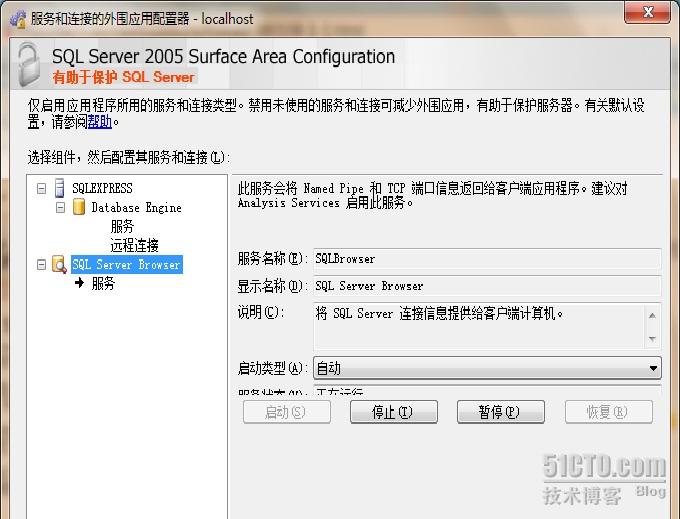
  如下图

7.测试连接