


系统环境:
Windows 2003 CHS ENT x86 64位操作系统WEB服务器:
IIS 6.0 设置32位兼容模式
FrameWork 1.1,2.0,3.0,3.5 sp1,建议不安装中文语言包。
域服务器:
Windows 2003 CHS ENT x86 64位操作系统
AD域
NAS存储:
支持AD
安全体系:
用AD域作为用户认证和web、nas之间访问认证。
设置步骤:
域服务器:
1.创建UNCUsers组,将来创建UNC用户都隶属于该组。
2.管理WEB服务器,将UNCUsers组加入WEB服务器中的IIS_WPG组。系统默认会对ASP.NET创建临时文件的目录必须权限赋予IIS_WPG组,所以当IIS进程执行用户为UNC用户时,需要将这类用户加入到IIS_WPG组。
2.1.避免出现"Unable to get the private bytes memory limit for the W3WP process. The ASP.NET cache will be unable to limit its memory use, which may lead to a process restart. Error: 0x80070005"错误。
2.2避免出现"The current identity (user) does not have write access to 'c:\WINDOWS\Microsoft.NET\Framework\v2.0.50727\Temporary ASP.NET Files'.
Exception Details: System.Web.HttpException: The current identity (DLS\unc01) does not have write access to 'c:\WINDOWS\Microsoft.NET\Framework\v2.0.50727\Temporary ASP.NET Files'."
NAS存储:
1.加入AD域。
2.对存放网站文件的目录,至少赋予UNCUsers组读权限。
WEB服务器:
1.安装Framework。
2.设置IIS兼容32位模式
执行:cscript %SYSTEMDRIVE%\inetpub\adminscripts\adsutil.vbs SET W3SVC/AppPools/Enable32bitAppOnWin64 1
3.针对网站需要ASP.NET版本以及32、64位模式,在对应的Framework文件夹内执行命令
aspnet_regiis.exe -i
在IIS->WEB扩展服务->ASP.NET v2.0.50727 (32-bit)检查是否存在。
4.允许ASP.NET v2.0.50727 (32-bit)
5.执行安全权限
针对UNC路径,执行ASP.NET代码执行权限设置:同样区分版本和32、64位模式
caspol.exe -m -ag 1 -url "file:////\\computername\sharename\*" FullTrust -exclusive on
避免错误:
"Security Exception
Description: The application attempted to perform an operation not allowed by the security policy. To grant this application the required permission please contact your system administrator or change the application's trust level in the configuration file. "
 代码
代码
Required permissions cannot be acquired.
Description: An unhandled exception occurred during the execution of the current web request. Please review the stack trace for more information about the error and where it originated in the code.
Exception Details: System.Security.Policy.PolicyException: Required permissions cannot be acquired.
Source Error:
An unhandled exception was generated during the execution of the current web request. Information regarding the origin and location of the exception can be identified
using the exception stack trace below.Stack Trace:
[PolicyException: Required permissions cannot be acquired.]
System.Security.SecurityManager.ResolvePolicy(Evidence evidence, PermissionSet reqdPset, PermissionSet optPset, PermissionSet denyPset, PermissionSet
[FileLoadException: Could not load file or assembly
'AjaxPro.2, Version=6.7.11.1, Culture=neutral, PublicKeyToken=4735ae9824c7d3ec' or one of its dependencies. Failed to grant minimum permission requests. (Exception from HRESULT: 0x80131417)][ConfigurationErrorsException: Could not load file or assembly
'AjaxPro.2, Version=6.7.11.1, Culture=neutral, PublicKeyToken=4735ae9824c7d3ec' or one of its dependencies. Failed to grant minimum permission requests. (Exception from HRESULT: 0x80131417)][HttpException (
0x80004005): Could not load file or assembly 'AjaxPro.2, Version=6.7.11.1, Culture=neutral, PublicKeyToken=4735ae9824c7d3ec' or one of its dependencies. Failed to grant minimum permission requests. (Exception from HRESULT: 0x80131417)][HttpException (
0x80004005): Could not load file or assembly 'AjaxPro.2, Version=6.7.11.1, Culture=neutral, PublicKeyToken=4735ae9824c7d3ec' or one of its dependencies. Failed to grant minimum permission requests. (Exception from HRESULT: 0x80131417)]代码
事件类型: 警告
事件来源: ASP.NET 2.0.50727.0
事件种类: Web Event
事件 ID: 1310
日期: 2010-12-9
事件: 9:40:38
用户: N/A
计算机: WEB01-64
描述:
Event code: 3008
Event message: A configuration error has occurred.
Event time: 2010-12-9 9:40:38
Event time (UTC): 2010-12-9 1:40:38
Event ID: ece89a1303ea46df9953db41e7422829
Event sequence: 1
Event occurrence: 1
Event detail code: 0
Application information:
Application domain: /LM/W3SVC/1688247084/ROOT/TRAINING-1-129363324373964272
Trust level: Full
Application Virtual Path: /TRAINING
Application Path: \\172.16.119.105\web_unc\OnlineSim\WEB_8013\WebSites\Training\
Machine name: WEB01-64
Process information:
Process ID: 1300
Process name: w3wp.exe
Account name: NT AUTHORITY\NETWORK SERVICE
Exception information:
Exception type: HttpException
Exception message: Could not load file or assembly 'AjaxPro.2, Version=6.7.11.1, Culture=neutral, PublicKeyToken=4735ae9824c7d3ec' or one of its dependencies. Failed to grant minimum permission requests. (Exception from HRESULT: 0x80131417)
Request information:
Request URL: http://localhost:8013/Training/Default.aspx
Request path: /Training/Default.aspx
User host address: 127.0.0.1
User:
Is authenticated: False
Authentication Type:
Thread account name: DLS\unc01
Thread information:
Thread ID: 1
Thread account name: DLS\unc01
Is impersonating: False
Stack trace: at System.Web.Compilation.BuildManager.ReportTopLevelCompilationException()
at System.Web.Compilation.BuildManager.EnsureTopLevelFilesCompiled()
at System.Web.Hosting.HostingEnvironment.Initialize(ApplicationManager appManager, IApplicationHost appHost, IConfigMapPathFactory configMapPathFactory, HostingEnvironmentParameters hostingParameters)
Custom event details:
有关更多信息,请参阅在 http:
//go.microsoft.com/fwlink/events.asp 的帮助和支持中心。6.将UNCUsers组添加到IIS_WPG组。
7.网站虚拟目录设置
虚拟目录-另一台计算机上的共享-连接为,设置之前创建的UNC域帐户。
8.如果有MVC应用,必须保证全局代码集中包含相应代码集,最好的方案就是安装一下安装包。
MVC错误详解
安装完fw3.5sp1后,未安装MVC的安装包,同时程序又是部署在域环境的UNC路径中,通常第一次访问时候,会发现网站能正常访问,但是没过多久,就不能访问了。提示以下错误:
Exception Details: System.IO.FileLoadException: Could not load file or assembly 'System.Web.Mvc, Version=1.0.0.0, Culture=neutral, PublicKeyToken=31bf3856ad364e35' or one of its dependencies. 拒绝访问。
Source Error:
An unhandled exception was generated during the execution of the current web request. Information regarding the origin and location of the exception can be identified using the exception stack trace below.
WRN: Assembly binding logging is turned OFF. To enable assembly bind failure logging, set the registry value [HKLM\Software\Microsoft\Fusion!EnableLog] (DWORD) to 1. Note: There is some performance penalty associated with assembly bind failure logging. To turn this feature off, remove the registry value [HKLM\Software\Microsoft\Fusion!EnableLog]. [FileLoadException: Could not load file or assembly 'System.Web.Mvc, Version=1.0.0.0, Culture=neutral, PublicKeyToken=31bf3856ad364e35' or one of its dependencies. 拒绝访问。] Training._Default.Page_Load(Object sender, EventArgs e) +0 System.Web.Util.CalliHelper.EventArgFunctionCaller(IntPtr fp, Object o, Object t, EventArgs e) +14 System.Web.Util.CalliEventHandlerDelegateProxy.Callback(Object sender, EventArgs e) +35 System.Web.UI.Control.OnLoad(EventArgs e) +99 System.Web.UI.Control.LoadRecursive() +50 System.Web.UI.Page.ProcessRequestMain(Boolean includeStagesBeforeAsyncPoint, Boolean includeStagesAfterAsyncPoint) +627 Version Information: Microsoft .NET Framework Version:2.0.50727.3082; ASP.NET Version:2.0.50727.3082
通过查看事件日志发现:
代码
Event code: 3005
Event message: An unhandled exception has occurred.
Event time: 2010-12-9 14:07:27
Event time (UTC): 2010-12-9 6:07:27
Event ID: 5dc898ec095c4e0d945e4a4c838d12ab
Event sequence: 2
Event occurrence: 1
Event detail code: 0
Application information:
Application domain: /LM/W3SVC/263101618/Root/Training-1-129363484449672079
Trust level: Full
Application Virtual Path: /Training
Application Path: \\172.16.119.105\web_unc\OnlineSim\WEB_8011\WebSites\ABC\
Machine name: WEB01-64
Process information:
Process ID: 1484
Process name: w3wp.exe
Account name: NT AUTHORITY\NETWORK SERVICE
Exception information:
Exception type: FileLoadException
Exception message: Could not load file or assembly 'System.Web.Mvc, Version=1.0.0.0, Culture=neutral, PublicKeyToken=31bf3856ad364e35' or one of its dependencies. 拒绝访问。
Request information:
Request URL: http://localhost:8011/ABC/Default.aspx
Request path: /ABC/Default.aspx
User host address: 127.0.0.1
User:
Is authenticated: False
Authentication Type:
Thread account name: DLS\unc01
Thread information:
Thread ID: 1
Thread account name: DLS\unc01
Is impersonating: False
Stack trace: at Training.MvcApplication.RegisterRoutes(RouteCollection routes)
at Training.MvcApplication.Application_Start()
Custom event details:
有关更多信息,请参阅在 http://go.microsoft.com/fwlink/events.asp 的帮助和支持中心。
分析后发现“FileLoadException”发生的原因在于,网站的映射中将.mvc映射给aspnet_isapi.dll(如下图)
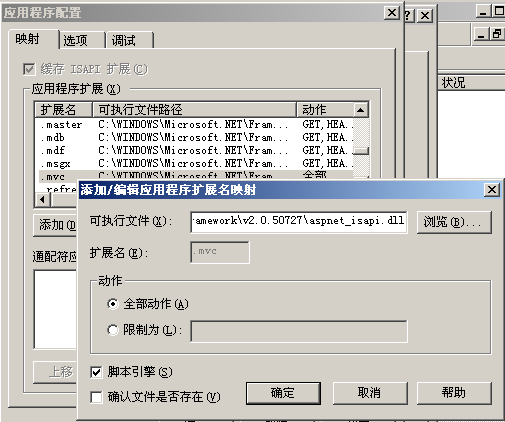
由于这个时候该进程的用户账户为
Process information:
Process ID: 1484
Process name: w3wp.exe
Account name: NT AUTHORITY\NETWORK SERVICE
该本机用户没有访问UNC路径Bin中system.web.mvc.dll的权限,所以转而访问本机全局代码集中的system.web.mvc,但是由于服务器本机未安装mvc,见全局代码集。
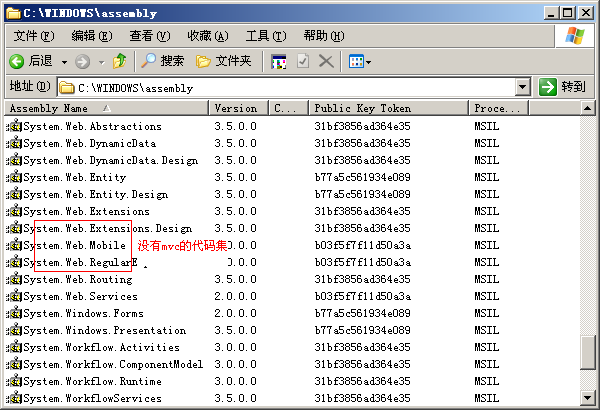
所以发生FileLoadException的错误,解决方法,可以将MVC相关代码集复制到全局代码集中,或者安装mvc安装包。
参考文章:
此内容由惯性聚合(RSS阅读器)自动聚合整理,仅供阅读参考。 原文来自 — 版权归原作者所有。