





ViewState是个好东西,使得开发者在开发web项目的时候感觉不到Http的无状态性。
不过,随着页面复杂,页面上控件多了以后,viewstate会变得很庞大。
特别是在IE里,对于复杂页面,往往postback一下会白屏一下,用户体验非常不好。可能你会说用ajax就可以了,是的,不过这是另外的话题了。这里讨论的是如何用最少的改动来改善viewstate。
其中有一种方法是把ViewState存在服务端的数据库,Render到客户端的是一个Guid,ViewState的数据存在数据库某张表,这样客户端就看不到ViewState了,安全性和传输内容的大小都非常好,但是每次LoadViewState的时候会去查询一次数据库,开销显然太大,而且数据库的脏数据会很多,以为不知道何时去清除ViewState。
另一种方法就是我在这里想讨论的:
我们知道,asp.net render到客户端的html中,viewstate是记在一个hidden的html element里的,而这个element的位置确实在Form刚开始。所以对于ie来说,先会去处理这个hidden的element,如何viewstate过大,处理时间长了,那页面就白了。对于firefox和chrome,好像不存在这样的情况。
所以我的想法是,将这个viewstate的hidden放到页面的最后,让ie先处理前面的html,把前面的html先显示出来。当然这里要注意的是,不要用table来布局页面,因为对于ie,如果整个页面被一个table包含的话,ie会直到整个table都被载入完毕以后才会显示该table,所以请尽量用div布局。
然后,我们开始动手:
新建PageBase页面,继承System.Web.UI.Page。
1 /// <summary>
2 /// add a hidden control at the bottom of the form.
3 /// </summary>
4 protected override void CreateChildControls()
5 {
6 base.CreateChildControls ();
7
8 foreach( Control c in this.Controls )
9 {
10 if( c.GetType() == typeof( HtmlForm ) )
11 {
12 HtmlInputHidden hiViewState = this.FindControl( "____VIEWSTATE" ) as HtmlInputHidden;
13 if( hiViewState == null )
14 {
15 hiViewState = new HtmlInputHidden();
16 hiViewState.ID = "____VIEWSTATE";
17 hiViewState.Name = "____VIEWSTATE";
18 c.Controls.Add( hiViewState );
19 }
20 break;
21 }
22 }
23
24
25 }
26
27
28 #region ViewState
29
30 /// <summary>
31 /// LoadPageStateFromPersistenceMedium
32 /// </summary>
33 protected override object LoadPageStateFromPersistenceMedium()
34 {
35
36 string ____viewState =this.Request.Form["____VIEWSTATE"] as string;
37 System.Web.UI.LosFormatter formatter = new System.Web.UI.LosFormatter();
38 object viewState = formatter.Deserialize( ____viewState );
39 return viewState;
40 }
41
42
43 /// <summary>
44 /// SavePageStateToPersistenceMedium
45 /// </summary>
46 protected override void SavePageStateToPersistenceMedium(object viewstate)
47 {
48 MemoryStream stream = new MemoryStream();
49 System.Web.UI.LosFormatter formatter = new System.Web.UI.LosFormatter();
50 formatter.Serialize(stream, viewstate);
51 stream.Position = 0;
52 TextReader reader = new StreamReader(stream);
53
54 HtmlInputHidden ____viewState = this.FindControl( "____VIEWSTATE" ) as HtmlInputHidden;
55 ____viewState.Value = reader.ReadToEnd();
56 }
57
58
59 #endregion
在上面的代码里,我重写了CreateChildControls方法,在form的最下面加了一个html hidden,用来存放viewstate。
然后重写 LoadPageStateFromPersistenceMedium和SavePageStateToPersistenceMedium方法,来处理viewstate的读取和保存。
最后,在页面里继承这个PageBase,这样,就把ViewState的位置搬到了页面最下方,加快了IE的显示速度,白屏的时间也大大缩短,几乎感觉不出了。
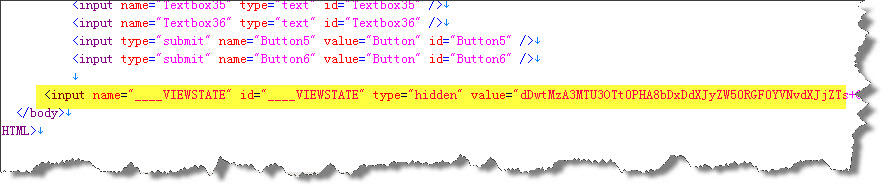 斗胆发到首页,大家有兴趣看看,因为这个想法是今天早上在地铁上突然想到的,早上就实现了一把,可能有考虑不周的地方,还请各位高手指出,谢谢!
测试的页面放在附件,供下载实验。谢谢。
/Files/jinweijie/OptimizeViewState.rar
鉴于好像很多朋友测试下来没有效果,推荐一个最直接的测试方法:按F5刷页面,可以看到:在IE下ViewStateTest.aspx载入是很快的,而ViewStateTestBeforeOptimize.aspx会有一段白页面的时间。谢谢 !
对不起,这种实现方法是有问题的,因为当viewstate如果没有下载完用户就按了按钮postback,程序就会出错。
我撤下我的文章,不好意思。
此内容由惯性聚合(RSS阅读器)自动聚合整理,仅供阅读参考。 原文来自 — 版权归原作者所有。