惯性聚合 高效追踪和阅读你感兴趣的博客、新闻、科技资讯
阅读原文 在惯性聚合中打开

推荐订阅源

Attack and Defense Labs
T
Threatpost
C
Cybersecurity and Infrastructure Security Agency CISA
H
Hackread – Cybersecurity News, Data Breaches, AI and More
I
Intezer
C
Cyber Attacks, Cyber Crime and Cyber Security
The Register - Security
量子位
Security Latest
Security Latest
奇客Solidot–传递最新科技情报
奇客Solidot–传递最新科技情报
大猫的无限游戏
大猫的无限游戏
小众软件
小众软件
Exploit-DB.com RSS Feed
C
CXSECURITY Database RSS Feed - CXSecurity.com
MyScale Blog
MyScale Blog
J
Java Code Geeks
Apple Machine Learning Research
Google DeepMind News
WordPress大学
WordPress大学
Spread Privacy
Spread Privacy
Jina AI
Jina AI
博客园 - 【当耐特】
P
Palo Alto Networks Blog
Last Week in AI
Last Week in AI
SecWiki News
SecWiki News
Threat Intelligence Blog | Flashpoint
cs.AI updates on arXiv.org
G
GRAHAM CLULEY
宝玉的分享
宝玉的分享
Hacker News - Newest:
Hacker News - Newest: "LLM"
T
The Blog of Author Tim Ferriss
V
Vulnerabilities – Threatpost
有赞技术团队
有赞技术团队
T
Tor Project blog
H
Hacker News: Front Page
A
Arctic Wolf
NISL@THU
NISL@THU
A
About on SuperTechFans
云风的 BLOG
云风的 BLOG
Engineering at Meta
Engineering at Meta
V
V2EX
N
News and Events Feed by Topic
Webroot Blog
Webroot Blog
Know Your Adversary
Know Your Adversary
P
Privacy International News Feed
I
InfoQ
D
Docker
L
LINUX DO - 最新话题
K
KPMG report finds enterprise disconnect between AI and its ROI | CIO
U
Unit 42

博客园 - Smthhy

从公司管理到IT审计-网摘 如何为PDF文件添加书签 解决WCF传输大数据量时出错并提示:远程主机强迫关闭了一个现有的连接 ms Sql server 中的getDate()函数使用方法总结 WCF客户端调用服务 出现套接字连接已中止...... C语言中time_t到.NET的转换与更改系统时间 Thread and Sync In C# (C#中的线程与同步) sql 跨服务器查询 div自适应高度 - Smthhy - 博客园 js中event.x,event.clientX,event.offsetX区别 JS模拟出 getElementsByClassName 功能 - Smthhy jQuery对象与DOM对象之间的转换 - Smthhy - 博客园 语言代号一览表 收集 IE Flash10b.ocx加载项失败 解决 解决Aptana无高亮显示,无提示问题 WebBrowser 打印设置,打印预览,去页眉和页脚 ASP.NET State Service - Smthhy 尝试创建Web项目或打开位于URL“http ://localhost/WebApplication1”的Web 项目 C# winform 打印当前窗体 - Smthhy
ARCGIS DESKTOP 安装步骤 - Smthhy
Smthhy · 2010-03-10 · via 博客园 - Smthhy

ARCGIS DESKTOP 安装步骤。

1.      先安装ARCGIS LICENSE MANAGER :
----------------------------------
1./ 安装 ArcGis License Manager就是在License目录下LMSetup.exe
2./ 选择 "I received the license by email..." 然后单击 browse


3./ 选择Crack目录下的license.lic单击next,完成安装。
4./ 选择不重启机器
5./ Crack目录下 arcgis.exe license.lic拷贝覆盖授权管理目录下的文件,  
(c:"program files"esri"license"arcgis9x)
6./ 用记事本编辑 license.lic , 将第一行主机名改为你机器的名字或者IP
(SERVER 192.168.10.100 ESRI_SENTINEL_KEY=37102011 27001)


不知道自己ip的可以点击开始-运行-输入cmd回车-输入ipconfig /all查看IP Address后面的就是你的IP
这里提醒下你的机器名绝对不要是中文名,一定要是英文名,否则写IP都没用。查看和更改方法:打开我的电脑属性-计算机名-完整的计算及名称-这里如果是中文的话点击下面的更改输入一个英文名重启机器即可。
7./ 点击开始菜单arcgis打开lmtools (License Manager 9x)
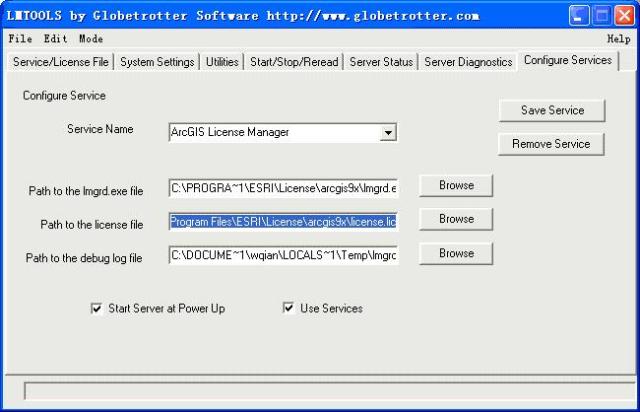
8./ 单击“Configuration using Services ”,选择 "ArgGIS license server"


9./ 然后单击 Configure Services选项卡 ,设置    Path to the license file :
    (例如 c:\\program files\\esri\\license\\arcgis9x\\license.lic


10./ 单击 Save Service
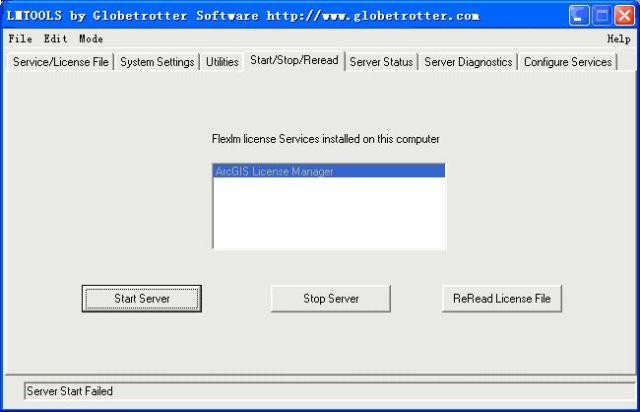
11./ 单击 Start/Stop/Reread选项卡,先单击 Stop Server按钮,再单击 Start Server按钮。

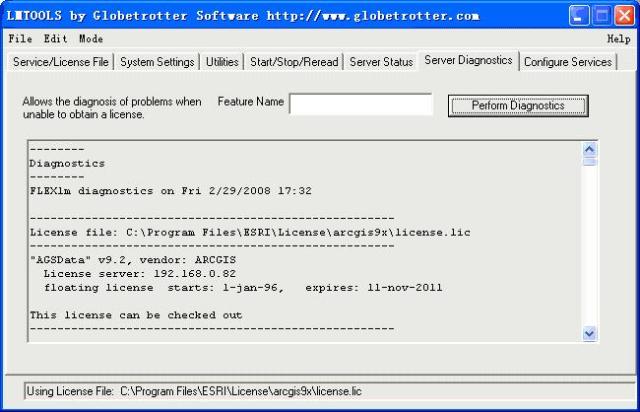
12.检验是否成功安装授权文件方法:单击Server Diagnostic选项卡,单击Perform Diagnostic等待运行完毕如果看到This license can be checked out说明OK.如下面的图


----------------------------------
二。安装ArcGIS Desktop :
1./ 安装ArcGIS DeskTop,这个就不用说了吧!

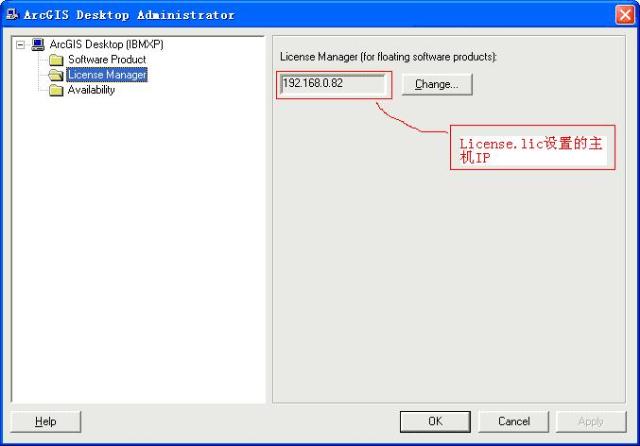
2./安装完成后,启动ArcGIS下的Desktop Administrator 设置License Manager

3.大功告成,启动你的ArcGis吧。

转自:http://www.cnblogs.com/hanghairizhi/archive/2008/03/03/1088262.html