
惯性聚合 高效追踪和阅读你感兴趣的博客、新闻、科技资讯
阅读原文 在惯性聚合中打开

推荐订阅源

月光博客
月光博客
freeCodeCamp Programming Tutorials: Python, JavaScript, Git & More
N
Netflix TechBlog - Medium
大猫的无限游戏
大猫的无限游戏
爱范儿
爱范儿
Martin Fowler
Martin Fowler
OSCHINA 社区最新新闻
OSCHINA 社区最新新闻
The Register - Security
IT之家
IT之家
博客园_首页
Microsoft Security Blog
钛媒体:引领未来商业与生活新知
钛媒体:引领未来商业与生活新知
博客园 - 三生石上(FineUI控件)
I
InfoQ
CTFtime.org: upcoming CTF events
Jina AI
Jina AI
Apple Machine Learning Research
M
MIT News - Artificial intelligence
博客园 - Franky
C
Check Point Blog
T
The Blog of Author Tim Ferriss
V
Visual Studio Blog
Cyber Security Advisories - MS-ISAC
T
Tailwind CSS Blog
Recent Announcements
云风的 BLOG
云风的 BLOG
美团技术团队
The Cloudflare Blog
Y
Y Combinator Blog
H
Hackread – Cybersecurity News, Data Breaches, AI and More
MyScale Blog
MyScale Blog
The GitHub Blog
The GitHub Blog
D
DataBreaches.Net
Google DeepMind News
V
V2EX
aimingoo的专栏
aimingoo的专栏
GbyAI
GbyAI
G
Google Developers Blog
S
SegmentFault 最新的问题
Hugging Face - Blog
Hugging Face - Blog
奇客Solidot–传递最新科技情报
奇客Solidot–传递最新科技情报
U
Unit 42
罗磊的独立博客
量子位
MongoDB | Blog
MongoDB | Blog
Last Week in AI
Last Week in AI
Stack Overflow Blog
Stack Overflow Blog
小众软件
小众软件
D
Docker
人人都是产品经理
人人都是产品经理

博客园 - Windie Chai

为SharePoint顶部链接开发自定义数据源 SharePoint 2010 JavaScript技巧两则 Windows Phone Background Agent杂谈 Linq to SharePoint,看上去很美 Windows Phone自定义主题 Windows Phone WebBrowser的技巧 《Visual Studio程序员箴言》笔记 HTML5学习碎片 Windows Phone 7 UI设计和交互规范随笔(2) Windows Phone 7 UI设计和交互规范随笔(1) 使用SharePoint Client OM来查询列表的注意事项(2) 使用SharePoint Client OM来查询列表的注意事项 小心Windows Live Writer插件偷走你的博客密码 [C#]增强响应性,用加载窗体(Splash)来载入主窗体 WindStyle ExifInfo for Windows Live Writer发布 WF4.0活动模型(1):工作流既活动 泛谈SharePoint 2010无代码工作流 Windstyle SlugHelper for Windows Live Writer发布 让代码看起来更舒服(2):选择适合的字体
如何在SharePoint 2010项目中引用UserProfiles.dll
Windie Chai · 2010-01-15 · via 博客园 - Windie Chai

2010-01-15 08:49  Windie Chai  阅读(1520)  评论()    收藏  举报

如果需要进行SharePoint的UserProfile开发的话,我们需要引用以下程序集:

C:\Program Files\Common Files\Microsoft Shared\Web Server Extensions\14\ISAPI\Microsoft.Office.Server.UserProfiles.dll

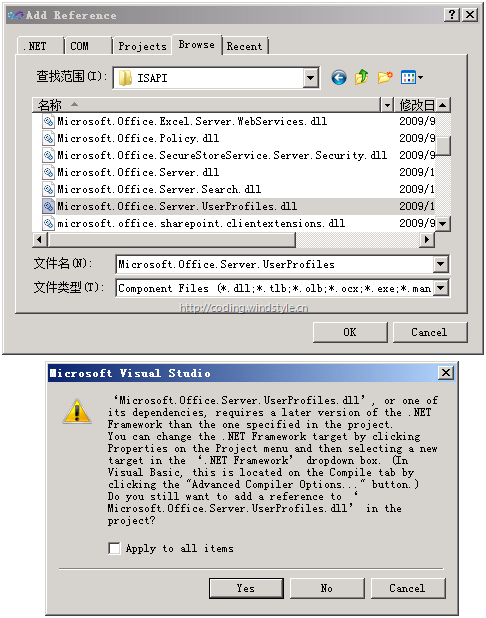
在添加引用的时候,Visual Studio 2010会弹出如下图所示的对话框,提示我们项目的.NET 版本太低:
image

强行引用之后,项目会因为找不到命名空间而无法编译,如果把项目的.NET版本改为4.0,这个问题就解决了。

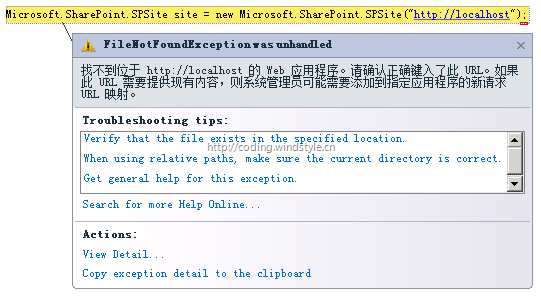
然而SharePoint 2010依然基于.NET Framework 3.5的,如果你在.NET版本为4.0的项目中引用了Microsoft.SharePoint.dll并且企图实例化一个SPSite对象的话, 在执行阶段会抛出一个FileNotFoundException,如下图所示:
image

那么如果想要在同一个项目中同时引用这两个程序集来进行开发该怎么进行?这个明显的冲突在SharePoint还是技术预览版的时候就让我郁闷不已,甚至连产品组的技术支持都没有给我明确的解答(一定是他们太忙了,我表示理解),今天在Kaneboy和十一的帮助下终于知道了如何去解决。

解决方法就是在.NET版本为3.5的项目中进行开发,额外引用下面这个程序集:

C:\Program Files (x86)\Microsoft Chart Controls\Assemblies\System.Web.DataVisualization.dll

最后再感慨一下,SharePoint到了2010时代,已经庞大的令人恐惧了。