

惯性聚合 高效追踪和阅读你感兴趣的博客、新闻、科技资讯
阅读原文 在惯性聚合中打开

推荐订阅源

B
Blog
C
Check Point Blog
The GitHub Blog
The GitHub Blog
Y
Y Combinator Blog
SecWiki News
SecWiki News
有赞技术团队
有赞技术团队
Latest news
Latest news
D
DataBreaches.Net
Blog — PlanetScale
Blog — PlanetScale
Project Zero
Project Zero
H
Help Net Security
Cyber Security Advisories - MS-ISAC
G
GRAHAM CLULEY
Engineering at Meta
Engineering at Meta
T
Threat Research - Cisco Blogs
腾讯CDC
P
Proofpoint News Feed
L
LINUX DO - 热门话题
C
Cisco Blogs
P
Palo Alto Networks Blog
Vercel News
Vercel News
P
Privacy International News Feed
爱范儿
爱范儿
Scott Helme
Scott Helme
L
Lohrmann on Cybersecurity
MyScale Blog
MyScale Blog
K
Kaspersky official blog
B
Blog RSS Feed
美团技术团队
Microsoft Security Blog
O
OpenAI News
博客园 - 叶小钗
量子位
T
Tenable Blog
C
Cybersecurity and Infrastructure Security Agency CISA
J
Java Code Geeks
Application and Cybersecurity Blog
Hacker News: Ask HN
Hacker News: Ask HN
OSCHINA 社区最新新闻
OSCHINA 社区最新新闻
L
LINUX DO - 最新话题
F
Fortinet All Blogs
N
News | PayPal Newsroom
The Hacker News
The Hacker News
C
CXSECURITY Database RSS Feed - CXSecurity.com
cs.CV updates on arXiv.org
博客园 - 【当耐特】
N
News and Events Feed by Topic
V
Visual Studio Blog
Google DeepMind News
Last Week in AI
Last Week in AI

博客园 - 毕海

golang的cgo支持调用C++的方法 [原]zeromq框架测试报告 [转]linux下查看进程内存使用情况 程序员必读系列 python 不同版本下载资源 提示“load System.Core failed” phpwind主要表结构的研究随笔[1] [转]Python快速教程 [转]80个Python经典资料(教程+源码+工具)汇总——下载目录 [转]一位大牛整理的python资源 [转]PyInstaller2的信息文件Version的生成 [转]使用PyInstaller2将Python脚本转化为可执行文件(下-进阶使用) [转]使用PyInstaller2将Python脚本转化为可执行文件(上-安装部分) [转]Nginx安装 [转]Centos 5.5 卸载与安装java1.7环境 在win8 x64上安装Scrapy mongodb协议透传 mongodb的监控与性能优化 记一次MongoDB性能问题
[转]使用PyInstaller2将Python脚本转化为可执行文件(中-使用部分)
毕海 · 2013-05-28 · via 博客园 - 毕海

最近使用Python为项目开发一款测试工具。因为使用者在另一个部门,领导希望能把Python脚本发布为脱离Python平台运行的可执行程序,最好是单个的exe文件,同时也保护我们部门的源码。PyInstaller恰满足这个需求。目前PyInstaller的最新版本是2.0,支持Python2.7。接上贴,本文将讨论怎样使用PyInstaller2将Python脚本文件转化成Windows可执行exe文件。文中提到的所有工具都能下载到。本文博客园balian原创,欢迎转载,转载请说明原作者。

安装PyInstaller2步骤请见:
使用PyInstaller2将Python脚本转化为可执行文件(上-安装部分)
http://www.cnblogs.com/balian/archive/2012/11/21/2780503.html

main.py是一个简单的Python脚本,在C盘根目录的文件夹scripts中。

'''
main.py
'''
print 'main.py - Hello World!'

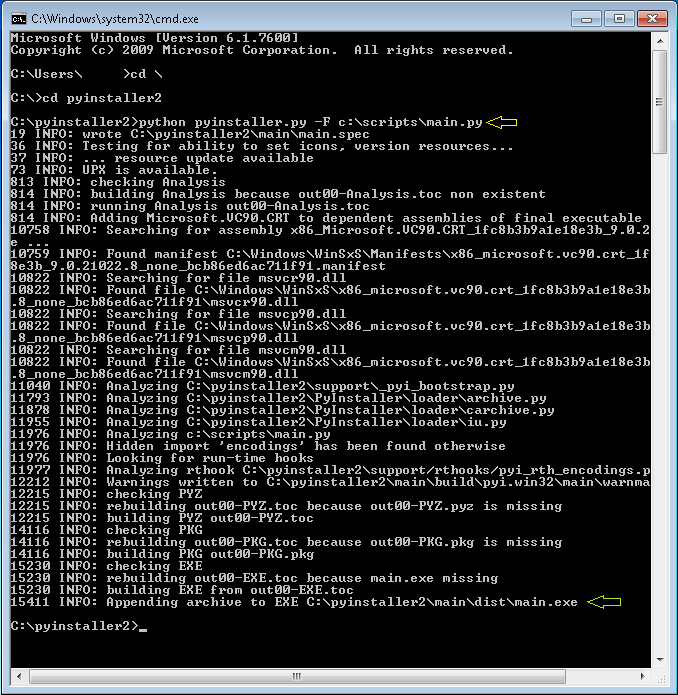
要将main.py转换为单个exe文件,需要在Pyintstller2安装文件夹下运行如下命令:

python pyinstaller.py -F c:\scripts\main.py

该命令具体执行效果如下图。
image

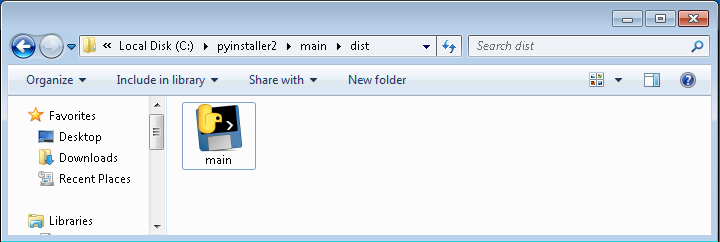
本文来自博客园balian。单个的main.exe文件可以在文件夹C:\pyinstaller2\main\dist找到,如图。现在main.exe可以用来发布了。
image

命令中参数-F表示生成单个exe文件。如果没有该参数,需要发布的就是一个文件夹了,如下图。

image

PyInstaller2对于Python内部模块的支持如何,使用同样的命令对如下代码打包,没有任何问题。

'''
main.py
'''
import time
print 'main.py - Hello World!'
time.sleep(10)
 

下面看看PyInstaller2对于用户自定义的模块怎么处理。在C盘根目录的文件夹scripts中,有文件test_module.py和main.py。分别如下:

'''
test_module.py
'''
def test_print():
    print 'test_module.py - Import module successfully.!\n'

以及

'''
main.py
'''
import time
import test_module

print 'main.py - Hello World!'
time.sleep(5)
test_module.test_print()
time.sleep(5)

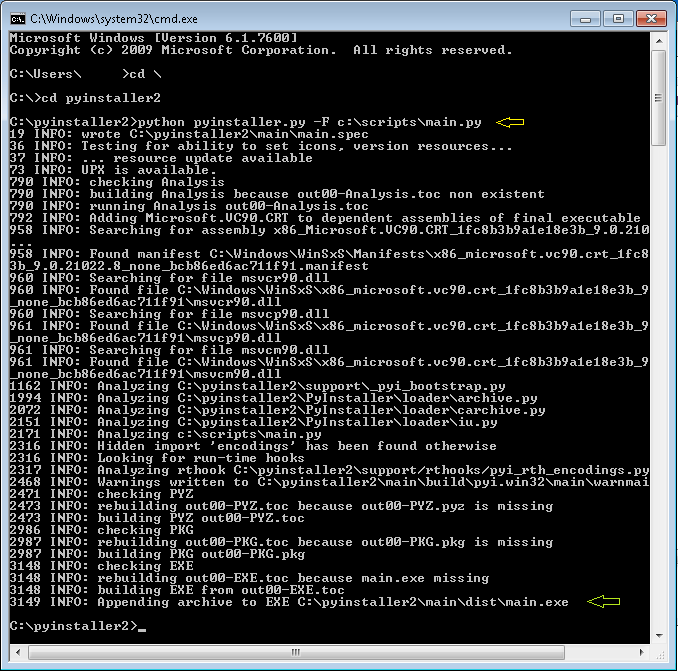
仍旧使用同样的命令打包成单一exe文件,PyInstaller2表示毫无压力。
image

转自:http://www.cnblogs.com/balian/archive/2012/11/22/2782308.html