


In Part 1 of my LINQ to SQL blog post series I discussed "What is LINQ to SQL" and provided a basic overview of some of the data scenarios it enables.
In my first post I provided code samples that demonstrated how to perform common data scenarios using LINQ to SQL including:
I performed all of these data scenarios using a LINQ to SQL class model that looked like the one below:
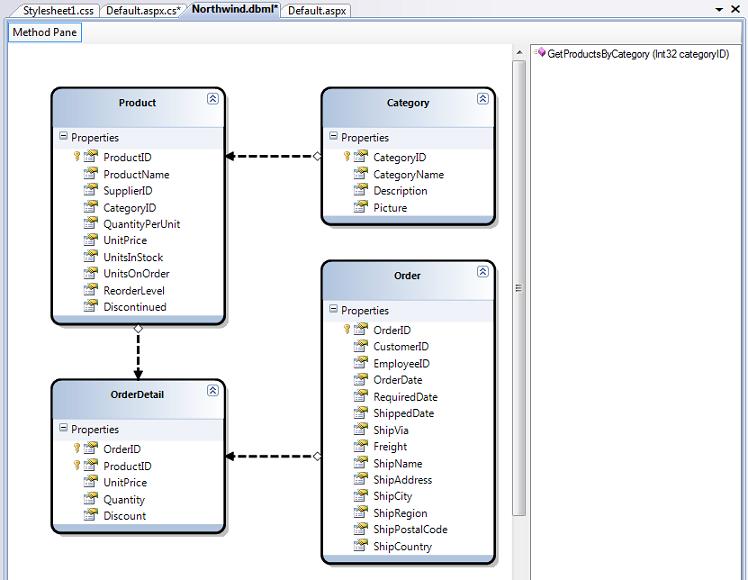
In this second blog post in the series I'm going to go into more detail on how to create the above LINQ to SQL data model.
LINQ to SQL, the LINQ to SQL Designer, and all of the features that I'm covering in this blog post series will ship as part of the .NET 3.5 and Visual Studio "Orcas" release.
You can follow all of the steps below by downloading either Visual Studio "Orcas" Beta 1 or Visual Web Developer Express "Orcas" Beta1. Both can be installed and used side-by-side with VS 2005.
You can add a LINQ to SQL data model to an ASP.NET, Class Library or Windows client project by using the "Add New Item" option within Visual Studio and selecting the "LINQ to SQL" item within it:
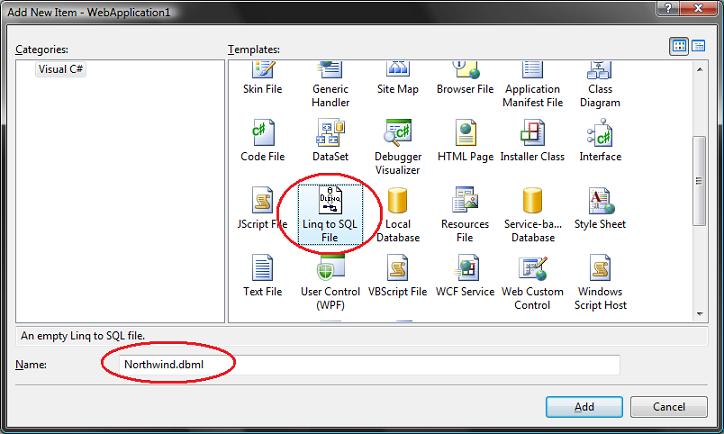
Selecting the "LINQ to SQL" item will launch the LINQ to SQL designer, and allow you to model classes that represent a relational database. It will also create a strongly-typed "DataContext" class that will have properties that represent each Table we modeled within the database, as well as methods for each Stored Procedure we modeled. As I described in Part 1 of this blog post series, the DataContext class is the main conduit by which we'll query entities from the database as well as apply changes back to it.
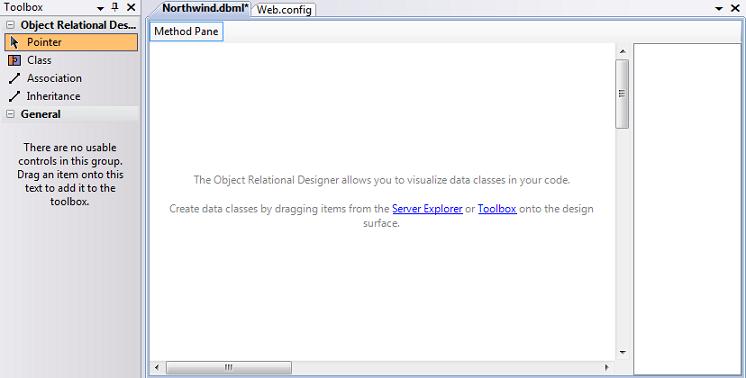
Below is a screen-shot of an empty LINQ to SQL ORM designer surface, and is what you'll see immediately after creating a new LINQ to SQL data model:
LINQ to SQL enables you to model classes that map to/from a database. These classes are typically referred to as "Entity Classes" and instances of them are called "Entities". Entity classes map to tables within a database. The properties of entity classes typically map to the table's columns. Each instance of an entity class then represents a row within the database table.
Entity classes defined with LINQ to SQL do not have to derive from a specific base class, which means that you can have them inherit from any object you want. All classes created using the LINQ to SQL designer are defined as "partial classes" - which means that you can optionally drop into code and add additional properties, methods and events to them.
Unlike the DataSet/TableAdapter feature provided in VS 2005, when using the LINQ to SQL designer you do not have to specify the SQL queries to use when creating your data model and access layer.
Instead, you focus on defining your entity classes, how they map to/from the database, and the relationships between them. The LINQ to SQL OR/M implementation will then take care of generating the appropriate SQL execution logic for you at runtime when you interact and use the data entities. You can use LINQ query syntax to expressively indicate how to query your data model in a strongly typed way.
If you already have a database schema defined, you can use it to quickly create LINQ to SQL entity classes modeled off of it.
The easiest way to accomplish this is to open up a database in the Server Explorer within Visual Studio, select the Tables and Views you want to model in it, and drag/drop them onto the LINQ to SQL designer surface:
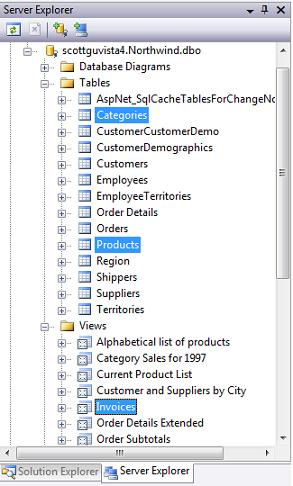
When you add the above 2 tables (Categories and Products) and 1 view (Invoices) from the "Northwind" database onto the LINQ to SQL designer surface, you'll automatically have the following three entity classes created for you based on the database schema:
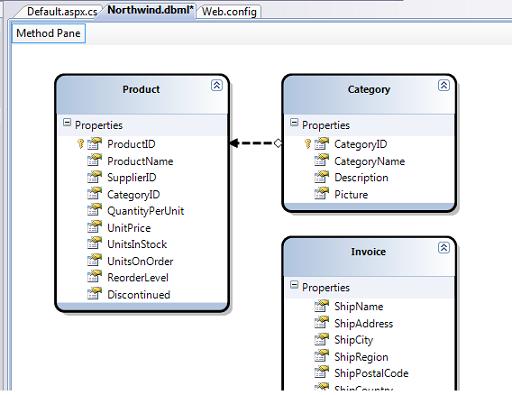
Using the data model classes defined above, I can now run all of the code samples (expect the SPROC one) described in Part 1 of this LINQ to SQL series. I don't need to add any additional code or configuration in order to enable these query, insert, update, delete, and server-side paging scenarios.
One of the things you'll notice when using the LINQ to SQL designer is that it automatically "pluralizes" the various table and column names when it creates entity classes based on your database schema. For example: the "Products" table in our example above resulted in a "Product" class, and the "Categories" table resulted in a "Category" class. This class naming helps make your models consistent with the .NET naming conventions, and I usually find having the designer fix these up for me really convenient (especially when adding lots of tables to your model).
If you don't like the name of a class or property that the designer generates, though, you can always override it and change it to any name you want. You can do this either by editing the entity/property name in-line within the designer or by modifying it via the property grid:
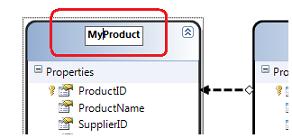
The ability to have entity/property/association names be different from your database schema ends up being very useful in a number of cases. In particular:
1) When your backend database table/column schema names change. Because your entity models can have different names from the backend schema, you can decide to just update your mapping rules and not update your application or query code to use the new table/column name.
2) When you have database schema names that aren't very "clean". For example, rather than use "au_lname" and "au_fname" for the property names on an entity class, you can just name them to "LastName" and "FirstName" on your entity class and develop against that instead (without having to rename the column names in the database).
When you drag objects from the server explorer onto the LINQ to SQL designer, Visual Studio will inspect the primary key/foreign key relationships of the objects, and based on them automatically create default "relationship associations" between the different entity classes it creates. For example, when I added both the Products and Categories tables from Northwind onto my LINQ to SQL designer you can see that a one to many relationship between the two is inferred (this is denoted by the arrow in the designer):
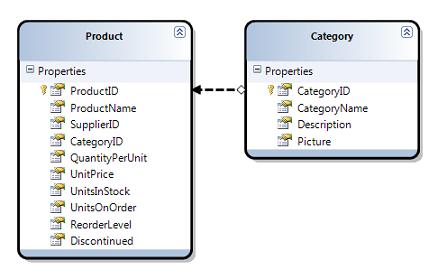
The above association will cause cause the Product entity class to have a "Category" property that developers can use to access the Category entity for a given Product. It will also cause the Category class to have a "Products" collection that enables developers to retrieve all products within that Category.
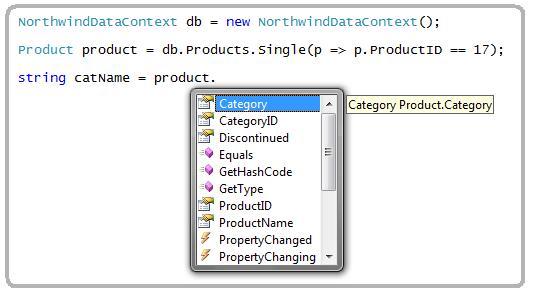
If you don't like how the designer has modeled or named an association, you can always override it. Just click on the association arrow within the designer and access its properties via the property grid to rename, delete or modify it.
LINQ to SQL enables developers to specify whether the properties on entities should be prefetched or delay/lazy-loaded on first access. You can customize the default pre-fetch/delay-load rules for entity properties by selecting any entity property or association in the designer, and then within the property-grid set the "Delay Loaded" property to true or false.
For a simple example of when I'd want to-do this, consider the "Category" entity class we modeled above. The categories table inside "Northwind" has a "Picture" column which stores a (potentially large) binary image of each category, and I only want to retrieve the binary image from the database when I'm actually using it (and not when doing a simply query just to list the category names in a list).
I could configure the Picture property to be delay loaded by selecting it within the LINQ to SQL designer and by settings its Delay Loaded value in the property grid:
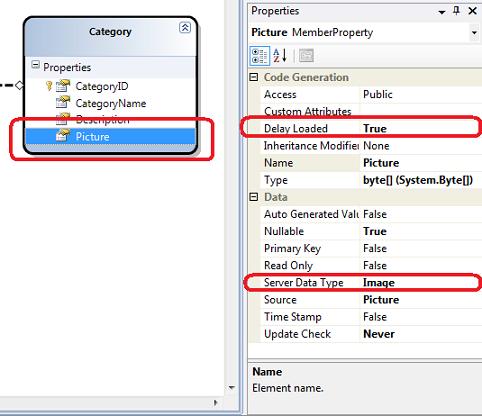
Note: In addition to configuring the default pre-fetch/delay load semantics on entities, you can also override them via code when you perform LINQ queries on the entity class (I'll show how to-do this in the next blog post in this series).
LINQ to SQL allows you to optionally model stored procedures as methods on your DataContext class. For example, assume we've defined the simple SPROC below to retrieve product information based on a categoryID:
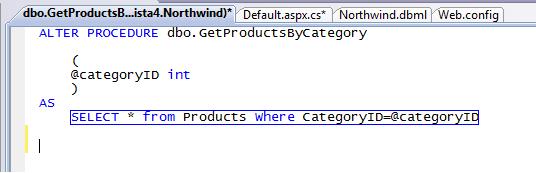
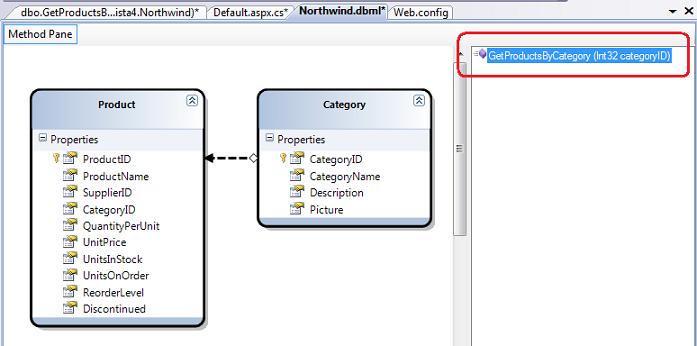
I can use the server explorer within Visual Studio to drag/drop the SPROC onto the LINQ to SQL designer surface in order to add a strongly-typed method that will invoke the SPROC. If I drop the SPROC on top of the "Product" entity in the designer, the LINQ to SQL designer will declare the SPROC to return an IEnumerable<Product> result:
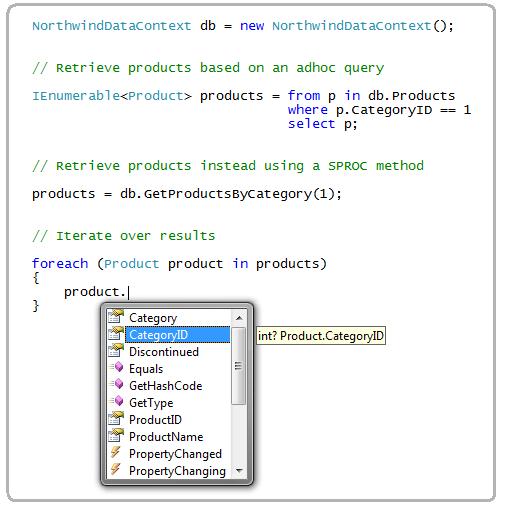
I can then use either LINQ Query Syntax (which will generate an adhoc SQL query) or alternatively invoke the SPROC method added above to retrieve product entities from the database:
Using SPROCs to Update/Delete/Insert Data
By default LINQ to SQL will automatically create the appropriate SQL expressions for you when you insert/update/delete entities. For example, if you wrote the LINQ to SQL code below to update some values on a "Product" entity instance:
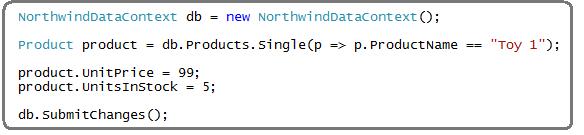
By default LINQ to SQL would create and execute the appropriate "UPDATE" statement for you when you submitted the changes (I'll cover this more in a later blog post on updates).
You can also optionally define and use custom INSERT, UPDATE, DELETE sprocs instead. To configure these, just click on an entity class in the LINQ to SQL designer and within its property-grid click the "..." button on the Delete/Insert/Update values, and pick a particular SPROC you've defined instead:
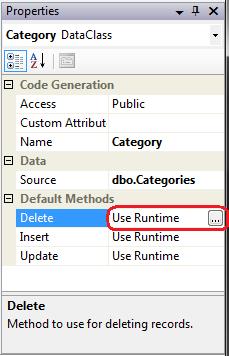
What is nice about changing the above setting is that it is done purely at the mapping layer of LINQ to SQL - which means the update code I showed earlier continues to work with no modifications required. This avoids developers using a LINQ to SQL data model from having to change code even if they later decide to put in a custom SPROC optimization later.
LINQ to SQL provides a nice, clean way to model the data layer of your application. Once you've defined your data model you can easily and efficiently perform queries, inserts, updates and deletes against it.
Using the built-in LINQ to SQL designer within Visual Studio and Visual Web Developer Express you can create and manage your data models for LINQ to SQL extremely fast. The LINQ to SQL designer also provides a lot of flexibility that enables you to customize the default behavior and override/extend the system to meet your specific needs.
In upcoming posts I'll be using the data model we created above to drill into querying, inserts, updates and deletes further. In the update, insert and delete posts I'll also discuss how to add custom business/data validation logic to the entities we designed above to perform additional validation logic.
Mike Taulty also has a number of great LINQ to SQL videos that I recommend checking out here. These provide a great way to learn by watching someone walkthrough using LINQ to SQL in action.
Hope this helps,
Scott
http://weblogs.asp.net/scottgu/archive/2007/05/29/linq-to-sql-part-2-defining-our-data-model-classes.aspx
此内容由惯性聚合(RSS阅读器)自动聚合整理,仅供阅读参考。 原文来自 — 版权归原作者所有。