


惯性聚合 高效追踪和阅读你感兴趣的博客、新闻、科技资讯
阅读原文 在惯性聚合中打开

推荐订阅源

T
Threat Research - Cisco Blogs
让小产品的独立变现更简单 - ezindie.com
月光博客
月光博客
V
Vulnerabilities – Threatpost
cs.CV updates on arXiv.org
S
Secure Thoughts
Microsoft Azure Blog
Blog — PlanetScale
Blog — PlanetScale
Exploit-DB.com RSS Feed
T
Tailwind CSS Blog
S
SegmentFault 最新的问题
钛媒体:引领未来商业与生活新知
钛媒体:引领未来商业与生活新知
云风的 BLOG
云风的 BLOG
The Last Watchdog
The Last Watchdog
L
LINUX DO - 热门话题
酷 壳 – CoolShell
酷 壳 – CoolShell
WordPress大学
WordPress大学
AWS News Blog
AWS News Blog
美团技术团队
G
Google Developers Blog
宝玉的分享
宝玉的分享
www.infosecurity-magazine.com
C
CXSECURITY Database RSS Feed - CXSecurity.com
Recent Commits to openclaw:main
I
InfoQ
小众软件
小众软件
Google DeepMind News
P
Privacy & Cybersecurity Law Blog
Stack Overflow Blog
Stack Overflow Blog
Webroot Blog
Webroot Blog
D
DataBreaches.Net
IT之家
IT之家
PCI Perspectives
PCI Perspectives
人人都是产品经理
人人都是产品经理
Hacker News: Ask HN
Hacker News: Ask HN
L
LangChain Blog
SecWiki News
SecWiki News
cs.CL updates on arXiv.org
C
Cisco Blogs
T
Threatpost
P
Proofpoint News Feed
Y
Y Combinator Blog
Cloudbric
Cloudbric
T
Tor Project blog
量子位
博客园_首页
B
Blog
Hugging Face - Blog
Hugging Face - Blog
GbyAI
GbyAI
D
Darknet – Hacking Tools, Hacker News & Cyber Security

博客园 - JasonBie

使用NPOI编辑Excel C# datagridview 快速导出数据到Excel Outlook2016 不能自动配置企业Exchange的解决办法 Linq实现left join左连接 解决sql server collation conflict Asp.net APP 重置密码的方式 jQuery dataTables 列不对齐的原因 JavaScript 获得客户端IP Entity Framework Linq 动态组合where条件 查询SQLSERVER执行过的SQL记录 Asp.net Web API 返回Json对象的两种方式 Read Excel file from C# JavaScript测试工具比较: QUnit, Jasmine, and Mocha Asp.net Form验证后造成URL参数重复的问题 MVC删除数据的方法 Session State Cookie Transferring Information Between Pages View State
电脑端微信语音像机器人解决办法
JasonBie · 2019-08-19 · via 博客园 - JasonBie

最近使用电脑端微信(企业微信)语音时,对方总听着我这边声音像机器人一样,还时断时续的。经过研究发现,是声卡设置问题,关闭麦克风的音效增强就好了:

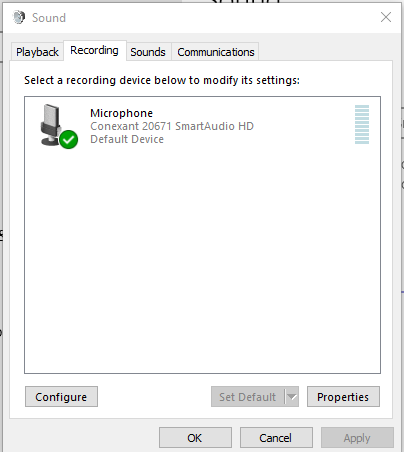
1. 控制面板打开声音设置

2. 在录音设置界面,打开属性窗口
 3. 在“高级”页面,找到启用音效增强,把前面的勾去掉就好了

不确定这个问题是不是跟某些品牌的电脑或声卡有关,但是和我一样有此问题的同事也是用这个方法解决了。如果你也有类似的问题,希望对你有帮助。