



惯性聚合 高效追踪和阅读你感兴趣的博客、新闻、科技资讯
阅读原文 在惯性聚合中打开

推荐订阅源

P
Privacy International News Feed
WordPress大学
WordPress大学
Security Latest
Security Latest
Cyberwarzone
Cyberwarzone
K
Kaspersky official blog
Cisco Talos Blog
Cisco Talos Blog
Microsoft Security Blog
G
GRAHAM CLULEY
N
News | PayPal Newsroom
Apple Machine Learning Research
freeCodeCamp Programming Tutorials: Python, JavaScript, Git & More
V
Visual Studio Blog
美团技术团队
J
Java Code Geeks
I
Intezer
The Cloudflare Blog
SecWiki News
SecWiki News
S
Secure Thoughts
Microsoft Azure Blog
V2EX - 技术
V2EX - 技术
C
Cyber Attacks, Cyber Crime and Cyber Security
奇客Solidot–传递最新科技情报
奇客Solidot–传递最新科技情报
Spread Privacy
Spread Privacy
D
DataBreaches.Net
S
Security Affairs
Help Net Security
Help Net Security
S
Securelist
F
Full Disclosure
C
Check Point Blog
F
Fortinet All Blogs
Know Your Adversary
Know Your Adversary
Exploit-DB.com RSS Feed
Y
Y Combinator Blog
云风的 BLOG
云风的 BLOG
阮一峰的网络日志
阮一峰的网络日志
The Register - Security
cs.CL updates on arXiv.org
人人都是产品经理
人人都是产品经理
博客园_首页
G
Google Developers Blog
Google Online Security Blog
Cyber Security Advisories - MS-ISAC
H
Help Net Security
酷 壳 – CoolShell
酷 壳 – CoolShell
I
InfoQ
Application and Cybersecurity Blog
H
Hacker News: Front Page
L
LINUX DO - 热门话题
Threat Intelligence Blog | Flashpoint
L
LangChain Blog

博客园 - JasonBie

使用NPOI编辑Excel C# datagridview 快速导出数据到Excel Linq实现left join左连接 电脑端微信语音像机器人解决办法 解决sql server collation conflict Asp.net APP 重置密码的方式 jQuery dataTables 列不对齐的原因 JavaScript 获得客户端IP Entity Framework Linq 动态组合where条件 查询SQLSERVER执行过的SQL记录 Asp.net Web API 返回Json对象的两种方式 Read Excel file from C# JavaScript测试工具比较: QUnit, Jasmine, and Mocha Asp.net Form验证后造成URL参数重复的问题 MVC删除数据的方法 Session State Cookie Transferring Information Between Pages View State
Outlook2016 不能自动配置企业Exchange的解决办法
JasonBie · 2019-10-15 · via 博客园 - JasonBie

最新重装了系统,设置Outlook2016连接服务器时不能自动配置,以前用Outlook2013没有问题,现在升级到2016只能采用自动配置。经过很多周折,最终通过下面的方法解决了,如果你也有这样的问题希望对你有帮助。

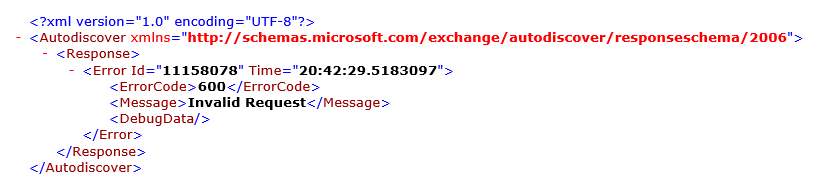
1. 确认公司邮箱可以用owa(outlook web app)登录, 比如mail.company.com/owa。尝试打开下面的地址:mail.company.com/autodiscover/autodiscover.xml,会出现下面的错误信息。
 

2. 在自己电脑本地写一个autodiscover.xml(notepad复制即可)

<?xml version="1.0" encoding="utf-8"?>
<Autodiscover xmlns="http://schemas.microsoft.com/exchange/autodiscover/responseschema/2006">
     <Response xmlns="http://schemas.microsoft.com/exchange/autodiscover/outlook/responseschema/2006a">
         <Account>
             <AccountType>email</AccountType>
             <Action>redirectUrl</Action>
                 <RedirectUrl>https://mail.company.com/autodiscover/autodiscover.xml</RedirectUrl>
             </Account>
      </Response>
</Autodiscover>

注意:把里面的redirectUrl改成你刚刚试过报错那个地址!最后存在一个简单点的目录,例如C:\autodiscover\autodiscover.xml

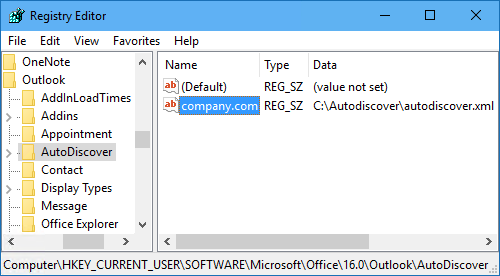
3. 改注册表:

HKEY_CURRENT_USER\SOFTWARE\Microsoft\Office\16.0\Outlook\AutoDiscover

(Office 2016的版本是16.0)在里面新增一个字符串值,名字是你公司域名company.com,值是你存放本地文件的完整目录C:\autodiscover\autodiscover.xml
4. 保存好之后就重启outlook,重新添加账户!