





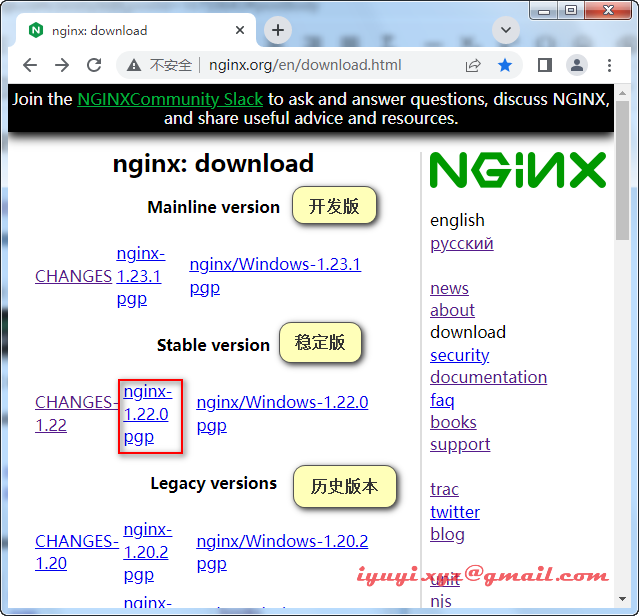
下载地址:http://nginx.org/en/download.html
2 安装前的准备
# 操作系统内核版本
uname -a
# 操作系统发行版本
cat /etc/redhat-release
在安装Nginx之前,我们需要确保安装Nginx所依赖的其他程序,执行下面的命令,安装或更新相应的程序。
yum install -y make zlib zlib-devel gcc-c++ libtool openssl openssl-devel pcre pcre-devel libxslt-devel geoip-devel gd gd-devel执行完成后,如果之前未安装的,则会自动安装,如果之前已经安装有旧的版本,则会被新的版本代替。
3 wget下载
# 推荐wget下载
yun install -y wget
wget http://nginx.org/download/nginx-1.22.0.tar.gz
4 创建用户和组
useradd nginxxyz -s /sbin/nologin
id nginxxyztar -zxvf /opt/software/nginx-1.22.0.tar.gz -C /opt/ # 解压
cd /opt/nginx-1.22.0 # 进入nginx目录
使用 ll 可以看到目录下有 configure 的可执行文件,这个文件的作用,就是根据你系统的情况,生成makefile的,以便于下一步的编译和安装
cd /opt/nginx-1.22.0
./configure   # 不带参数,默认会安装到 /usr/local/nginx 目录,也可以 指定参数。
./configure --prefix=/usr/local/nginx  # 则会在安装的时候,安装到 /usr/data/nginx 的目录  。
./configure \
--user=nginxxyz \
--group=nginxxyz \
--with-threads \
--with-file-aio \
--with-http_ssl_module \
--with-http_v2_module \
--with-http_realip_module \
--with-http_addition_module \
--with-http_xslt_module=dynamic \
--with-http_image_filter_module=dynamic \
--with-http_geoip_module=dynamic \
--with-http_sub_module \
--with-http_dav_module \
--with-http_flv_module \
--with-http_mp4_module \
--with-http_gunzip_module \
--with-http_gzip_static_module \
--with-http_auth_request_module \
--with-http_random_index_module \
--with-http_secure_link_module \
--with-http_degradation_module \
--with-http_slice_module \
--with-http_stub_status_module \
--with-stream=dynamic \
--with-stream_ssl_module \
--with-stream_realip_module \
--with-stream_geoip_module=dynamic \
--with-stream_ssl_preread_module \
--with-compat \
--with-pcre-jit \
--prefix=/usr/local/nginxmake
make install # 这两行可以分开执行,也可以在同一行执行
make && make install # 同一行执行将nginx服务加入环境变量
在文件中添加 nginx 的安装路径下的bin 目录
vim /etc/profile
export PATH=$PATH:/usr/local/nginx/sbin
# 使配置文件生效
source /etc/profile# 启动nginx
nginx
# 重启nginx
nginx -s reload
# 停止nginx
nginx -s stop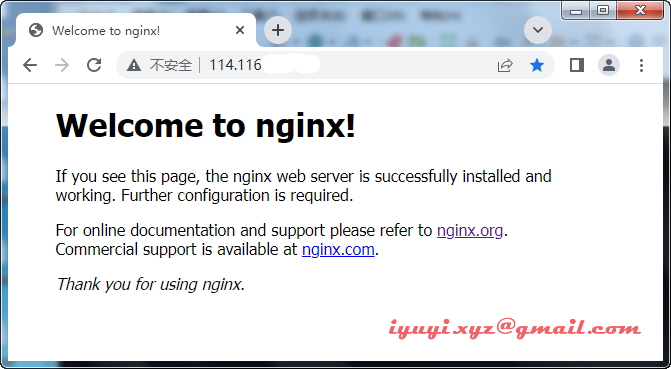
很多时候,我们为了方便管理,在服务器重启后,需要nginx自动启动,那么我们可以添加 nginx 的服务
# 创建 nginx 服务文件
vim /lib/systemd/system/nginx.service
nginx 的服务文件配置可参考如下:
[Unit]
Description=nginx
After=network.target

[Service]
Type=forking
ExecStart=/usr/local/nginx/sbin/nginx
ExecReload=/usr/local/nginx/sbin/nginx -s reload
ExecStop=/usr/local/nginx/sbin/nginx -s stop
PrivateTmp=true

[Install]
WantedBy=multi-user.target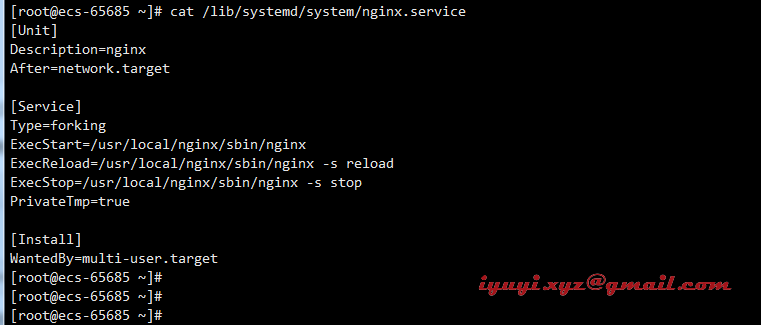
完成后,按ESC键,输入:wq 保存并退出,上面的nginx 相应的目录,需要改为你自己的目录。
服务文件配置好了,接下来要把它添加到服务里面。
systemctl enable nginx.service执行完后,系统会在下方提示:
Created symlink from /etc/systemd/system/multi-user.target.wants/nginx.service to /usr/lib/systemd/system/nginx.service.看到这个,nginx 的服务就已经完成添加,但这个时候,还没有启动的,我们可以通过下面的命令来操作nginx。
# 查看运行状态
systemctl status nginx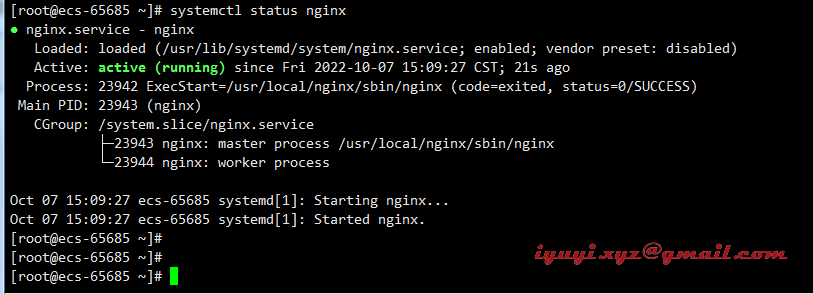
其他命令
# 启动 nginx
systemctl start nginx
# 停止 nginx
systemctl stop nginx
# 重新加载 nginx
systemctl reload nginx
如果重新修改 nginx.service 配置文件后,则需要使用下面的命令来重新加载服务的配置文件。
# 重新加载服务的配置文件
systemctl daemon-reload使用源码安装方式,nginx的配置文件,通常会在 /usr/local/nginx/conf/nginx.conf 这个位置,可以通过 vi 或 vim 修改。
# 打开配置文件
vim /usr/local/nginx/conf/nginx.conf# 关闭防火墙
systemctl stop firewalld
# 开放3306端口命令
firewall-cmd --zone=public --add-port=3306/tcp --permanent
# 配置立即生效
firewall-cmd --reload云主机需配置安全组(默认已放行,可省略)
在入方向规则,允许80放行

错误:./configure: error: the HTTP rewrite module requires the PCRE library.
解决:安装pcre-devel:yum -y install pcre-devel
错误:./configure: error: the HTTP cache module requires md5 functions
from OpenSSL library. You can either disable the module by using
–without-http-cache option, or install the OpenSSL library into the system,
or build the OpenSSL library statically from the source with nginx by using
–with-http_ssl_module –with-openssl= options.
解决:yum -y install openssl openssl-devel
错误:./configure: error: the HTTP XSLT module requires the libxml2/libxslt 缺少libxml2
解决:yum -y install libxml2 libxml2-devel && yum -y install libxslt-devel
错误信息:./configure: error: the HTTP image filter module requires the GD library. You can either do not enable the module or install the libraries.
解决方法:http_image_filter_module是nginx提供的集成图片处理模块,需要gd-devel的支持 yum -y install gd-devel
错误信息:./configure: error: perl module ExtUtils::Embed is required 缺少ExtUtils
解决方法:yum -y install perl-devel perl-ExtUtils-Embed
错误信息:./configure: error: the GeoIP module requires the GeoIP library. You can either do not enable the module or install the library. 缺少GeoIP
解决方法:yum -y install GeoIP GeoIP-devel GeoIP-data
错误信息:./configure: error: the Google perftools module requires the Google perftools
library. You can either do not enable the module or install the library.
解决方法:yum -y install gperftools
此内容由惯性聚合(RSS阅读器)自动聚合整理,仅供阅读参考。 原文来自 — 版权归原作者所有。