



Today, we’re announcing a new metadata capability for Amazon Simple Storage Service (Amazon S3) called annotations, enabling you to attach rich, large-scale business context directly to your objects. You can store up to 1,000 named annotations per object, each up to 1 MB in size, totaling up to 1 GB per object, in flexible formats like JSON, XML, YAML, or plain text. You can modify or delete an annotation at any time, without re-writing your objects, making it easy to keep your object context current.
Organizations are building AI agents and autonomous workflows that need to find, understand, and act on data without human intervention. To support these agentic workflows, you need metadata that can evolve alongside the data, scale to petabytes of objects, and remain queryable without expensive retrieval.
With S3 annotations, you can store context such as AI-generated transcripts, content ratings, or technical specifications directly alongside your objects. Your context moves automatically with the object during copy, replication, and cross-region transfers, and S3 removes it when you delete the object. When you enable S3 Metadata, annotations automatically flow into fully managed annotation tables that you can query with Amazon Athena and other analytics engines.
Common use cases
Annotations solve complex metadata challenges across industries:
- Media & Entertainment: Track transcripts, content moderation results, subtitle files, and licensing metadata as separate annotations on video assets, eliminating the need to synchronize metadata across multiple media asset management systems.
- Financial Services: Attach AI-generated investment summaries and sentiment analysis to research documents, enabling autonomous research agents to discover relevant datasets through natural-language queries without maintaining separate metadata databases.
- Life Sciences: Annotate clinical trial data with regulatory status, patient cohort details, and approval chains, making compliance audits faster while keeping full context accessible for archived data in Amazon S3 Glacier storage classes without retrieval charges.
How annotations address metadata challenges
Amazon S3 already supports several ways to describe your objects. System-defined metadata captures properties like size and storage class. Object tags support operational tasks like access control and lifecycle management. User-defined metadata lets you add small amounts of custom information at upload time.
While these capabilities work well for their intended purposes, they have limitations when you need to attach much richer context without building and maintaining separate metadata systems. Annotations address these needs by providing metadata capabilities at a fundamentally different scale and flexibility, offering mutable, queryable context per object compared to 10 immutable tags or 2 KB of headers.
| Capability | Max size | Mutable? | Best for |
| System-defined metadata | Fixed | No | Object properties (size, storage class, creation time) |
| User-defined metadata | 2 KB | No (set at upload) | Small custom key-value pairs |
| Object tags | 10 tags, 128/256 characters per key/value | Yes | Access control, lifecycle rules, cost allocation |
| Annotations | 1 GB (1,000 × 1 MB) | Yes | Rich business context (JSON, XML, YAML, plain text) |
Today, metadata describing S3 objects often lives in separate databases or sidecar files, requiring complex synchronization workflows that can exceed data storage costs. When you enable S3 Metadata annotation tables, this context becomes queryable at scale through Amazon Athena. AI agents can discover your data through natural language with the S3 Tables MCP server, which provides a standardized interface for AI models to query your annotations. You can query annotations for objects in any storage class, without restoring the objects or paying retrieval charges.
Getting started with annotations
To start using annotations, make sure your AWS Identity and Access Management (IAM) policy or bucket policy grants permissions for the s3:PutObjectAnnotation and s3:GetObjectAnnotation actions. You can then add annotations to any existing or new S3 object using the PutObjectAnnotation API.
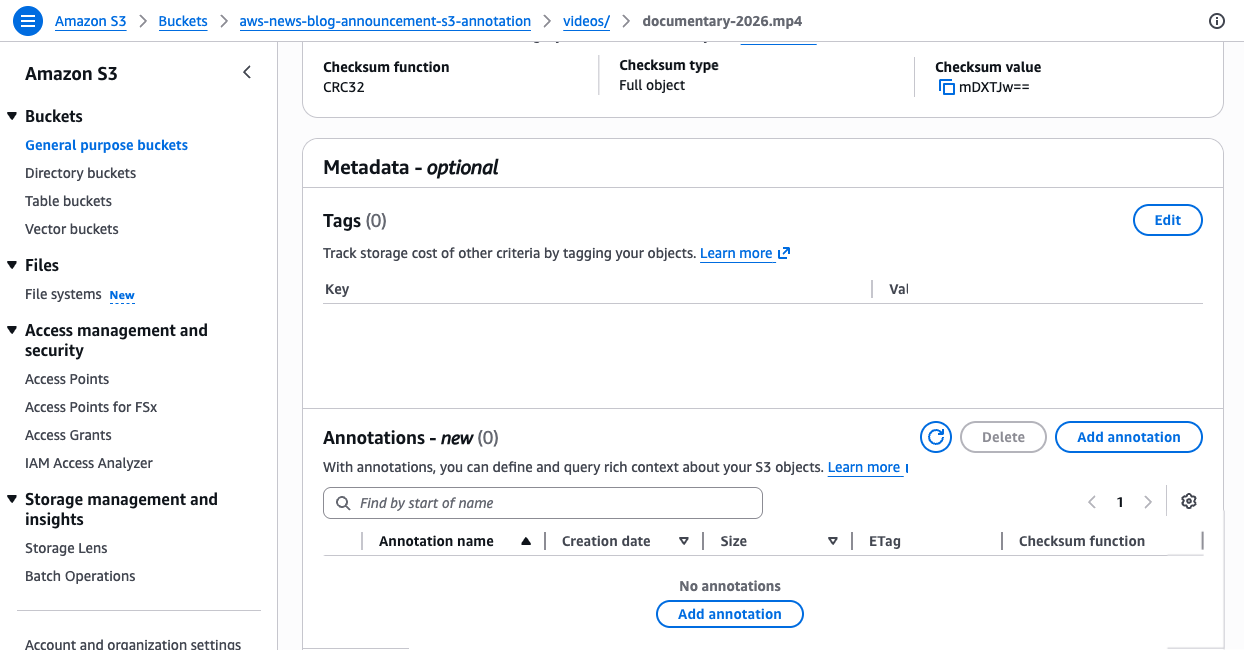
For example, a media company can attach technical specifications and AI-produced summaries to a video asset using the AWS Command Line Interface (AWS CLI):
# Create a JSON file with technical metadata
cat > mediainfo.json << 'EOF'
{"codec":"H.265","resolution":"3840x2160","audio_tracks":8,"frame_rate":29.97}
EOF

# Attach it as an annotation
aws s3api put-object-annotation \
  --bucket my-media-bucket \
  --key videos/documentary-2026.mp4 \
  --annotation-name mediainfo \
  --annotation-payload ./mediainfo.json
# Attach a plain-text AI-generated summary as a separate annotation
echo "A 90-minute nature documentary covering wildlife migration patterns across three continents, featuring aerial footage and underwater sequences. Languages: English, Spanish, Portuguese." > ai_summary.txt

aws s3api put-object-annotation \
  --bucket my-media-bucket \
  --key videos/documentary-2026.mp4 \
  --annotation-name ai_summary \
  --annotation-payload ./ai_summary.txt
These commands attach two separate annotations to the same video object. The mediainfo annotation stores structured technical specifications as JSON, while the ai_summary annotation stores a text description. Each annotation is identified by a unique name, and you can read and modify each one independently. With unique names for each annotation, you can use different annotations to support multiple concurrent enrichment workflows, for example, one team adding technical metadata while another team adds content classifications, without interfering with each other.
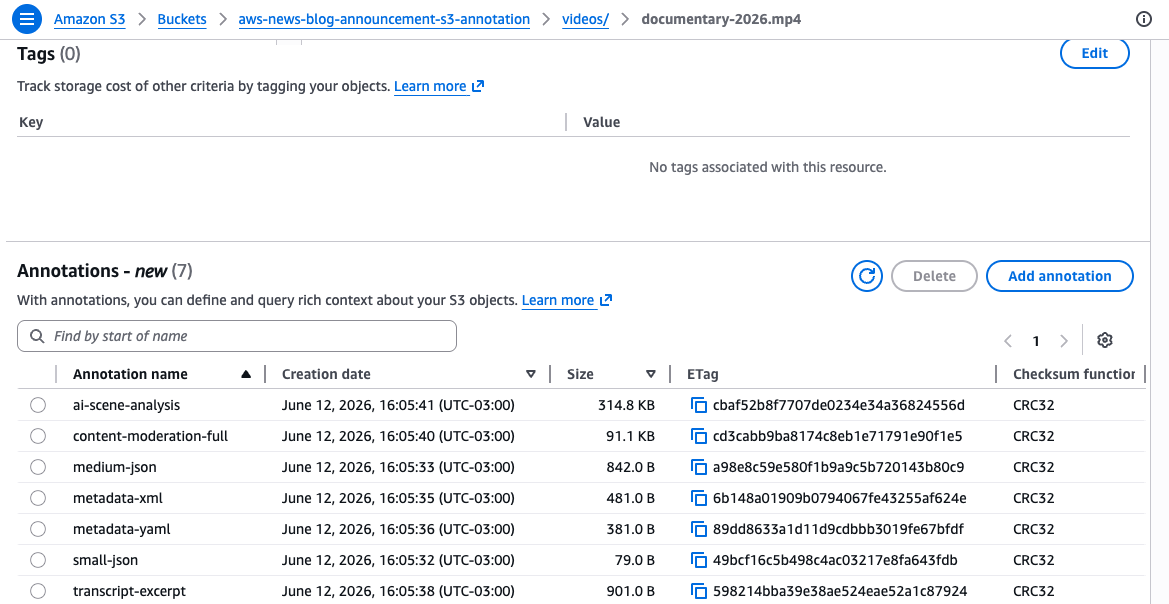
Retrieve a specific annotation using the GetObjectAnnotation API:
aws s3api get-object-annotation \
  --bucket my-media-bucket \
  --key videos/documentary-2026.mp4 \
  --annotation-name mediainfo \
  ./mediainfo-output.json
To see all annotations attached to an object, use the ListObjectAnnotations API:
aws s3api list-object-annotations \
  --bucket my-media-bucket \
  --key videos/documentary-2026.mp4
When you no longer need a specific annotation, remove it using the DeleteObjectAnnotation API:
aws s3api delete-object-annotation \
  --bucket my-media-bucket \
  --key videos/documentary-2026.mp4 \
  --annotation-name mediainfo
You can update an existing annotation at any time by calling PutObjectAnnotation again with the same annotation name. For large objects uploaded using multipart upload, attach annotations after completing the multipart upload using the PutObjectAnnotation API.
Querying annotations at scale with S3 Metadata tables
Attaching annotations to individual objects is useful, but the real power comes when you query across all your annotations at scale. When you enable S3 Metadata annotation tables on your bucket, S3 automatically indexes your annotations into a fully managed Apache Iceberg table, called an annotation table. You can query annotation tables with Amazon Athena or any Iceberg-compatible engine.
To enable annotation tables, use the S3 console or the CreateBucketMetadataConfiguration API. The following example creates a new metadata configuration with annotation tables enabled while keeping journal tables for change tracking and disabling the live inventory table:
{
  "JournalTableConfiguration": {
    "RecordExpiration": { "Expiration": "DISABLED" }
  },
  "InventoryTableConfiguration": { "ConfigurationState": "DISABLED" },
  "AnnotationTableConfiguration": {
    "ConfigurationState": "ENABLED",
    "Role": "arn:aws:iam::123456789012:role/S3MetadataAnnotationRole"
  }
}
This configuration tells S3 to automatically capture all your annotations in a queryable table. Once applied, any annotation you attach to objects in this bucket will appear in the table within approximately one hour.
If the bucket already has a metadata configuration, use the UpdateBucketMetadataAnnotationTableConfiguration API:
aws s3api update-bucket-metadata-annotation-table-configuration \
  --bucket my-media-bucket \
  --annotation-table-configuration '{"ConfigurationState":"ENABLED","Role":"arn:aws:iam::123456789012:role/S3MetadataAnnotationRole"}'
Once enabled, your annotations automatically flow into the annotation table. Journal tables update in near real time, while annotation tables refresh within an hour. Unlike traditional metadata tables that require predefined schemas, annotation tables automatically adapt to any JSON, XML, or YAML structure you write. Each annotation becomes a row in the table with its content stored in a text_value column, letting you query across all annotations without schema migrations.
If you enable annotation tables on a bucket that already has annotated objects, S3 automatically backfills existing annotations into the table. The backfill process runs in the background and can take several hours to days depending on the number of objects.
For example, to find all video assets with more than 8 audio tracks across your entire bucket using Amazon Athena:
SELECT DISTINCT bucket, object_key
FROM "s3tablescatalog/aws-s3"."b_my_media_bucket"."annotation"
WHERE name = 'mediainfo'
AND CAST(json_extract_scalar(text_value, '$.audio_tracks') AS INTEGER) > 8
This query scans the annotation table for all annotations named mediainfo, extracts the audio_tracks field from the JSON content, and returns objects where the count exceeds 8.
Or to find all objects that received new annotations in the last 24 hours through the journal table:
SELECT bucket, key, version_id, record_timestamp, annotation.name
FROM "s3tablescatalog/aws-s3"."b_my_media_bucket"."journal"
WHERE record_timestamp >= (current_date - interval '1' day)
AND annotation.name IS NOT NULL
AND record_type IN ('CREATE_ANNOTATION', 'DELETE_ANNOTATION')
This query uses the journal table to track annotation changes in near real time, which is ideal for building event-driven workflows that respond to new or deleted annotations.
You can also use natural language to search objects by their annotations using agents in Amazon SageMaker Unified Studio or any IDE with the S3 Tables MCP server. For example, asking “find all PG-rated movies with Spanish subtitles from 2023” returns results in seconds instead of the hours it would take querying multiple disconnected systems.
Get started today
You can start using Amazon S3 annotations today in all AWS Regions, including the AWS China Regions. Annotation tables are available in all AWS Regions where S3 Metadata is available.
Whether you’re building AI agents that need to discover data autonomously, managing petabytes of media assets with complex metadata, or tracking compliance context for archived datasets, annotations give you the scale and flexibility to attach rich metadata directly to your objects without managing separate systems.
Annotation storage is always billed at S3 Standard rates, even if the parent object is in S3 Glacier or another storage class. For full pricing details, visit the Amazon S3 pricing page.
To learn more and get started, visit the Amazon S3 Metadata overview page and the Amazon S3 documentation. Send feedback to AWS re:Post for S3 or through your usual AWS Support contacts.
Daniel Abib