原文:http://blog.csdn.net/coolszy/article/details/7518345
由于Android项目开源所致,市面上出现了N多安卓软件市场。为了让我们开发的软件有更多的用户使用,我们需要向N多市场发布,软件升级后,我们也必须到安卓市场上进行更新,给我们增加了工作量。因此我们有必要给我们的Android应用增加自动更新的功能。
既然实现自动更新,我们首先必须让我们的应用知道是否存在新版本的软件,因此我们可以在自己的网站上放置配置文件,存放软件的版本信息:
- <update>
- <version>2</version>
- <name>baidu_xinwen_1.1.0</name>
- <url>http://gdown.baidu.com/data/wisegame/f98d235e39e29031/baiduxinwen.apk</url>
- </update>
在这里我使用的是XML文件,方便读取。由于XML文件内容比较少,因此可通过DOM方式进行文件的解析:
- public class ParseXmlService
- {
- public HashMap<String, String> parseXml(InputStream inStream) throws Exception
- {
- HashMap<String, String> hashMap = new HashMap<String, String>();
-
-
- DocumentBuilderFactory factory = DocumentBuilderFactory.newInstance();
-
- DocumentBuilder builder = factory.newDocumentBuilder();
-
- Document document = builder.parse(inStream);
-
- Element root = document.getDocumentElement();
-
- NodeList childNodes = root.getChildNodes();
- for (int j = 0; j < childNodes.getLength(); j++)
- {
-
- Node childNode = (Node) childNodes.item(j);
- if (childNode.getNodeType() == Node.ELEMENT_NODE)
- {
- Element childElement = (Element) childNode;
-
- if ("version".equals(childElement.getNodeName()))
- {
- hashMap.put("version",childElement.getFirstChild().getNodeValue());
- }
-
- else if (("name".equals(childElement.getNodeName())))
- {
- hashMap.put("name",childElement.getFirstChild().getNodeValue());
- }
-
- else if (("url".equals(childElement.getNodeName())))
- {
- hashMap.put("url",childElement.getFirstChild().getNodeValue());
- }
- }
- }
- return hashMap;
- }
- }
通过parseXml()方法,我们可以获取服务器上应用的版本、文件名以及下载地址。紧接着我们就需要获取到我们手机上应用的版本信息:
-
-
-
-
-
-
- private int getVersionCode(Context context)
- {
- int versionCode = 0;
- try
- {
-
- versionCode = context.getPackageManager().getPackageInfo("com.szy.update", 0).versionCode;
- } catch (NameNotFoundException e)
- {
- e.printStackTrace();
- }
- return versionCode;
- }
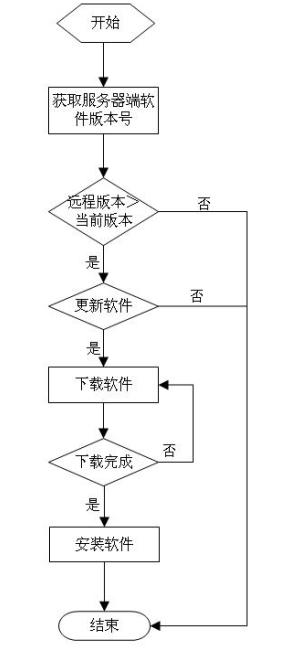
通过该方法我们获取到的versionCode对应AndroidManifest.xml下android:versionCode。android:versionCode和android:versionName两个属性分别表示版本号,版本名称。versionCode是整数型,而versionName是字符串。由于versionName是给用户看的,不太容易比较大小,升级检查时,就可以检查versionCode。把获取到的手机上应用版本与服务器端的版本进行比较,应用就可以判断处是否需要更新软件。
处理流程
处理代码
- package com.szy.update;
-
- import java.io.File;
- import java.io.FileOutputStream;
- import java.io.IOException;
- import java.io.InputStream;
- import java.net.HttpURLConnection;
- import java.net.MalformedURLException;
- import java.net.URL;
- import java.util.HashMap;
-
- import android.app.AlertDialog;
- import android.app.Dialog;
- import android.app.AlertDialog.Builder;
- import android.content.Context;
- import android.content.DialogInterface;
- import android.content.Intent;
- import android.content.DialogInterface.OnClickListener;
- import android.content.pm.PackageManager.NameNotFoundException;
- import android.net.Uri;
- import android.os.Environment;
- import android.os.Handler;
- import android.os.Message;
- import android.view.LayoutInflater;
- import android.view.View;
- import android.widget.ProgressBar;
- import android.widget.Toast;
-
-
-
-
-
-
-
- public class UpdateManager
- {
-
- private static final int DOWNLOAD = 1;
-
- private static final int DOWNLOAD_FINISH = 2;
-
- HashMap<String, String> mHashMap;
-
- private String mSavePath;
-
- private int progress;
-
- private boolean cancelUpdate = false;
-
- private Context mContext;
-
- private ProgressBar mProgress;
- private Dialog mDownloadDialog;
-
- private Handler mHandler = new Handler()
- {
- public void handleMessage(Message msg)
- {
- switch (msg.what)
- {
-
- case DOWNLOAD:
-
- mProgress.setProgress(progress);
- break;
- case DOWNLOAD_FINISH:
-
- installApk();
- break;
- default:
- break;
- }
- };
- };
-
- public UpdateManager(Context context)
- {
- this.mContext = context;
- }
-
-
-
-
- public void checkUpdate()
- {
- if (isUpdate())
- {
-
- showNoticeDialog();
- } else
- {
- Toast.makeText(mContext, R.string.soft_update_no, Toast.LENGTH_LONG).show();
- }
- }
-
-
-
-
-
-
- private boolean isUpdate()
- {
-
- int versionCode = getVersionCode(mContext);
-
- InputStream inStream = ParseXmlService.class.getClassLoader().getResourceAsStream("version.xml");
-
- ParseXmlService service = new ParseXmlService();
- try
- {
- mHashMap = service.parseXml(inStream);
- } catch (Exception e)
- {
- e.printStackTrace();
- }
- if (null != mHashMap)
- {
- int serviceCode = Integer.valueOf(mHashMap.get("version"));
-
- if (serviceCode > versionCode)
- {
- return true;
- }
- }
- return false;
- }
-
-
-
-
-
-
-
- private int getVersionCode(Context context)
- {
- int versionCode = 0;
- try
- {
-
- versionCode = context.getPackageManager().getPackageInfo("com.szy.update", 0).versionCode;
- } catch (NameNotFoundException e)
- {
- e.printStackTrace();
- }
- return versionCode;
- }
-
-
-
-
- private void showNoticeDialog()
- {
-
- AlertDialog.Builder builder = new Builder(mContext);
- builder.setTitle(R.string.soft_update_title);
- builder.setMessage(R.string.soft_update_info);
-
- builder.setPositiveButton(R.string.soft_update_updatebtn, new OnClickListener()
- {
- @Override
- public void onClick(DialogInterface dialog, int which)
- {
- dialog.dismiss();
-
- showDownloadDialog();
- }
- });
-
- builder.setNegativeButton(R.string.soft_update_later, new OnClickListener()
- {
- @Override
- public void onClick(DialogInterface dialog, int which)
- {
- dialog.dismiss();
- }
- });
- Dialog noticeDialog = builder.create();
- noticeDialog.show();
- }
-
-
-
-
- private void showDownloadDialog()
- {
-
- AlertDialog.Builder builder = new Builder(mContext);
- builder.setTitle(R.string.soft_updating);
-
- final LayoutInflater inflater = LayoutInflater.from(mContext);
- View v = inflater.inflate(R.layout.softupdate_progress, null);
- mProgress = (ProgressBar) v.findViewById(R.id.update_progress);
- builder.setView(v);
-
- builder.setNegativeButton(R.string.soft_update_cancel, new OnClickListener()
- {
- @Override
- public void onClick(DialogInterface dialog, int which)
- {
- dialog.dismiss();
-
- cancelUpdate = true;
- }
- });
- mDownloadDialog = builder.create();
- mDownloadDialog.show();
-
- downloadApk();
- }
-
-
-
-
- private void downloadApk()
- {
-
- new downloadApkThread().start();
- }
-
-
-
-
-
-
-
-
- private class downloadApkThread extends Thread
- {
- @Override
- public void run()
- {
- try
- {
-
- if (Environment.getExternalStorageState().equals(Environment.MEDIA_MOUNTED))
- {
-
- String sdpath = Environment.getExternalStorageDirectory() + "/";
- mSavePath = sdpath + "download";
- URL url = new URL(mHashMap.get("url"));
-
- HttpURLConnection conn = (HttpURLConnection) url.openConnection();
- conn.connect();
-
- int length = conn.getContentLength();
-
- InputStream is = conn.getInputStream();
-
- File file = new File(mSavePath);
-
- if (!file.exists())
- {
- file.mkdir();
- }
- File apkFile = new File(mSavePath, mHashMap.get("name"));
- FileOutputStream fos = new FileOutputStream(apkFile);
- int count = 0;
-
- byte buf[] = new byte[1024];
-
- do
- {
- int numread = is.read(buf);
- count += numread;
-
- progress = (int) (((float) count / length) * 100);
-
- mHandler.sendEmptyMessage(DOWNLOAD);
- if (numread <= 0)
- {
-
- mHandler.sendEmptyMessage(DOWNLOAD_FINISH);
- break;
- }
-
- fos.write(buf, 0, numread);
- } while (!cancelUpdate);
- fos.close();
- is.close();
- }
- } catch (MalformedURLException e)
- {
- e.printStackTrace();
- } catch (IOException e)
- {
- e.printStackTrace();
- }
-
- mDownloadDialog.dismiss();
- }
- };
-
-
-
-
- private void installApk()
- {
- File apkfile = new File(mSavePath, mHashMap.get("name"));
- if (!apkfile.exists())
- {
- return;
- }
-
- Intent i = new Intent(Intent.ACTION_VIEW);
- i.setDataAndType(Uri.parse("file://" + apkfile.toString()), "application/vnd.android.package-archive");
- mContext.startActivity(i);
- }
- }
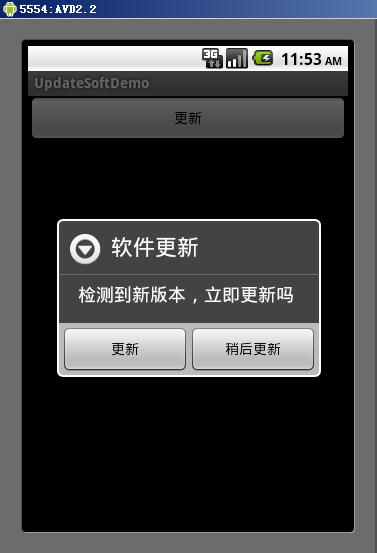
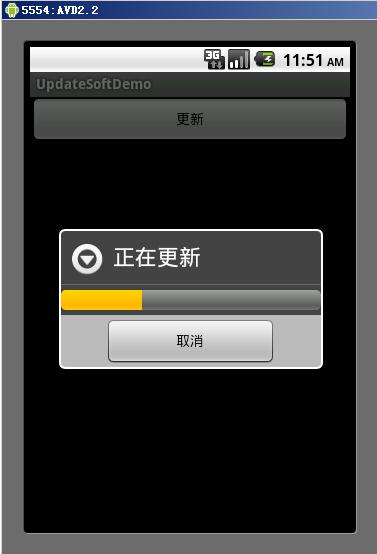
效果图
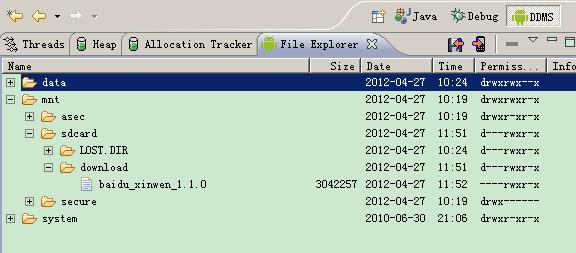
检查模拟器SDCARD是否存在下载文件: