惯性聚合 高效追踪和阅读你感兴趣的博客、新闻、科技资讯
阅读原文 在惯性聚合中打开

推荐订阅源

N
Netflix TechBlog - Medium
V
Vulnerabilities – Threatpost
Google Online Security Blog
Hugging Face - Blog
Hugging Face - Blog
L
LINUX DO - 热门话题
云风的 BLOG
云风的 BLOG
P
Proofpoint News Feed
D
Docker
C
Cyber Attacks, Cyber Crime and Cyber Security
MyScale Blog
MyScale Blog
P
Palo Alto Networks Blog
T
Tenable Blog
P
Privacy International News Feed
Google DeepMind News
小众软件
小众软件
Cisco Talos Blog
Cisco Talos Blog
aimingoo的专栏
aimingoo的专栏
Cyber Security Advisories - MS-ISAC
A
Arctic Wolf
C
Cybersecurity and Infrastructure Security Agency CISA
C
Cisco Blogs
T
Threat Research - Cisco Blogs
NISL@THU
NISL@THU
The Hacker News
The Hacker News
Project Zero
Project Zero
AWS News Blog
AWS News Blog
Simon Willison's Weblog
cs.CL updates on arXiv.org
T
Threatpost
V
Visual Studio Blog
The GitHub Blog
The GitHub Blog
The Cloudflare Blog
Last Week in AI
Last Week in AI
Jina AI
Jina AI
Cyberwarzone
Cyberwarzone
The Register - Security
C
CXSECURITY Database RSS Feed - CXSecurity.com
Vercel News
Vercel News
D
Darknet – Hacking Tools, Hacker News & Cyber Security
MongoDB | Blog
MongoDB | Blog
U
Unit 42
Scott Helme
Scott Helme
A
About on SuperTechFans
WordPress大学
WordPress大学
F
Fortinet All Blogs
大猫的无限游戏
大猫的无限游戏
G
GRAHAM CLULEY
Latest news
Latest news
让小产品的独立变现更简单 - ezindie.com
S
Schneier on Security

博客园 - 胖胖安

Xamarin.Android 的 Google 登入 Xamarin.iOS 的 Google 登入 Xamarin.Android 的照相機使用 Xamarin.iOS 照相機功能的使用 (1) :最簡單的做法 Xamarin.iOS 的鍵盤控制 (AutoLayout 與 新的 Keyboard 事件 ) Xamarin.Android 控制鍵盤縮放 install rvm iOS : TableView MultiSelect 兩個 System.IO.FileInfo 的 Extension Method SQL Server 2008 Resize LDF IIS 7 站點下,ASP.NET 3.5 與 4.0 的並存問題 jQuery AutoComplete Parameters Tips : SQL Server 2008 "saving changes is not permitted." 的解決辦法 - 胖胖安 Section 3 : 程式進入點 Section 2 : 專案結構 Section 1 : 使用 XCode 建立一個新專案 iPhone 開發前的準備工作 IIS 7 上 设定ASP.NET 时应注意事项 DBML 在Beta2與正式版間差異 - 胖胖安 - 博客园
Xamarin 環境建置–Xamarin Agent
胖胖安 · 2016-03-14 · via 博客园 - 胖胖安

以 Xamarin 開發 iOS App 時仍需要使用 Xcode 所提供的 toolchains 進行編譯及部屬工作。
如果又要享受 Visual Studio 帶來的便利,又想開發iOS App那就需要使用 Xamarin Agent 來溝通兩者。

當然如果在Mac OS X 上選擇使用Xamarin Studio 進行開發,這個問題就不存在了。

以下介紹設定的步驟 :

(1) 在 Mac 內,建立管理者帳號
     "系統偏好設定"下的"使用者與群組"
     新增帳號時,選擇"管理者"及使用"個別密碼"。
     因為我們之後需要使用ssh連線進入Mac。
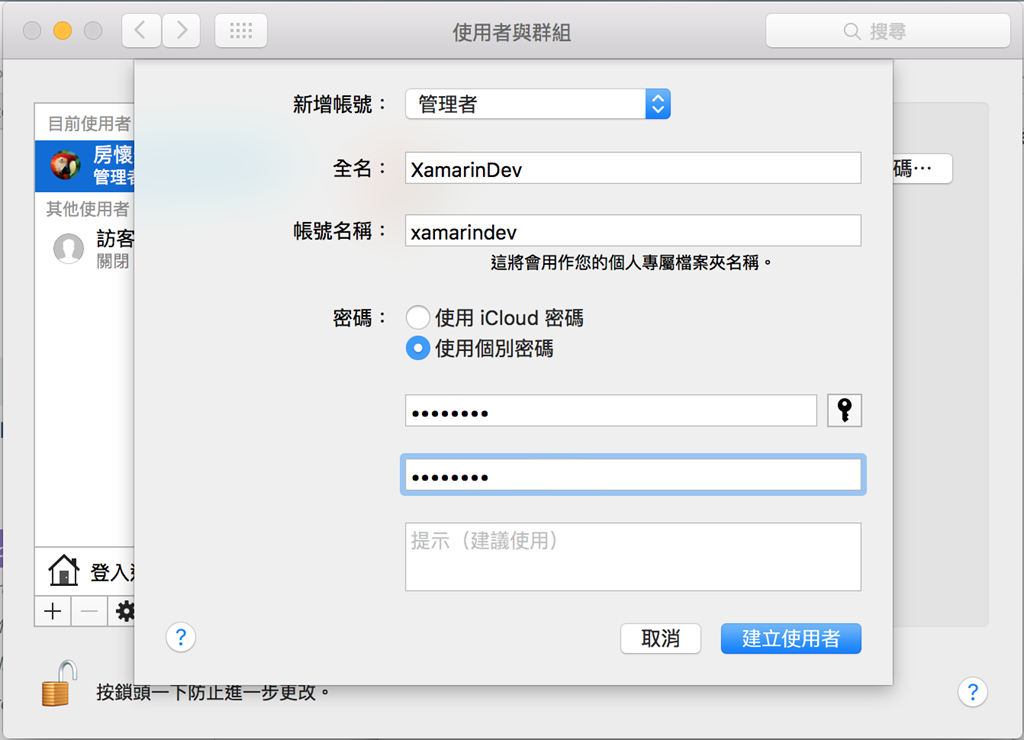
     螢幕快照 2016-03-14 下午2.11.50

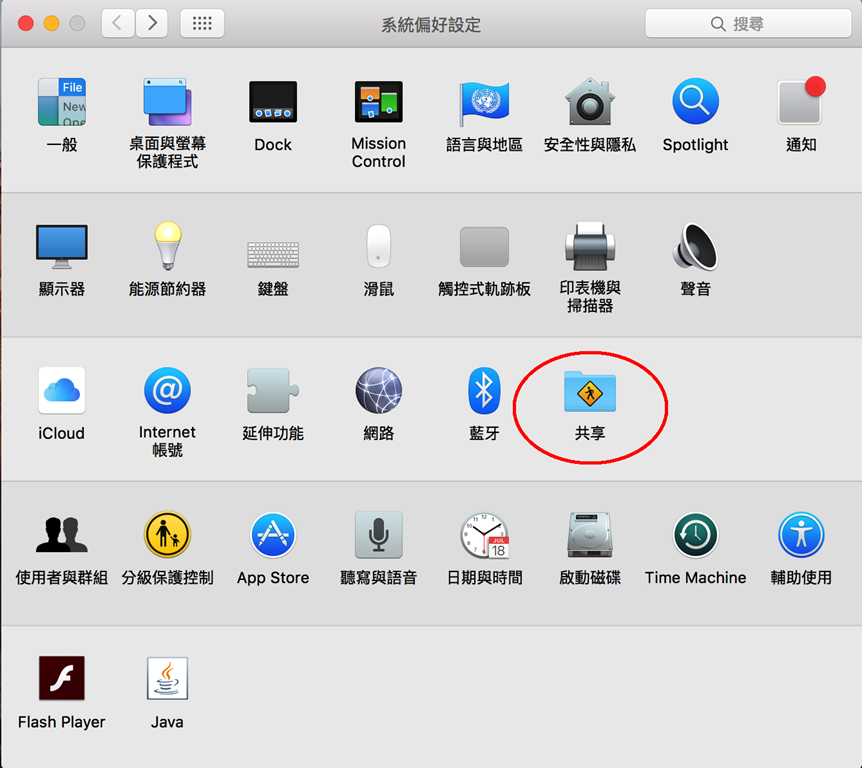
(2) 在 Mac 內,開啟遠端登入

     "系統偏好設定"下,選擇共享

     螢幕快照 2016-03-14 下午2.16.04

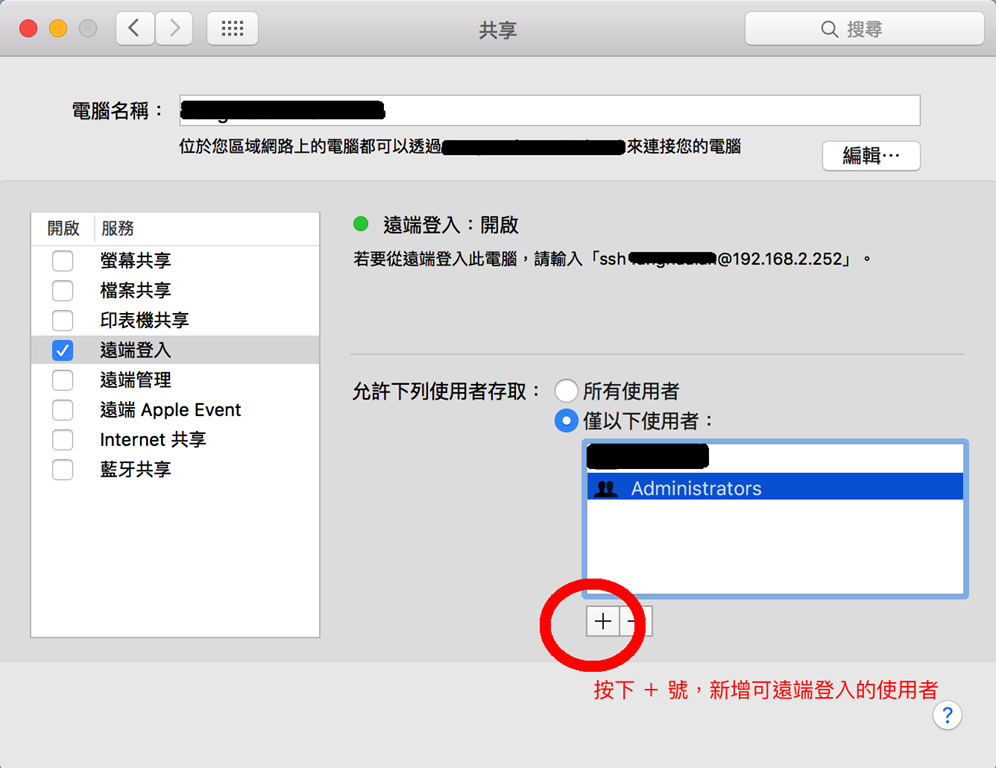
     "共享"下新增前一步驟建立的使用者

     螢幕快照 2016-03-14 下午2.18.01

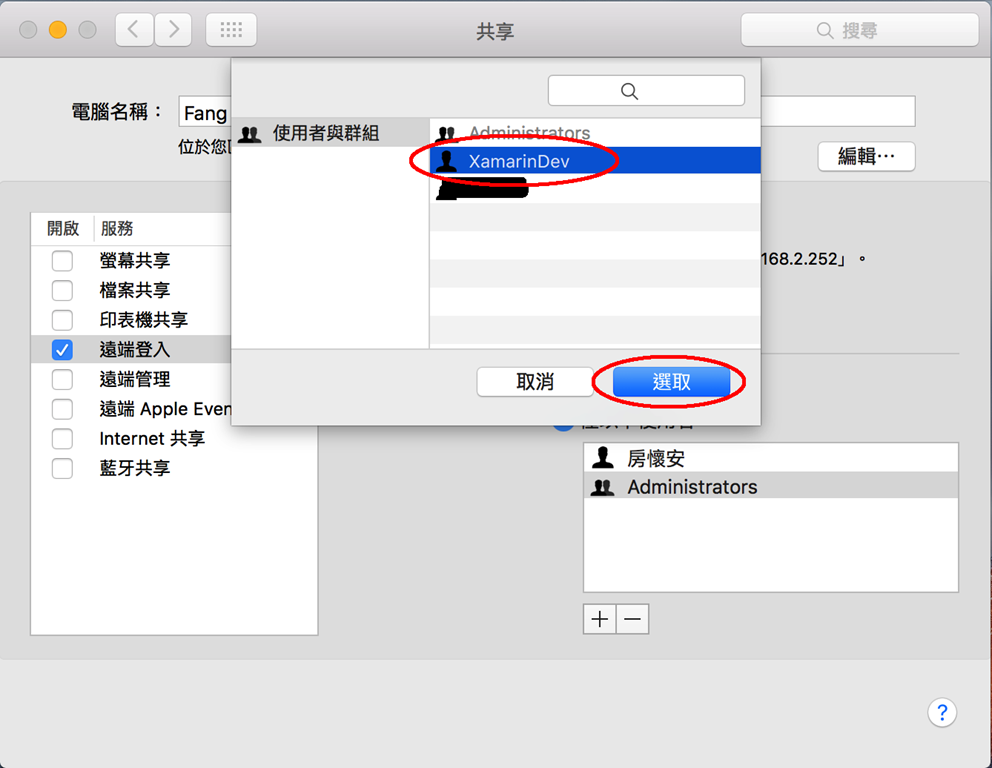
     選取使用者
     
     螢幕快照 2016-03-14 下午2.18.17

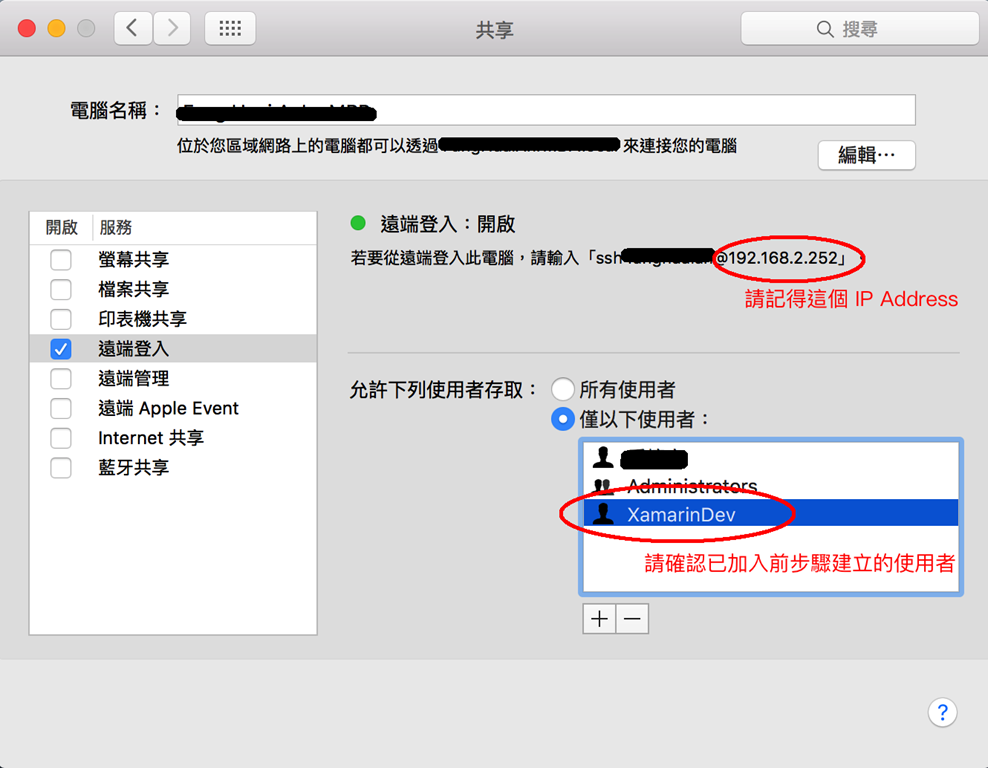
     確認已選取指定的使用者,並記下IP Address

     螢幕快照 2016-03-14 下午2.18.33

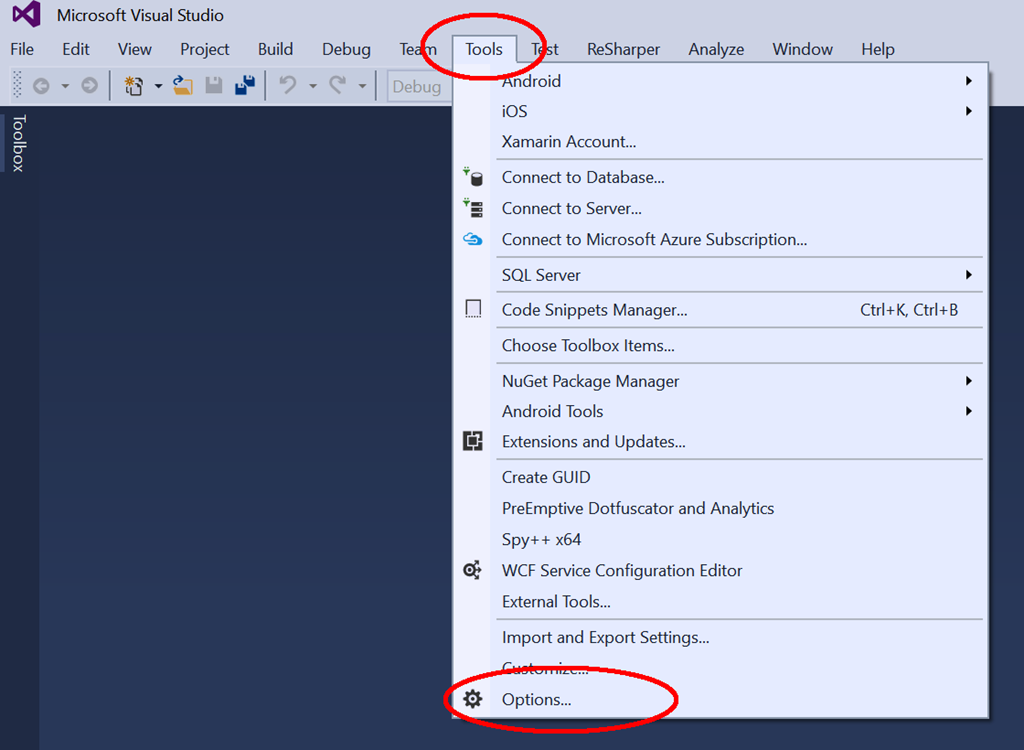
(3) 在 Visual Studio 下,選取"工具"項下的"選項"
    

     螢幕快照 2016-03-14 下午2.36.50


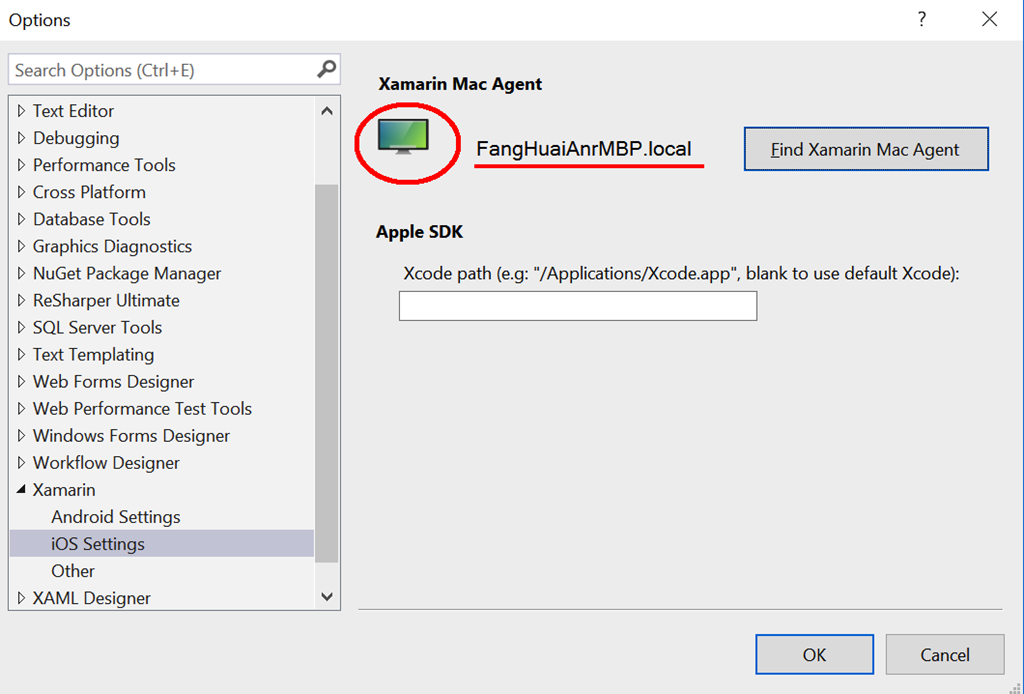
     選取 "Xamarin" 項下的 iOS Setting ,
     可以發現右方沒有連結到 Mac,按下
     "Find Xamarin Mac Agent"
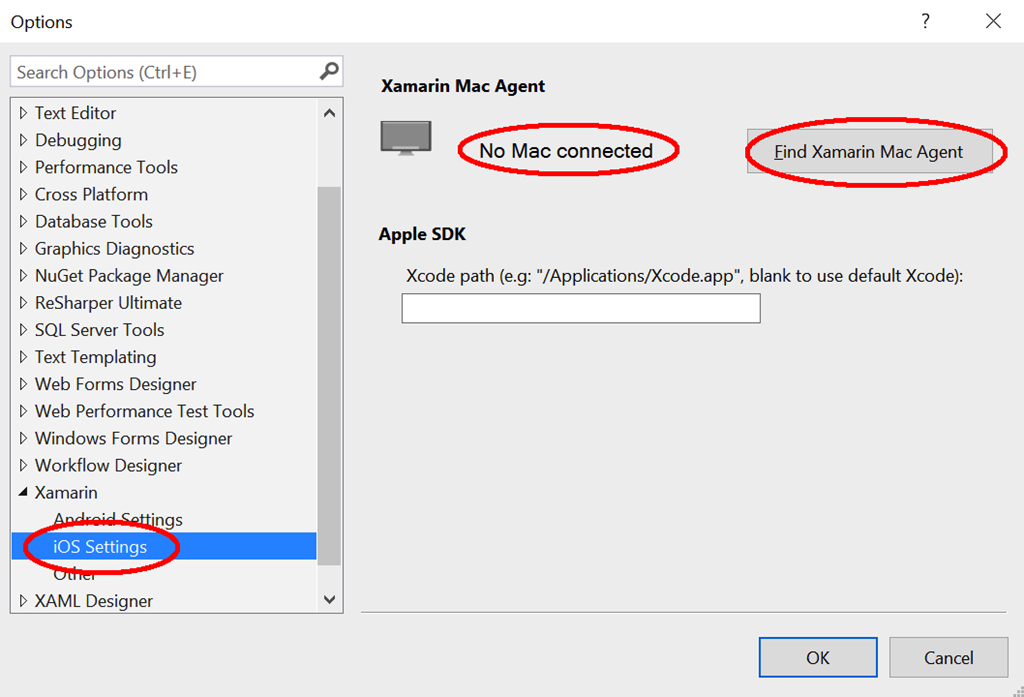
     螢幕快照 2016-03-14 下午2.38.59

     這時進入 Xamarin Mac Agent 的設定畫面,
     按"Add Mac"
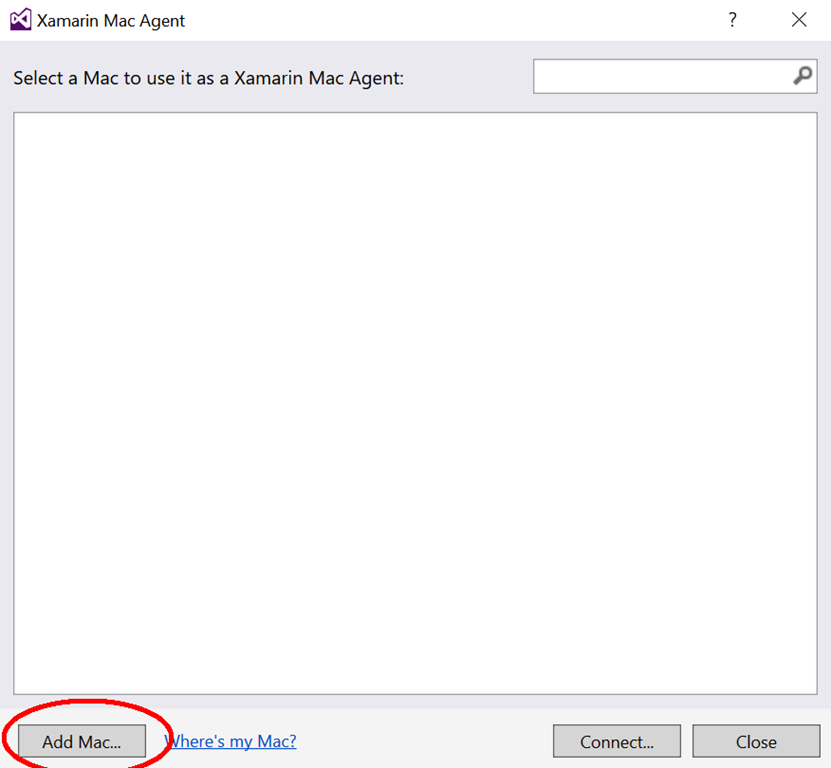
     螢幕快照 2016-03-14 下午2.40.55

     會出現對話框,詢問 IP Address 或電腦名稱。
     按前一步驟記下的 IP Address 填入
     接下來會詢問登入的帳號與密碼,注意大小寫區分
     (塗黑部分是電腦名稱及IP A Address)
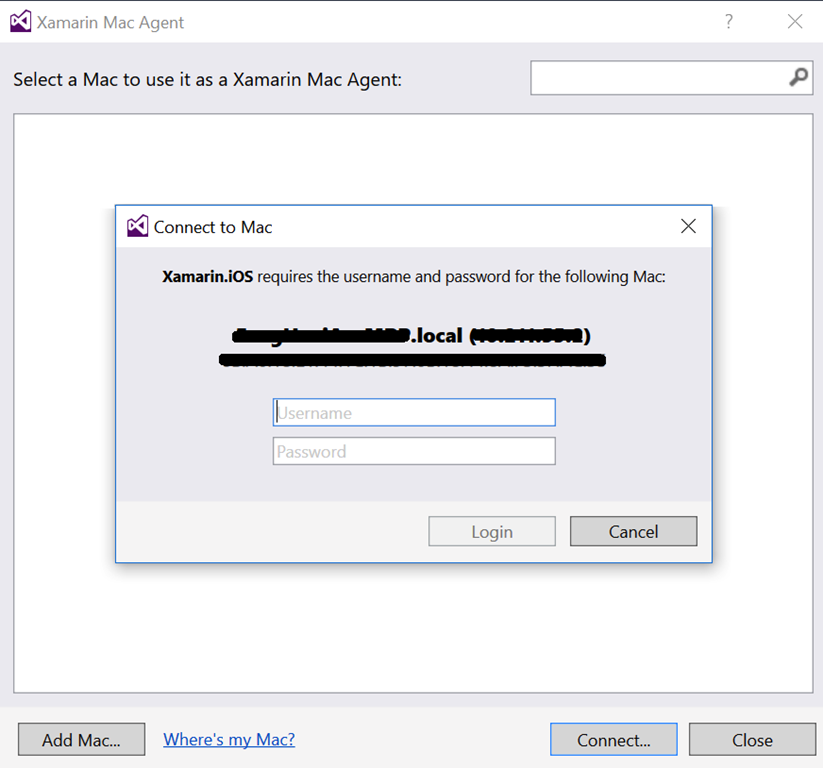
     螢幕快照 2016-03-14 下午2.40.42
    
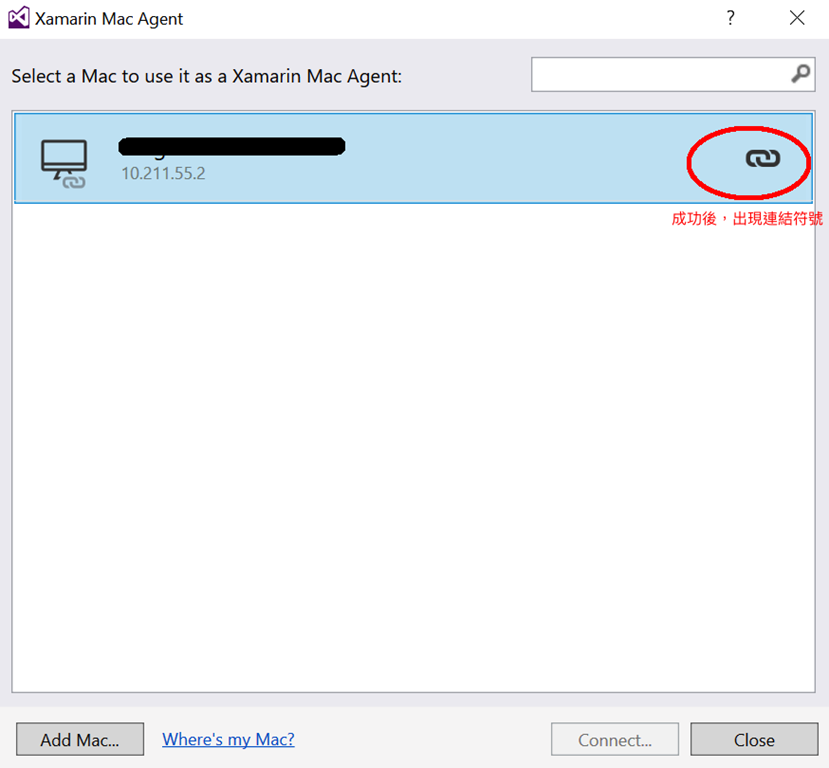
     成功後可見此畫面,即可關閉
    
     螢幕快照 2016-03-14 下午2.41.37

     關閉以上畫面後,可見已連結的資訊

     螢幕快照 2016-03-14 下午2.41.51

在 Visual Studio 的 Toolbar 也可以看到連結符號,滑鼠移動過去時,也有提示。
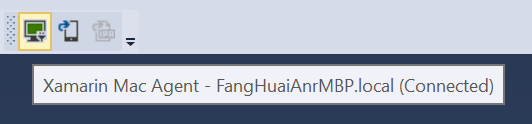
   螢幕快照 2016-03-14 下午2.42.23

通常遇到的問題 (1) 確認是在同一個網域
     雖然使用 ssh 連線的Xamarin Mac Agent並沒有這項限制,不過通常發生的疑難雜症都是導因於此。
(2) Mac 上的使用者權限開不夠,最好是使用 Admin 權限。

(3) Mac 上的使用者也需要 Xamarin License

以上是設定 Xamarin Mac Agent 的步驟