







1 不含参数
2 含参数
3 常見問題
3.1 報表增加字段rdlc咋辦?
3.2 老是提示:尚未提供資料來源 'titles' 的資料來源執行個體。咋解決?
3.3 提示參數:'pubId' 參數遺漏值
2011年12月7日星期三 上午11时8分
假定报表已经开发好,报表服务器上的报表为:publishers.rdl和TitlesByPublisher.rdl。
1 publishers.rdl的扩展名为rdlc,即publishers.rdlc。其它不做任何修改。
2 在已有的专案中,建立一个资料夹,存放报表,例如:Reports。
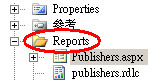
3 将publishers.rdlc添加到Reports文件夹。
4 新增一个页面用于承载报表(publishers.rdlc),例如:Publishers.aspx。
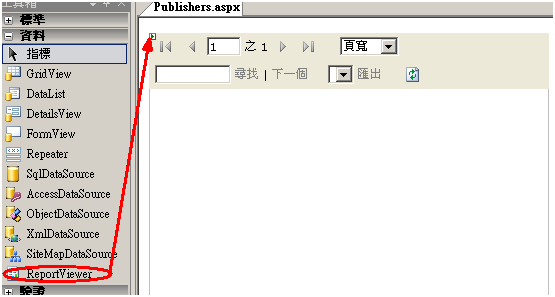
5 reportviewer控件拖到页面Publishers.aspx。
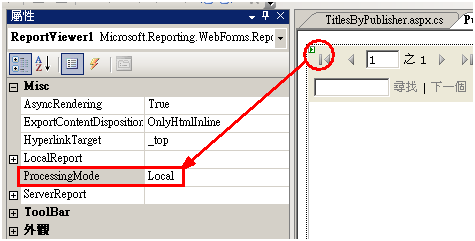
6 设置reportviewer控件的ProcessingMode为Local,表示在Client(ASP.NET)上Run。
7 写代码为报表赋数据源
(1)取得数据源
public DataSet GetPublishers()
{
try
{
using (SqlConnection conn = new SqlConnection(connectionString))
{
DataSet ds = new DataSet();
string cmdText = "select * from publishers ";
SqlCommand comm = new SqlCommand(cmdText, conn);
SqlDataAdapter sqlAdapter = new SqlDataAdapter(comm);
sqlAdapter.Fill(ds, "publishers");
return ds;
}
}
catch (Exception ex)
{
throw ex;
}
}
(2)设置报表参数——路径、数据源
private void BindReprotData()
{
DataSet ds = GetPublishers();
if (ds != null && ds.Tables.Count > 0 && ds.Tables[0].Rows.Count > 0)
{
this.ReportViewer1.LocalReport.ReportPath = "Reports\\publishers.rdlc";
this.ReportViewer1.LocalReport.DataSources.Clear();
this.ReportViewer1.LocalReport.DataSources.Add(new Microsoft.Reporting.WebForms.ReportDataSource("publishers", ds.Tables[0]));
this.ReportViewer1.DataBind();
}
}
8 显示报表
private string connectionString;
protected void Page_Load(object sender, EventArgs e)
{
connectionString = System.Configuration.ConfigurationManager.ConnectionStrings["pubs"].ConnectionString;
BindReprotData();
}
9 结果

注意:
※ReportPath:不可使用“~”。写在代码里,方便使用配置文件。
※ProcessingMode为Local
大体思路是:将参数写到SQL里,从DB中获取所需数据,报表参数删掉。
1 publishers.rdl的扩展名为rdlc,即publishers.rdlc。其它不做任何修改。
2 將publishers.rdlc添加到項目中。
3 刪除報表中的參數。
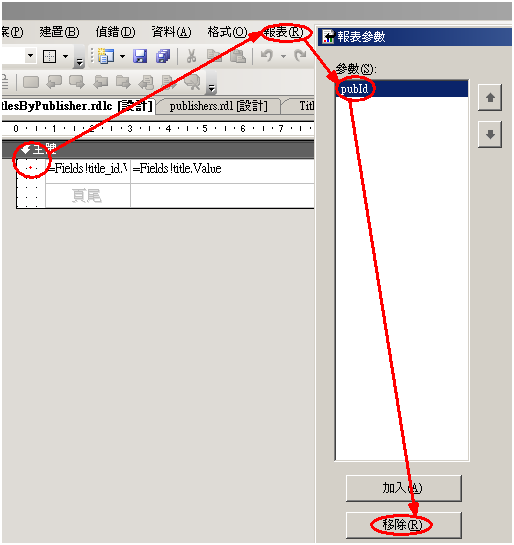
4 確定,以保存。
5 添加TitlesByPublisher.aspx
6 reportviewer控件拖到页面TitlesByPublisher.aspx
7设置reportviewer控件的ProcessingMode为Local
8 在页面TitlesByPublisher.aspx上,添加一個和文本框和按鈕。ID分別為txtpub_id、btnShow。
9 獲取報表數據
(1)
private string connectionString;
protected void Page_Load(object sender, EventArgs e)
{
connectionString = System.Configuration.ConfigurationManager.ConnectionStrings["pubs"].ConnectionString;
}
public DataSet GetTitlesByPublisher(int pubId)
{
try
{
using (SqlConnection conn = new SqlConnection(connectionString))
{
DataSet ds = new DataSet();
string cmdText = "select * from titles where pub_id=@pubId ";
SqlCommand comm = new SqlCommand(cmdText, conn);
comm.Parameters.AddWithValue("@pubId", pubId);
SqlDataAdapter sqlAdapter = new SqlDataAdapter(comm);
sqlAdapter.Fill(ds, "Titles");
return ds;
}
}
catch (Exception ex)
{
throw ex;
}
}
(2)設置報表屬性
private void BindReprotData()
{
int pub_id;
if (int.TryParse(this.txtpub_id.Text.Trim(), out pub_id))
{
DataSet ds = GetTitlesByPublisher(pub_id);
if (ds != null && ds.Tables.Count > 0 && ds.Tables[0].Rows.Count > 0)
{
this.ReportViewer1.LocalReport.ReportPath = @"Reports\TitlesByPublisher.rdlc";
this.ReportViewer1.LocalReport.DataSources.Clear();
this.ReportViewer1.LocalReport.DataSources.Add(new Microsoft.Reporting.WebForms.ReportDataSource("titles", ds.Tables[0]));
this.ReportViewer1.DataBind();
}
}
}
10 顯示報表
protected void btnShow_Click(object sender, EventArgs e)
{
BindReprotData();
}
注意
※設報表參數使用Microsoft.Reporting.WebForms.ReportParameter。實踐證明用此性能低。
1 用VS工具打開報表項目。
2 修改報表,添加字段。
3 修改擴展名,rdl->rdlc。
1 查看報表的數據源名字。

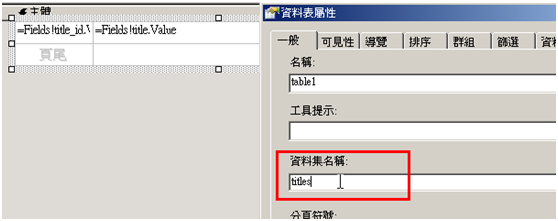
2 修改代碼中,數據源的名字。
this.ReportViewer1.LocalReport.DataSources.Add(new Microsoft.Reporting.WebForms.ReportDataSource("titles", ds.Tables[0]))
原因:報表參數沒賦值
1 定義報表參數集合
Dim params(1) As Microsoft.Reporting.WebForms.ReportParameter
2 設置每一個參數
Dim p0 As Microsoft.Reporting.WebForms.ReportParameter
'參數的名稱應和RDL報表中的參數名稱一致
p0 = New Microsoft.Reporting.WebForms.ReportParameter("pubId", pubId.Text)
params(0) = p0
3 參數集合添加到報表中
ReportViewer1.LocalReport.SetParameters(params)
此内容由惯性聚合(RSS阅读器)自动聚合整理,仅供阅读参考。 原文来自 — 版权归原作者所有。