








一、创建测试数据
--创建message表--
create table message
(
Msg_Id number primary key,
Msg_Title varchar2(100) not null,
Msg_Body varchar2(2000),
Msg_Createtime date default sysdate,
Msg_UserName varchar2(30)
);
--初始化message表数据--
create or replace procedure prd_InitMessage
is

begin

    for i in 1..15 loop
      insert into scott.message(msg_id,msg_title,msg_body,msg_username)
      values
        (i, 'Test独上高楼望断天涯路', 'Test衣带渐宽终不悔', 'king'||i);

    end loop;
    commit;
end ;
二、创建存储过程
/*
包声明
*/
create or replace package pkg_message
is
  --声明变量、过程
  type type_refcur is ref cursor;--游标变量,由于返回多条记录
  procedure GetAllMessage(
    result1 out type_refcur
  );
end;
/*
包主体
*/
create or replace package body pkg_message
is
  --要注意一点是 procedure 前面不能有create
  procedure GetAllMessage(
    result1 out type_refcur
  )
  is

  begin
    open result1 for
    select * from scott.message;
  end GetAllMessage;
end;
三、VB.NET 调用PROCEDURE
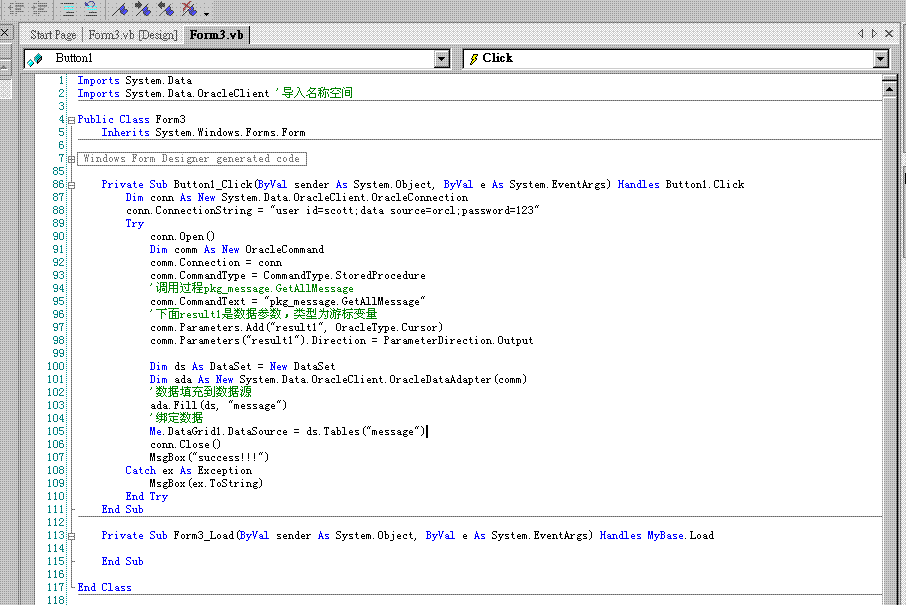
    Private Sub Button1_Click(ByVal sender As System.Object, ByVal e As System.EventArgs) Handles Button1.Click
        Dim conn As New System.Data.OracleClient.OracleConnection

        conn.ConnectionString = "user id=scott;data source=orcl;password=123"
        Try

            conn.Open()

            Dim comm As New OracleCommand
            comm.Connection = conn
            comm.CommandType = CommandType.StoredProcedure
            comm.CommandText = "pkg_message.GetAllMessage"

            Dim result1 As New OracleClient.OracleParameter
            result1.OracleType = OracleType.Cursor
            result1.Direction = ParameterDirection.Output
            comm.Parameters.Add(result1)

            'comm.Parameters.Add("result", OracleType.Cursor)
            'comm.Parameters("result").Direction = ParameterDirection.Output

            Dim ds As DataSet = New DataSet
            Dim ada As New System.Data.OracleClient.OracleDataAdapter(comm)
            ada.Fill(ds)


            'Me.DataGrid1.DataSource = ds.Tables("message")
            conn.Close()
            MsgBox("success!!!")
        Catch ex As Exception
            MsgBox(ex.ToString)
        End Try
    End Sub
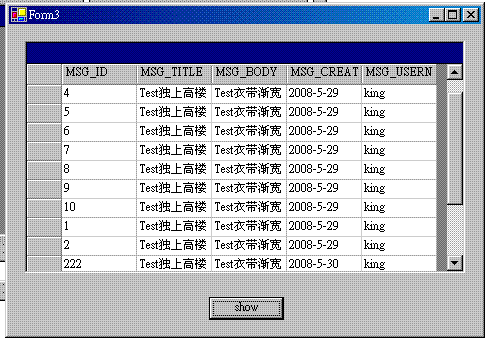
此内容由惯性聚合(RSS阅读器)自动聚合整理,仅供阅读参考。 原文来自 — 版权归原作者所有。