


惯性聚合 高效追踪和阅读你感兴趣的博客、新闻、科技资讯
阅读原文 在惯性聚合中打开

推荐订阅源

Exploit-DB.com RSS Feed
A
About on SuperTechFans
IT之家
IT之家
让小产品的独立变现更简单 - ezindie.com
Blog — PlanetScale
Blog — PlanetScale
aimingoo的专栏
aimingoo的专栏
云风的 BLOG
云风的 BLOG
The GitHub Blog
The GitHub Blog
Vercel News
Vercel News
G
Google Developers Blog
J
Java Code Geeks
宝玉的分享
宝玉的分享
T
Tailwind CSS Blog
Cloudbric
Cloudbric
L
LINUX DO - 最新话题
MyScale Blog
MyScale Blog
H
Heimdal Security Blog
PCI Perspectives
PCI Perspectives
Attack and Defense Labs
S
Security @ Cisco Blogs
Latest news
Latest news
I
Intezer
L
Lohrmann on Cybersecurity
C
CXSECURITY Database RSS Feed - CXSecurity.com
月光博客
月光博客
T
Threatpost
博客园 - 【当耐特】
S
Schneier on Security
P
Privacy International News Feed
G
GRAHAM CLULEY
T
Tenable Blog
AWS News Blog
AWS News Blog
Threat Intelligence Blog | Flashpoint
雷峰网
雷峰网
博客园 - Franky
Engineering at Meta
Engineering at Meta
美团技术团队
S
Secure Thoughts
T
Troy Hunt's Blog
Microsoft Security Blog
SecWiki News
SecWiki News
V
Visual Studio Blog
人人都是产品经理
人人都是产品经理
Application and Cybersecurity Blog
Cisco Talos Blog
Cisco Talos Blog
奇客Solidot–传递最新科技情报
奇客Solidot–传递最新科技情报
Martin Fowler
Martin Fowler
Webroot Blog
Webroot Blog
Google DeepMind News
H
Hackread – Cybersecurity News, Data Breaches, AI and More

博客园 - Sunmoonfire

SharePoint 2013无代码实现列表视图的时间段动态筛选 SharePoint 2013:自定义ECB菜单项的添加 SharePoint Foundation 2013 with SP1 在SharePoint列表中使用自增栏 修改SharePoint列表项显示“新”图标的天数 通过PowerShell实现SharePoint列表增删改 在SharePoint 2010页面中嵌入SWF文件 在LINQ to SharePoint中使用创建时间,创建者,修改时间,修改者 SharePoint 2010之LINQ与SPMetal 修改SharePoint页面上的控件数量的限制 SharePoint 2010:部署.resx(资源)文件到App_GlobalResources的简单方法 在SharePoint 2010中使用jQuery 在SharePoint 2010环境下区分w3wp进程 打SharePoint 2010 SP1后访问用户配置文件同步服务应用程序出错的解决办法 使用[本人]创建视图筛选时的一个问题和解答 "缺少服务器端相关性"的内容定位 SharePoint 2010开发工具图解系列:Visual Studio 2010创建事件接收器 SharePoint 2010开发工具图解系列:Visual Studio 2010创建列表 SharePoint 2010开发工具图解系列:Visual Studio 2010 SharePoint Tool入门
SharePoint 2010自定义母版页小技巧——JavaScript和CSS引用
Sunmoonfire · 2013-11-26 · via 博客园 - Sunmoonfire

通常在我们的项目中,都会涉及到母版页的定制。并且必不可少的,需要配合以一套自己的JavaScript框架和CSS样式。
你有没有遇到过这样的情况呢,在开发环境和UAT时都还算顺利,但是当最终部署到生产服务器场时,运行完PS 脚本后,发现网页的其他部分似乎都没事,唯独样式和Ajax不正常,。

当我们调出我们最好的朋友(IE的F12开发人员工具,或者Firebug和Chrome浏览器开发控制台),就会发现问题是由于我们在生产环境中改变了网站集的URL结构导致绝对路径不能正常工作。

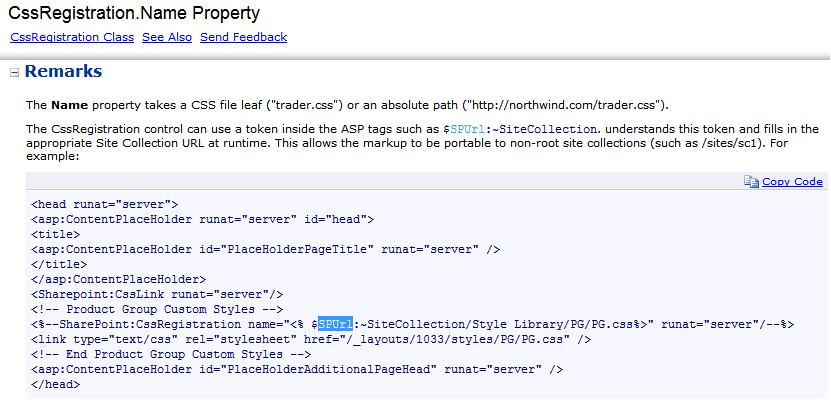
那么问题就来了,我们如何能写出一个最佳的URL引用,来替代硬编码或绝对地址。从SDK里一通寻找后,终于找到如下的解决方案:
JavaScript文件的引用

<asp:ScriptManager id="ScriptManager" runat="server" EnablePageMethods="false" 
EnablePartialRendering="true" EnableScriptGlobalization="false" 
    EnableScriptLocalization="true">
    <Scripts>
            <asp:ScriptReference 
Path="<%$SPUrl:~SiteCollection/Style Library/ProjectPortal/js/jquery-1.5.2.js%>">
</asp:ScriptReference>
            <asp:ScriptReference 
Path="<%$SPUrl:~SiteCollection/Style 
    Library/ProjectPortal/js/ProjectPortalLoadAfterJquery.js%>">
</asp:ScriptReference>                
    </Scripts>
</asp:ScriptManager>

CSS样式文件的引用

<SharePoint:CssRegistration ID="CssRegistration1"
name="<% $SPUrl:~sitecollection/Style Library/ProjectPortal/ppb-styles.css  %>" 
After="corev4.css" runat="server"/>

如上所示,实现这一魔法的关键在于$SPUrl:~sitecollection这个Token,它会随着网站集URL而变。所以保证了整个文件引用路径的正确。

很有用的一个小技巧吧。

参考资料

SharePoint 2010 Custom Master Page Tips and Tricks -> JavaScript and StyleSheet Reference