


惯性聚合 高效追踪和阅读你感兴趣的博客、新闻、科技资讯
阅读原文 在惯性聚合中打开

推荐订阅源

U
Unit 42
罗磊的独立博客
T
Tailwind CSS Blog
奇客Solidot–传递最新科技情报
奇客Solidot–传递最新科技情报
Jina AI
Jina AI
V
V2EX
美团技术团队
阮一峰的网络日志
阮一峰的网络日志
酷 壳 – CoolShell
酷 壳 – CoolShell
月光博客
月光博客
量子位
MyScale Blog
MyScale Blog
G
Google Developers Blog
M
MIT News - Artificial intelligence
L
LangChain Blog
Microsoft Azure Blog
Recent Announcements
MongoDB | Blog
MongoDB | Blog
N
Netflix TechBlog - Medium
有赞技术团队
有赞技术团队
让小产品的独立变现更简单 - ezindie.com
D
DataBreaches.Net
云风的 BLOG
云风的 BLOG
B
Blog

博客园 - Vincent Yang

Cannot load macro project error SQL Express - "Failed generate a user instance..." SQL Express 2008 x64 Integration with Visual Studio 2008 SP1 PowerShell Operators Crystal Reports .NET Error - "Access to report file denied. Another program may be using it." - Vincent Yang (转:)SharePoint Database Naming Standards List Types & List Internal ID available within MOSS 2007 64bit SQL Server issues : Connections to SQL Server files (*.mdf) require SQL Server Express 2005 to function properly 正式入住Windows 7 + XPM A Generic Singleton Form Provider for C# Extreme Programming: Do these 12 practices make perfect? Pick up the pace with extreme programming Testing an ASP.NET Web Service using PowerShell Parsing XML Files with PowerShell Testing SQL Stored Procedures using PowerShell Working with Collections of Objects using PowerShell Generating iCalender file using ASP.NET SQL Server Precision And Scale Problems (SQL Server 精度问题) Six Quick Crystal Reports Design Tips
Telerik: IIS7 & IIS 7.5 and ‘Telerik.Web.UI.Web...
Vincent Yang · 2009-10-16 · via 博客园 - Vincent Yang

Few days ago, I upgraded my work machine from windows XP to windows 7, one of my projects which use global theme and telerik control stopped working on my local machine. Here is the solution I've found so far to fix this error.

First solution:

Change the project's application pool under IIS 7 or IIS 7.5 to "classic mode". It will simply solve all the problems. What I think is because IIS7 & IIS 7.5 total change the pipeline.

Second solution:

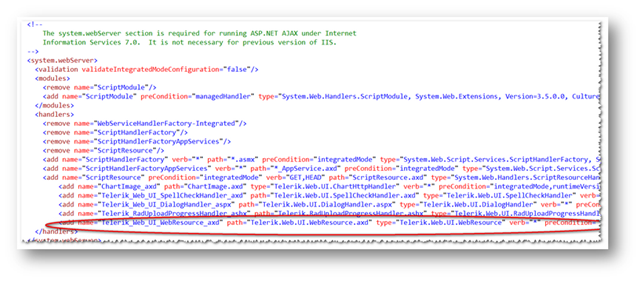
Add this line '<add name="Telerik_Web_UI_WebResource_axd" path="Telerik.Web.UI.WebResource.axd" type="Telerik.Web.UI.WebResource" verb="*" preCondition="integratedMode,runtimeVersionv2.0"/>' under <system.webServer> section.
image