




惯性聚合 高效追踪和阅读你感兴趣的博客、新闻、科技资讯
阅读原文 在惯性聚合中打开

推荐订阅源

K
Kaspersky official blog
Martin Fowler
Martin Fowler
CTFtime.org: upcoming CTF events
V
Visual Studio Blog
博客园_首页
Engineering at Meta
Engineering at Meta
The Cloudflare Blog
MongoDB | Blog
MongoDB | Blog
Blog — PlanetScale
Blog — PlanetScale
T
The Blog of Author Tim Ferriss
雷峰网
雷峰网
D
Docker
博客园 - 司徒正美
S
SegmentFault 最新的问题
M
MIT News - Artificial intelligence
博客园 - 叶小钗
博客园 - 三生石上(FineUI控件)
U
Unit 42
J
Java Code Geeks
A
About on SuperTechFans
N
Netflix TechBlog - Medium
freeCodeCamp Programming Tutorials: Python, JavaScript, Git & More
S
Security Affairs
I
Intezer
Cisco Talos Blog
Cisco Talos Blog
C
Cyber Attacks, Cyber Crime and Cyber Security
Threat Intelligence Blog | Flashpoint
B
Blog RSS Feed
P
Privacy & Cybersecurity Law Blog
T
Tenable Blog
T
Threatpost
H
Hacker News: Front Page
G
Google Developers Blog
博客园 - 【当耐特】
Hugging Face - Blog
Hugging Face - Blog
Apple Machine Learning Research
L
Lohrmann on Cybersecurity
大猫的无限游戏
大猫的无限游戏
Google DeepMind News
A
Arctic Wolf
S
Secure Thoughts
GbyAI
GbyAI
NISL@THU
NISL@THU
S
Security @ Cisco Blogs
Exploit-DB.com RSS Feed
Webroot Blog
Webroot Blog
C
CXSECURITY Database RSS Feed - CXSecurity.com
O
OpenAI News
Spread Privacy
Spread Privacy
Application and Cybersecurity Blog

博客园 - 一叶浮萍

Visual Studio 2022 Net6.0 无法发现testcase, 也无法执行test case Microsoft.AspNetCore.Http.Abstractions 2.20 is deprecated 使用office365 world2016发布编辑备份你的博客 使用office365 world2016发布编辑备份你的博客 You are not late! You are not early! 在同一个服务器(同一个IP)为不同域名绑定的免费SSL证书 Vue.js Is Good, but Is It Better Than Angular or React? It was not possible to find any compatible framework version VS增加插件 Supercharger破解教程 Git使用ssh key Disconnected: No supported authentication methods available (server sent: publickey) VS 2013打开.edmx文件时报类型转换异常 64位系统里注册32位软件 System.Data.Dbtype转换为System.Data.SqlDbType Bonobo Git Server (Simple git server for Windows.) 测试备忘 TortoiseGit bonobo gitserver记住帐号密码 TortoiseGit bonobo gitserver记住帐号密码 TITLE: BizTalk Server 2013 Administration Console 应用程序-特定 权限设置并未向在应用程序容器 不可用 SID (不可用)中运行的地址 LocalHost (使用 LRPC) 中的用户
Echarts ecomfe 触摸屏 touch 在IE10下无法显示悬浮框
一叶浮萍 · 2015-07-17 · via 博客园 - 一叶浮萍

问题描述:

Windows 8 IE10浏览http://echarts.baidu.com/doc/example/line2.html 时,鼠标放置在数据点上时无法显示悬浮框。

正常情况为:
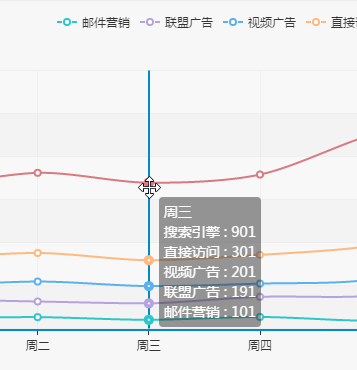
而现在情况为:

问题分析:

公司有各种型号电脑,X230,W530,X240,业务部门多使用x240, 这一款笔记本屏幕带有触摸屏功能,其他型号没有。所有操作系统都为win8,IE10小版本号也一致。

最初就将问题定位为触摸屏引起了这个问题,但一直无法找到具体原因。因为在chrome,firfox等浏览器没有问题,只有在IE上有问题,所以给微软开了单子来查找原因。

微软的同学经过1周多的排查,分析echarts代码,终于发现不出现悬浮框是因为mousemove的事件没有添加上。至此原因已定位。

if (window.addEventListener) {

//ie10chrome都会走到此处

window.addEventListener('resize', this._resizeHandler);

if (env.os.tablet || env.os.phone) {

//IE 10 触摸屏下env.os.tablet true,只走下列代码

root.addEventListener('touchstart', this._touchstartHandler);

root.addEventListener('touchmove', this._touchmoveHandler);

root.addEventListener('touchend', this._touchendHandler);

} else {

// chrome则走此处代码

root.addEventListener('click', this._clickHandler);

root.addEventListener('dblclick', this._dblclickHandler);

root.addEventListener('mousewheel', this._mousewheelHandler);

root.addEventListener('mousemove', this._mousemoveHandler);

root.addEventListener('mousedown', this._mousedownHandler);

root.addEventListener('mouseup', this._mouseupHandler);

}

root.addEventListener('DOMMouseScroll', this._mousewheelHandler);

root.addEventListener('mouseout', this._mouseoutHandler);

} else {

window.attachEvent('onresize', this._resizeHandler);

root.attachEvent('onclick', this._clickHandler);

root.ondblclick = this._dblclickHandler;

root.attachEvent('onmousewheel', this._mousewheelHandler);

root.attachEvent('onmousemove', this._mousemoveHandler);

root.attachEvent('onmouseout', this._mouseoutHandler);

root.attachEvent('onmousedown', this._mousedownHandler);

root.attachEvent('onmouseup', this._mouseupHandler);

}

evn.os.tablet和evn.os.phone的取值代码如下:

os.tablet = !!(ipad || playbook || android && !ua.match(/Mobile/) || firefox && ua.match(/Tablet/) || ie && !ua.match(/Phone/) && ua.match(/Touch/));

os.phone = !!(!os.tablet && !os.ipod && (android || iphone || webos || blackberry || bb10 || chrome && ua.match(/Android/) || chrome && ua.match(/CriOS\/([\d.]+)/) || firefox && ua.match(/Mobile/) || ie && ua.match(/Touch/)));

其中如果是IE情况tablet是判断useragent中是否存在Touch,因存在所以tablet为true。

根据文档http://blogs.msdn.com/b/ie/archive/2012/07/12/ie10-user-agent-string-update.aspx IE10在触摸环境下的UserAgent串如下:

Mozilla/5.0 (compatible; MSIE 10.0; Windows NT 6.2; Trident/6.0; Touch)

微软给出了如下建议,但其实没有人想判断Agent,因为在IE10navigator.maxTouchPoints一直取不到值,微软的同学你知道吗?

尽量避免做browser detection,而应该做feature detection,参考:https://msdn.microsoft.com/en-us/hh561717.aspx

解决办法有两个,我们采取了第一点:

  1. 修改echarts.js文件,修改evn.os.tablet和evn.os.phone的取值代码,不在判断是否是touch。一直默认为false。
  2. 修改echarts.js文件,去掉此判断if (env.os.tablet || env.os.phone)无论任何情况都添加两种事件。当然如果此中办法,需要在detachEvent也要去掉。