


惯性聚合 高效追踪和阅读你感兴趣的博客、新闻、科技资讯
阅读原文 在惯性聚合中打开

推荐订阅源

S
Schneier on Security
cs.AI updates on arXiv.org
T
Threat Research - Cisco Blogs
C
Cyber Attacks, Cyber Crime and Cyber Security
C
CXSECURITY Database RSS Feed - CXSecurity.com
A
Arctic Wolf
Security Latest
Security Latest
Simon Willison's Weblog
I
Intezer
cs.CV updates on arXiv.org
T
Troy Hunt's Blog
Latest news
Latest news
Help Net Security
Help Net Security
S
Security Affairs
Webroot Blog
Webroot Blog
The Hacker News
The Hacker News
AI
AI
cs.CL updates on arXiv.org
T
Tor Project blog
Forbes - Security
Forbes - Security
Google DeepMind News
AWS News Blog
AWS News Blog
Attack and Defense Labs
P
Proofpoint News Feed
www.infosecurity-magazine.com
H
Help Net Security
L
Lohrmann on Cybersecurity
S
SegmentFault 最新的问题
Google Online Security Blog
MongoDB | Blog
MongoDB | Blog
Cyberwarzone
Cyberwarzone
The Last Watchdog
The Last Watchdog
S
Securelist
N
News and Events Feed by Topic
S
Secure Thoughts
F
Fortinet All Blogs
博客园_首页
C
Cybersecurity and Infrastructure Security Agency CISA
量子位
M
MIT News - Artificial intelligence
F
Full Disclosure
T
The Blog of Author Tim Ferriss
T
Tailwind CSS Blog
Recent Commits to openclaw:main
Microsoft Security Blog
I
InfoQ
P
Privacy International News Feed
L
LangChain Blog
Know Your Adversary
Know Your Adversary
C
CERT Recently Published Vulnerability Notes

博客园 - 真 OO无双

(轉貼) Bit Twiddling Hacks (SOC) (Verilog) (C) (筆記) 如何移除VirtualBox所遺留下的驅動程式? (SOC) (VirtualBox) (筆記) always block內省略else所代表的電路 (SOC) (Verilog) (原創) 如何在Qsys Subsystem使用Interrupt? (SOC) (Nios II) (Qsys) (原創) Qsys或RTL做修改後,Nios II SBT該如何面對新的硬體? (SOC) (Nios II) (Qsys) (原創) 如何解決目錄改變時,Nios II project無法編譯的問題? (SOC) (Nios II) (DE2-70) (筆記) 如何寫入binary file某個byte連續n byte的值? (C/C++) (C) (筆記) 如何寫入binary file某個byte的值? (C/C++) (C) (筆記) 如何讀取binary file某個byte連續n byte的值? (C/C++) (C) (筆記) 如何讀取binary file某個byte的值? (C/C++) (C) (原創) Altera Technology Roadshow 2011 Taipei (SOC) (Quartus II) (Nios II) (Qsys) (原創) 如何在安裝SELinux的環境執行Quartus II? (SOC) (Quartus II) (Linux) (RedHat) (筆記) 如何得知Quartus II最新版到底修改了哪些東西? (SOC) (Quartus II) (Nios II) (SOPC Builder) (Qsys) (筆記) Qsys resource整理 (SOC) (Nios II) (Qsys) (原創) 如何安裝Linux版本的Quartus II? (SOC) (Quartus II) (Linux) (RedHat) (VirtualBox) (筆記) 如何在RedHat Linux安裝VirtualBox Guest Additions? (SOC) (Linux) (RedHat) (VirtualBox) (筆記) 常用設定暫存器值的編程技巧 (SOC) (C/C++) (C) (Verilog) (原創) Quartus II安裝新觀念:如何將Quartus II安裝在VirtualBox內? (SOC) (Quartus II) (VirtualBox) (筆記) $dispaly()、$strobe()、$monitor() 、$fwrite()與blocking / nonblocking的關係 (SOC) (Verilog) (Debussy) (Verdi)
(原創) Qsys Generation Tab的Simulation設定的意義 (SOC) (Nios II) (Qsys)
真 OO无双 · 2011-12-20 · via 博客园 - 真 OO无双

Abstract
若要對含有Nios II的SOPC系統進行simulation,在Qsys的Generation Tab有新的設定,本文討論其設定的意義。

Introduction
使用環境:Windows XP SP3 + VirtualBox 4.1.2 + Quartus II 11.0

在Qsys的Generation tab的Simulation部分,有以下的設定:
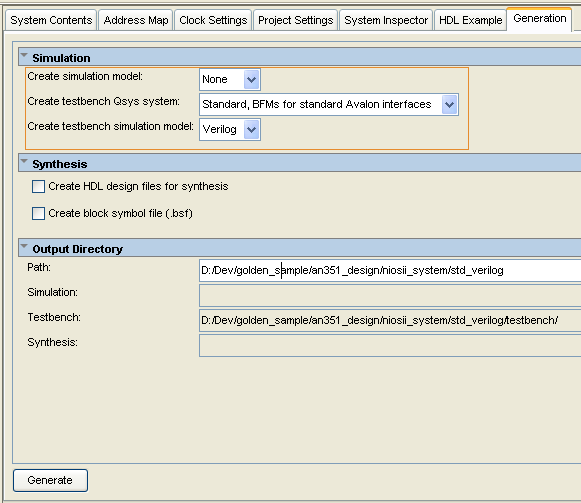
nios2_sim00 

根據[1] Quartus II Handbook 11.0 Volumn 1:Section II Chapter 5P.5-12,對各選項的設定解釋如下:

我個人是對以上的解釋有看沒有懂,以下是我實驗後的總結:

Create simulation model:Qsys會產生simulation model與testbench,但不會產生命名為xxx_tb.sys的testbench Qsys system,這種就類似FPGA不使用SOPC時,在top module自己將所有module手動接起來一樣。

Create testbench Qsys system:Qsys會幫你產生命名為xxx_tb.sys的testbench Qsys system,而這個testbench Qsys system就相當於simulation的top module。值得注意的是:這個選項只會幫你建立1個testbench Qsys system,並不會建立testbench與simulation model。

    Standard, BFMs for standard Avalon interfaces:所建立的testbench Qsys system會掛上所有的simulation model,包含各種記憶體與其他周邊,這是最完整的。

    Simple, BFMs for clocks and resets:根據Altera的官方解釋,看起來所建立的testbench Qsys system只會掛上clocks與reset simulation model,事實上還會掛上所有記憶體的simulation model,其實這是合理的,因為Nios II要跑C code,一定要有記憶體才能跑,而且在Nios II SBT的Run As ModelSim時,會根據Linker Script的定義,產生要載入各種記憶體的*.hex或*.dat然後載入到各記憶體的simulation model。值得注意的是:這個選項不會掛上記憶體以外周邊的simulation model,所以Qsys在Generate時會快一些。

Create testbench simulation model:此選項會根據之前所產生的testbench Qsys system去產生testbench與simulation model。

Conclusion
實務上該如何設定這些選項呢?根據[2] Simulating Nios II Embedded Processor Designs,建議使用以下設定:

Create simulation model:None

Create testbench Qsys system:Standard, BFMs for standard Avalon interfaces

Create testbench simulation model:Verilog

理由是既然選擇使用testbench Qsys system,就不用再選擇使用『Create simulation model』,而且Standard, BFMs for standard Avalon interfaces可以產生最完整的testbench與simulation model,包含系統所有的記憶體與周邊。

Reference
[1] Quartus II Handbook 11.0 Volumn 1:Section II Chapter 5的P.5-12
[2] Simulating Nios II Embedded Processor Designs

全文完。