









大部分系统都有权限系统。一般来说,它能管控人员对某个否页面的访问;对某些字段、控件可见或者不可见。对gridview中的数据是否可删除、可添加、可新增等等。大部分人都把权限作为一个子系统独立出来。但是这里我不是想设计一个权限管理系统,网上的设计方案太多了,可以说每个开发人员都有自己的开发权限管理系统的想法和思路。
在这篇文章中,我先用简单的C#代码模仿一个用户的权限,再使用sql去模拟。这是一种很简单,很直观,很高效的方式去判定用户的权限。
C#:
好吧,先从最简单开始,定义一个用户(User)类,如下。
1 class User
2 {
3 bool CanDelete;
4 bool CanRead;
5 bool CanWrite;
6 bool CanModify;
7 bool CanCreate;
8 }
这里设计5个属性来管控用户的权限。我发现这样虽然很直观,但是不宜扩张。我们将权限独立出来,在看下面代码:
1 enum PermissionTypes : int
2 {
3 None = 0,
4 Read = 1,
5 Write = 2,
6 Modify = 4,
7 Delete = 8,
8 Create = 16,
9 All = Read | Write | Modify | Delete | Create
10 }
11 class User
12 {
13 public PermissionTypes Permissions = PermissionTypes.None;
14 }
我们先试用一下,你就能感觉到神奇之处:
1 //创建一个用户
2 User admin = new User();
3 admin.Permissions = PermissionTypes.Read
4 | PermissionTypes.Write
5 | PermissionTypes.Delete;
6
7 //验证权限
8 bool canRead = ((PermissionTypes.Read & admin.Permissions) == PermissionTypes.Read);
9 bool canWrite = ((PermissionTypes.Write & admin.Permissions) == PermissionTypes.Write);
10 bool canCreate = ((PermissionTypes.Create & admin.Permissions) == PermissionTypes.Create);
11
12 //查看结果
13 Console.WriteLine(canRead); //true
14 Console.WriteLine(canWrite); //true
15 Console.WriteLine(canCreate); //false
16
利用了'|'和'&'两个操作。但是这样看起来很是很别捏,初始化权限和验证权限用了一长串'|'和'&'运算的代码。很不直观。我在System.Enum中扩展一些方法供你调用,代码如下。
1 //是否存在权限
2 public static bool Has<T>(this System.Enum type, T value)
3 {
4 try
5 {
6 return (((int)(object)type & (int)(object)value) == (int)(object)value);
7 }
8 catch
9 {
10 return false;
11 }
12 }
13 //判断权限
14 public static bool Is<T>(this System.Enum type, T value)
15 {
16 try
17 {
18 return (int)(object)type == (int)(object)value;
19 }
20 catch
21 {
22 return false;
23 }
24 }
25 //添加权限
26 public static T Add<T>(this System.Enum type, T value)
27 {
28 try
29 {
30 return (T)(object)(((int)(object)type | (int)(object)value));
31 }
32 catch (Exception ex)
33 {
34 throw new ArgumentException(
35 string.Format(
36 "不能添加类型 '{0}'",
37 typeof(T).Name
38 ), ex);
39 }
40 }
41
42 //移除权限
43 public static T Remove<T>(this System.Enum type, T value)
44 {
45 try
46 {
47 return (T)(object)(((int)(object)type & ~(int)(object)value));
48 }
49 catch (Exception ex)
50 {
51 throw new ArgumentException(
52 string.Format(
53 "不能移除类型 '{0}'",
54 typeof(T).Name
55 ), ex);
56 }
57 }
使用一下:
1 //创建一个用户
2 User admin = new User();
3 PermissionTypes permissions = new PermissionTypes();
4 admin.Permissions = permissions;
5 //添加权限
6 admin.Permissions = admin.Permissions.Add(PermissionTypes.Create);
7 admin.Permissions = admin.Permissions.Add(PermissionTypes.Read);
8 admin.Permissions = admin.Permissions.Add(PermissionTypes.Write);
9 //判断权限
10 bool canRead = admin.Permissions.Has(PermissionTypes.Read); //true
11 bool canWrite = admin.Permissions.Has(PermissionTypes.Write); //true
12 bool canDelete = admin.Permissions.Has(PermissionTypes.Delete); //false
13 bool canCreate = admin.Permissions.Has(PermissionTypes.Create); //true
14
15 Console.WriteLine(canRead); //true
16 Console.WriteLine(canWrite); //true
17 Console.WriteLine(canDelete); //false
18 Console.WriteLine(canCreate); //true
19 Console.Read();
SQL:
大部分权限管理都是数据库的操作,好依照上面的思路,我在sqlserver里面模拟一下以上的操作,在sql中与或运算是很高效的。先设计两张表User和Permission。
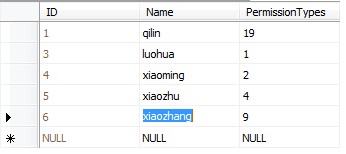

1、获取有Read权限的所有用户:
1 select * from [User] where PermissionTypes&1 =1
Result:

2、获取有Delete权限的所有用户:
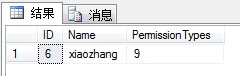
1 select * from [User] where PermissionTypes&8 =8
Result:
3、判断麒麟是否有有Delete权限
1 if exists (select * from [User] where Name='qilin' and PermissionTypes&8 =8)
2 print 'true'
3 else
4 print 'flase'
Result: flase
此内容由惯性聚合(RSS阅读器)自动聚合整理,仅供阅读参考。 原文来自 — 版权归原作者所有。