


- The DuckDuckGo browser’s built-in Scam Blocker guards against phishing sites, malware, and other common online scams. It’s on by default, so you’re protected as soon as you open the browser.
- NEW: Scam Blocker now also covers sham e-commerce sites, fake cryptocurrency exchanges, “scareware” that falsely claims your device has a virus, and other sites known to advertise fake products or services.
- Most browsers use Google tools for their phishing and malware protections, sending browsing data to Google in real time. We don’t. We designed Scam Blocker ourselves, with data from Netcraft, an independent cybersecurity company. Our scam protections don’t require an account, and we don’t share your browsing data with third parties.
- Scam Blocker is available for free within the DuckDuckGo browser on desktop and mobile. DuckDuckGo subscribers get full-device coverage when logged into the DuckDuckGo VPN – even when using other browsers.
Scam Blocker: Multiple protections for multiple threats
It’s not your imagination – online scams are getting more sophisticated. According to new reporting from the United States’ Federal Trade Commission, consumers lost $12.5 billion to fraud in 2024 alone. Scams related to investments, online shopping, and internet services were among the worst offenders.
Around here, we believe the best way to protect your personal information from hackers, scammers, and privacy-invasive companies is to stop it from being collected at all. Our browser and built-in search engine never track your searches, and our browsing protections help stop other companies from collecting your data, too. One of those protections is our Scam Blocker, designed and built by us for your security and your privacy. Scam Blocker guards against phishing sites, malware, and other common online scams without tracking your browsing data or sharing it with any third parties. It’s built into the DuckDuckGo browser and free to use, with no signup required.

Fake cryptocurrency offers, urgent messages about "viruses," and high-paying surveys – like the hypothetical examples above – are some of the common scam sites covered by DuckDuckGo’s Scam Blocker.
Scammers and cybercriminals have constantly evolving tactics, so it’s important to stay protected on multiple fronts. Thanks to Scam Blocker, the DuckDuckGo browser can help you spot and avoid some of the most common types:
- NEW PROTECTION: Scam investment sites, storefronts, surveys and more. Designed to trick you into giving away personal information or making bad financial transactions under false pretenses. These scam sites can include investment offers, cryptocurrency trading schemes, discounted pharmaceutical products, affiliate surveys with cash rewards, and more; the sites can look legitimate, but the offers are often “too good to be true.”
- NEW PROTECTION: Scareware. These alarming sites claim that your computer or phone is infected with spyware or viruses. Scareware creates a false sense of urgency to trick people into engaging with fake “tech support” and buying unwanted – or completely fake – antivirus software.
- Phishing sites. Phishing generally uses impersonation to get your login credentials or sensitive personal information. Cybercriminals’ phishing techniques include creating sham websites that look like a familiar legitimate business and using link redirects to get unsuspecting users there.
- Malware sites. If you download a harmless-looking file from one of these sites, malware can infect your phone or computer, causing damage or extracting personal information for later use. Some malware sites start an automatic download before you even click or enter anything.
- Tracker-powered malicious ads. “Malvertising” typically involves injecting malware-laden advertisements into legitimate websites and online ad networks. Some malicious ads can compromise your system even if you don’t click on them.
The scam tactics vary, but the end goals are usually the same: to commit financial fraud using your personal information or to trick you into paying for products or services that don’t exist. If you accidentally click a link that would take you to one of these scammy sites, DuckDuckGo’s built-in Scam Blocker will stop the page from loading and show you a warning message that allows you to navigate safely away. The DuckDuckGo browser also reduces your malicious ad risk while you browse, blocking tracker-powered ads while before they load.
Other browsers like Chrome, Firefox, and Safari rely on Google’s Safe Browsing Service to provide warnings about phishing sites, which involves sending information to Google. We don’t. We built our own anonymous solution that doesn’t send data to any third parties. No sign in, no tracking, and it’s on by default, so you're protected from the moment you open the browser. DuckDuckGo subscribers can connect to the DuckDuckGo VPN to get these protections for your whole device – including in other browsers!
How Scam Blocker works
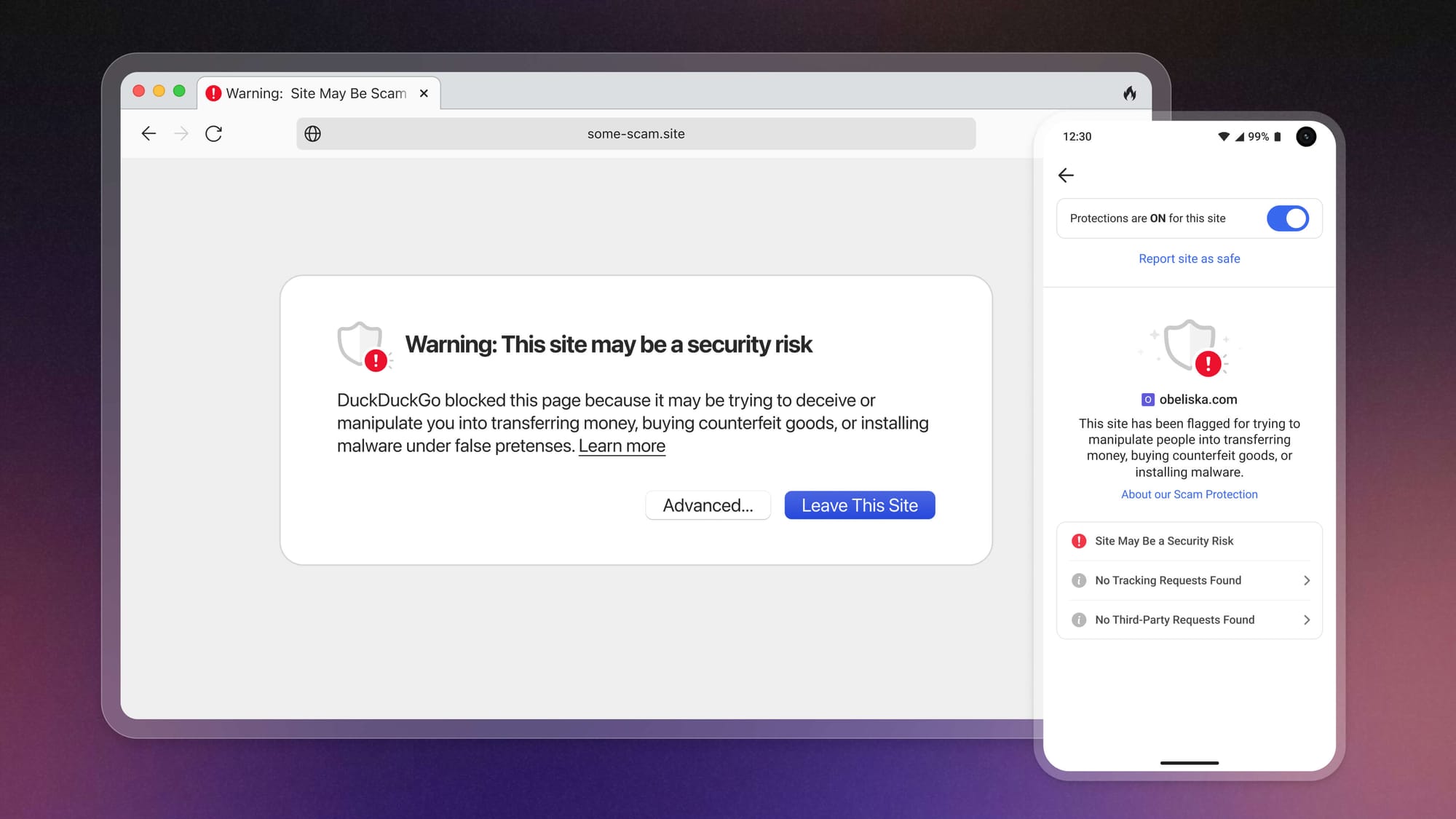
When you land on a potentially dangerous website, Scam Blocker will display a warning message before loading the site.
New scam sites pop up all the time, but the DuckDuckGo browser stays on top of it. We get a feed of malicious site URLs from Netcraft, an independent cybersecurity company that’s always scanning for new threats. We store that constantly refreshing list on our servers and pass any updates to your browser every 20 minutes.
The way Scam Blocker works is always anonymous. Once your browser downloads the latest dangerous site list from DuckDuckGo, it’s available locally on your device. When you navigate to a site, your browser first checks the site against the list stored on your device. If the site is on the list, your browser shows a warning message that gives you the option to navigate away safely or to continue to the site at your own risk.
Most of the potentially dangerous URLs flagged by Scam Blocker can be found on common sites like Google Drive or GitHub. Uncommon threats – which we encounter less than 0.1% of the time! – require an extra verification step that checks websites against a larger and more comprehensive database on DuckDuckGo servers. But this process is also anonymous; at no time during the threat verification process does your device communicate with any third parties. For a deeper dive on the cryptography we use to maintain anonymity when handling uncommon threats, visit this Help Page.
All this means that your searches and browsing history are still completely anonymous.
Note: This blog post has been edited since initial publication to stay up to date with our evolving product offerings.