









原发问问题:
asp.net 删不了目录Dim file() As FileInfo = My.Computer.FileSystem.GetDirectoryInfo("Server.MapPath("." & "/temp/"").GetFiles()For i As Integer = 0 To file.Length - 1
My.Computer.FileSystem.DeleteFile(file(i).FullName)
Next
解答:
亲爱的读者您好,很感谢您对于章立民研究室的支持,有关于您提到的问题,回复如下:由您的程序代码来推断,您可能是想要删除 ASP.NET 应用程序目录下之 temp 子目录内含的所有文件(不包含 temp 子目录本身)。此时,可以使用 My.Computer.FileSystem.GetFiles 方法,来取得该目录中文件的字符串集合。接着藉由 For … Each 循环并搭配使用 My.Computer.FileSystem.DeleteFile 方法,即可删除该目录中的每一个文件。如下所示即是一例:Dim strPath As String = Server.MapPath("./temp/")
Dim strFiles As _
System.Collections.ObjectModel.ReadOnlyCollection(Of String)
Try
' 删除文件。
strFiles = My.Computer.FileSystem.GetFiles(strPath)
For Each foundFile As String In strFiles
My.Computer.FileSystem.DeleteFile(foundFile)
Next
Catch ex As Exception
' 撰写您所要的错误处理程序。
End Try但由您发问的问题主题来看,似乎是希望删除位于应用程序中的 temp 这个目录。这时候只需叫用 My.Computer.FileSystem.DeleteDirectory 方法,便可一次删除特定的目录,如下所示即是一列:Dim strPath As String = Server.MapPath("./temp/")
Try
' 删除该目录。
My.Computer.FileSystem.DeleteDirectory(strPath, _
FileIO.DeleteDirectoryOption.DeleteAllContents)
Catch ex As Exception
' 撰写您所要的错误处理程序。
End Try请特别注意,叫用 My.Computer.FileSystem.DeleteDirectory 方法时,至少需要传入两个参数。以本例而言,第一个参数是所欲删除的目录,第二个参数是指定如果要删除的目录包含文件或子目录时,应该连同此目录的内含的文件或子目录一并删除。假如,您希望通过 For ... To ... Next 循环来删除 ASP.NET 应用程序目录下之 temp 子目录内的所有文件。使用 System.IO.File.Delete 方法似乎是比较好的作法。值得注意的是,ASP.NET 不允许我们直接删除一个非空的目录,亦即该目录中,不能再内含其它文件或子目录。如果所欲删除之目录尚存在其它文件或子目录时,将会触发“System.IO.IOException: 目录不是空的”错误讯息。因此在删除某个目录之前,必须先检查该目录是否存有其它文件或子目录,如果存在其它文件或子目录时,必须要先将他们删除,最后再删除我们所先前指定的目录。为了方便删除目录作业的进行,我们撰写了一个DeleteADirectory函式,用来删除某个目录,以便于其中再次呼叫该函式(亦即通过递回呼叫的技巧),来删除该目录中的其它子目录:Private Function DeleteADirectory( _
ByVal strPath As String) As Boolean
Dim strTemp() As String
Dim intCtrl As Integer
Try
' 删除文件。
strTemp = _
System.IO.Directory.GetFiles(strPath)
For intCtrl = 0 To UBound(strTemp)
System.IO.File.Delete(strTemp(intCtrl))
Next
' 删除子目录。
strTemp = _
System.IO.Directory.GetDirectories(strPath)
For intCtrl = 0 To UBound(strTemp)
DeleteADirectory(strTemp(intCtrl))
Next
' 删除该目录。
System.IO.Directory.Delete(strPath)
Return True
Catch ex As Exception
Return False
End Try
End Function如图表1所示,是我们在「方案总管」中所看到的项目目录架构。接着,我们使用上述三种方式分别删除 ASP.NET 应用程序目录下之 temp1 目录内的所有文件、删除 temp2 目录与其内含的文件或子目录、删除 temp3 目录与其内含的文件或子目录(其执行画面与结果如图表2所示)。最后,提醒大家,欲让 ASP.NET 成功删除某个目录(与其内含的文件、子目录),请确认已经使用文件总管给予该目录 ASPNET 这个本机之机器账号(Machine Account)适当的权限。如图表3、图表4、图表5所示,考虑系统安全,避免权限扩张,我们在正式上线运作的环境,不会给予 ASPNET 本机机器账号「完全控制」的权限,但请至少赋予 ASPNET 对该特定目录「修改」的权限,以便顺利删除特定目录(与其内含的文件、子目录)。
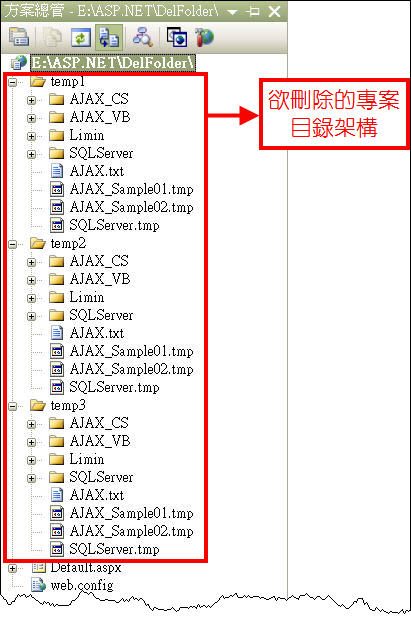
图表1
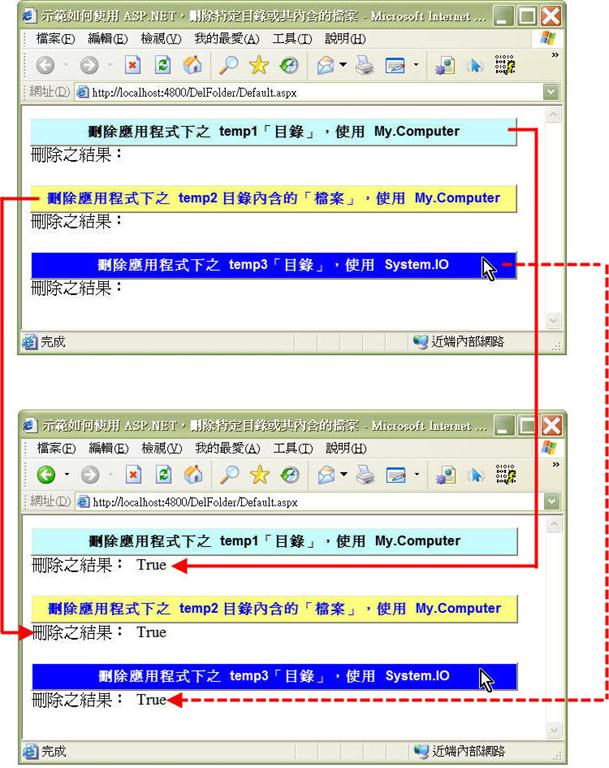
图表2
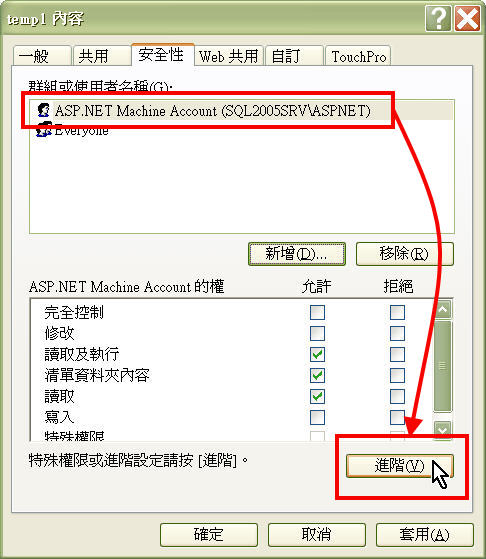
图表3
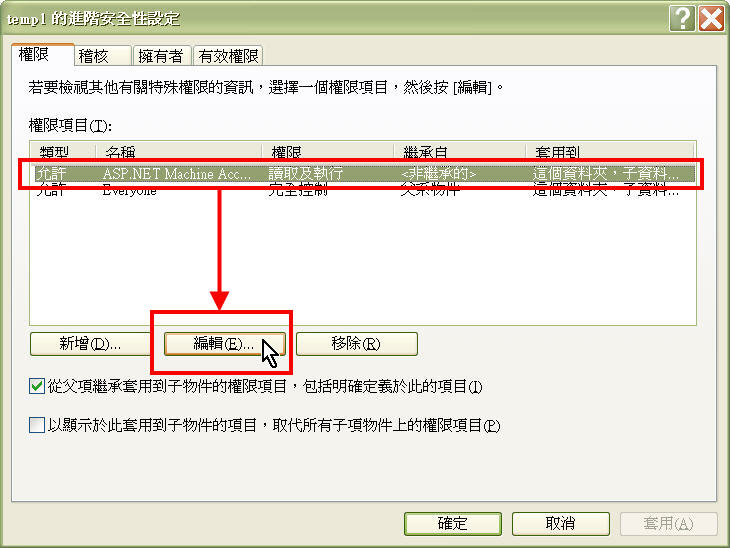
图表4
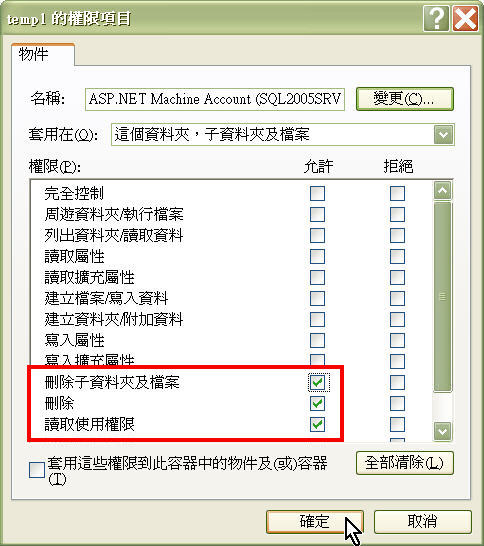
图表5
此内容由惯性聚合(RSS阅读器)自动聚合整理,仅供阅读参考。 原文来自 — 版权归原作者所有。