






原发问问题:
章老师你好,想请问你有关于listview显示大图标的问题,我在imagelist放入我要显示的图片后,由于imagelist的大小设定,让显示的图片并不会等比例缩小,我做成跟文件总管一样的缩图功能,图片能比例缩小,且显示的质量也比较好,该如何下手,目前卡关中@@thanks
解答:
亲爱的读者您好,很感谢您对于章立民研究室的支持,有关于您提到的问题,回复如下。
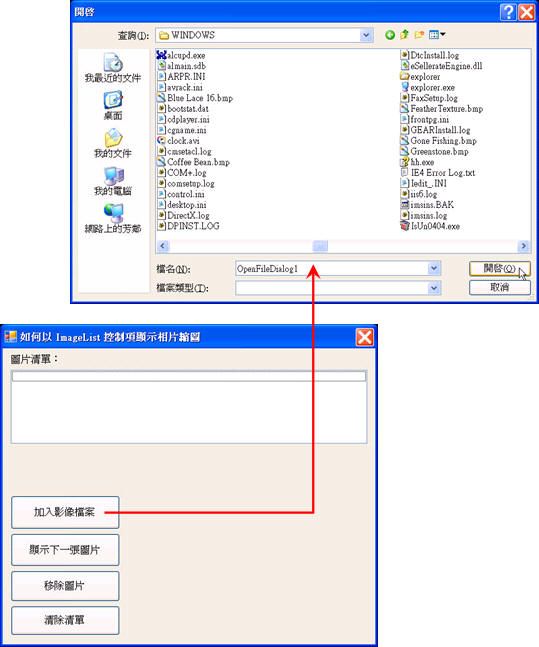
图表1
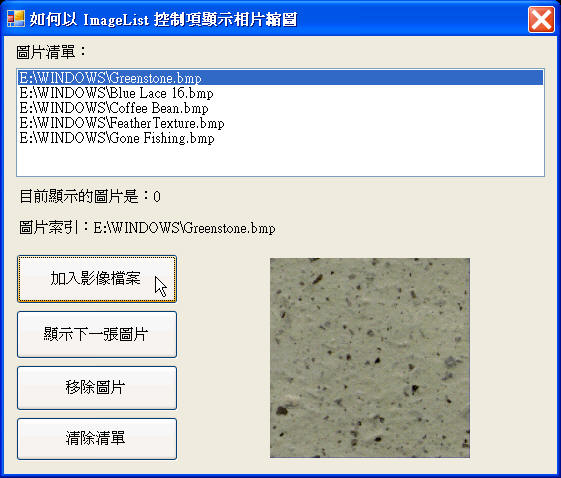
图表2

图表3
图表1到3所示者是程序范例的执行画面,它示范如何使用ImageList对象来管理加载的Image对象,由ListBox控件来决定显示的图片缩图内容,相关程序设计技巧说明如下:
首先,于窗体的Load事件处理程序中撰写下列程序代码,以便建立ImageList类别实体对象,并设定相关属性,让缩图以200*200的影像高度与宽度大小、16Bit的颜色深度显示:
Protected myGraphics As Graphics
Private currentImage As Integer = 0
Private Sub Form012_Load( _
ByVal sender As Object, ByVal e As System.EventArgs) Handles Me.Load
ImageList1 = New ImageList()
' 定义列表中的影像高度和宽度。
ImageList1.ImageSize = New Size(200, 200)
ImageList1.ColorDepth = ColorDepth.Depth16Bit
End Sub
当您按下「加入图像文件案」按钮,便会显示「开启文件」对话框,并呼叫用户自定义程序addImage(),以便将用户所选取的文件加入ImageList对象,同时更新ListBox控件显示的项目列表,程序代码如下所示:
' 加入图像文件案按钮 Click 事件处理程序。
Private Sub Button4_Click( _
ByVal sender As Object, ByVal e As System.EventArgs) Handles Button4.Click
OpenFileDialog1.Multiselect = True
If OpenFileDialog1.ShowDialog() = DialogResult.OK Then
If OpenFileDialog1.FileNames IsNot Nothing Then
Dim i As Integer
For i = 0 To OpenFileDialog1.FileNames.Length – 1
addImage(OpenFileDialog1.FileNames(i))
Next i
Else
addImage(OpenFileDialog1.FileName)
End If
ListBox1.SelectedIndex = 0
End If
End Sub
刚刚我们提到,用户自定义程序addImage()是用来将用户选取的影像加入ImageList对象,并将文件名新增至ListBox控件,以下是程序代码内容:
Private Sub addImage(ByVal imageToLoad As String)
If imageToLoad <> "" Then
imageList1.Images.Add(Image.FromFile(imageToLoad))
listBox1.BeginUpdate()
listBox1.Items.Add(imageToLoad)
listBox1.EndUpdate()
End If
End Sub
当您按下「显示下一张图片」按钮,便会取得ListBox控件列表中目前所选取项目的索引,藉以计算出下一个项目的索引值,以便将索引值传递给ImageList对象,让PictureBox控件显示正确的图片:
' 显示下一张图片按钮 Click 事件处理程序。
Private Sub Button1_Click(ByVal sender As Object, ByVal e As System.EventArgs) _
Handles Button1.Click
If ImageList1.Images.Empty <> True Then
If ImageList1.Images.Count - 1 > currentImage Then
currentImage += 1
Else
currentImage = 0
End If
' 于 PictureBox 控件中显示图片。
PictureBox1.Image = ImageList1.Images(currentImage)
Label3.Text = "目前显示的图片是:" + currentImage.ToString
ListBox1.SelectedIndex = currentImage
Label5.Text = "图片索引:" + ListBox1.Text
End If
End Sub
替ListBox控件的SelectedIndexChanged事件处理程序撰写下列程序代码,当用户选取不同的列表项目时,让PictureBox控件显示ImageList对象对应的图片:
Private Sub ListBox1_SelectedIndexChanged( _
ByVal sender As System.Object, ByVal e As System.EventArgs) _
Handles ListBox1.SelectedIndexChanged
If ListBox1.SelectedIndex <> -1 Then
currentImage = ListBox1.SelectedIndex
' 于 PictureBox 控件中显示图片。
PictureBox1.Image = ImageList1.Images(ListBox1.SelectedIndex)
Label3.Text = "目前显示的图片是:" + currentImage.ToString
Label5.Text = "图片索引:" + ListBox1.Text
End If
End Sub
当您按下「移除图片」按钮,便会取得ListBox控件列表中目前所选取索引,根据索引与对应索引的项目来删除ImageList对象以及ListBox控件对应的列表项目,并改变Label控件显示的消息正文,程序代码如下所示:
' 移除图片按钮 Click 事件处理程序。
Private Sub Button2_Click(ByVal sender As Object, ByVal e As System.EventArgs) _
Handles Button2.Click
If ListBox1.SelectedIndex <> -1 Then
ImageList1.Images.RemoveAt(ListBox1.SelectedIndex)
ListBox1.Items.Remove(ListBox1.SelectedItem)
PictureBox1.Image = Nothing
Label3.Text = Nothing
Label5.Text = Nothing
End If
End Sub
当您按下「清除列表」按钮,便会清除ListBox控件所有的列表项目,并改变Label控件显示的消息正文:
' 清除列表按钮 Click 事件处理程序。
Private Sub Button3_Click(ByVal sender As Object, ByVal e As System.EventArgs) _
Handles Button3.Click
ImageList1.Images.Clear()
ListBox1.Items.Clear()
PictureBox1.Image = Nothing
Label3.Text = Nothing
Label5.Text = Nothing
End Sub
此内容由惯性聚合(RSS阅读器)自动聚合整理,仅供阅读参考。 原文来自 — 版权归原作者所有。