




原发问问题:
章老师:你好,新年快乐.
IO与数据存取密诀里有提到文件复制及移动目录.
但如何复制整个目录及目录下面的所有子目录及所有文件到某个地方?
还有如何使用以前*.*的通配符来复制所有文件?
谢谢.请帮忙解答
解答:
亲爱的读者您好
很感谢您对于章立民研究室的支持
有关于您提到的问题
回复如下
如果需要复制整个目录的内容到另一个目录,以Visual C#来说,最简便的方法,就是使用Microsoft.VisualBasic.Devices命名空间的My.Computer.FileSystem对象之CopyDirectory方法,它拥有下列四个多载版本(注:相关参数的用途请参阅My.Computer.FileSystem. CopyDirectory方法的说明)
public void CopyDirectory
(
string sourceDirectoryName,
string destinationDirectoryName
)-或-public void CopyDirectory
(
string sourceDirectoryName,
string destinationDirectoryName,
bool overwrite
)-或-public void CopyDirectory
(
string sourceDirectoryName,
string destinationDirectoryName,
UIOption showUI
)-或-public void CopyDirectory
(
string sourceDirectoryName,
string destinationDirectoryName,
UIOption showUI,
UICancelOption onUserCancel
)
请注意:
要使用Visual Basic的My对象之前,必须先加入对Microsoft.VisualBasic的参考,再汇入适当的命名空间,例如:
using Microsoft.VisualBasic.Devices;
就可以在C#中使用与My相似的语法来撰写程序。
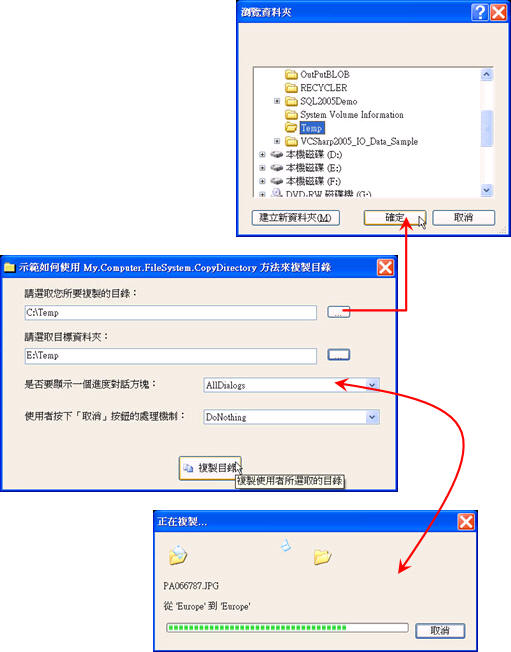
图表1
如图表1所示,程序范例示范如何复制目录,兹将程序代码列示如下:
public partial class DemoForm001 : Form
{
...
private void DemoForm001_Load(object sender, EventArgs e)
{
this.showUIComboBox.DataSource =
System.Enum.GetNames(typeof(UIOption));
this.showUIComboBox.SelectedIndex = 1;
this.onUserCancelComboBox.DataSource =
System.Enum.GetNames(typeof(UICancelOption));
this.onUserCancelComboBox.SelectedIndex = 0;
}
private void FileBrowseButton_Click(object sender, EventArgs e)
{
FolderBrowserDialog folderDialog = new FolderBrowserDialog();
folderDialog.RootFolder = Environment.SpecialFolder.MyComputer;
if ((folderDialog.ShowDialog() ==
System.Windows.Forms.DialogResult.OK))
{
this.FileToBeCopiedTextBox.Text = folderDialog.SelectedPath;
}
}
private void DirectoryBrowseButton_Click(object sender, EventArgs e)
{
FolderBrowserDialog folderDialog = new FolderBrowserDialog();
folderDialog.RootFolder = Environment.SpecialFolder.MyComputer;
if ((folderDialog.ShowDialog() ==
System.Windows.Forms.DialogResult.OK))
{
this.DestionFileTextBox.Text = folderDialog.SelectedPath;
}
}
private void btnCopyFolder_Click(object sender, EventArgs e)
{
Computer MyComputer = new Computer();
if(this.DestionFileTextBox.Text == "")
{
MessageBox.Show("您并未指定复制目标数据夹。", "请注意");
this.DestionFileTextBox.Focus();
this.DestionFileTextBox.SelectionStart =
this.DestionFileTextBox.Text.Length;
return;
}
try
{
MyComputer.FileSystem.CopyDirectory(
this.FileToBeCopiedTextBox.Text,
this.DestionFileTextBox.Text,
(UIOption)(System.Enum.Parse(typeof(UIOption),
showUIComboBox.SelectedItem.ToString())),
(UICancelOption)(System.Enum.Parse(typeof(UICancelOption),
onUserCancelComboBox.SelectedItem.ToString())));
// 启动 Windows 文件总管。
Process.Start("explorer.exe",
Path.GetDirectoryName(this.DestionFileTextBox.Text));
}
catch (Exception ex)
{
MessageBox.Show(ex.Message);
}
}
此内容由惯性聚合(RSS阅读器)自动聚合整理,仅供阅读参考。 原文来自 — 版权归原作者所有。