





在使用MVVM架构时,我们会遇到各种各样的问题
其中一个很常见的问题就是如何在ViewModel层处理UI事件时在后台代码文件中不写任何代码。
在我这个例子中实现的是取得鼠标移动时的位置。
我的解决方法如下:
1、通过一个Behavior 取得关联对象的EventArgs,代码如下
1 public class ExtendedInvokeCommandAction : TriggerAction<FrameworkElement>
2 {
3 public static readonly DependencyProperty CommandProperty = DependencyProperty.Register("Command", typeof(ICommand), typeof(ExtendedInvokeCommandAction), new PropertyMetadata(null, CommandChangedCallback));
4 public static readonly DependencyProperty CommandParameterProperty = DependencyProperty.Register("CommandParameter", typeof(object), typeof(ExtendedInvokeCommandAction), new PropertyMetadata(null, CommandParameterChangedCallback));
5
6 private static void CommandParameterChangedCallback(DependencyObject d, DependencyPropertyChangedEventArgs e)
7 {
8 var invokeCommand = d as ExtendedInvokeCommandAction;
9 if (invokeCommand != null)
10 invokeCommand.SetValue(CommandParameterProperty, e.NewValue);
11 }
12
13 private static void CommandChangedCallback(DependencyObject d, DependencyPropertyChangedEventArgs e)
14 {
15 var invokeCommand = d as ExtendedInvokeCommandAction;
16 if (invokeCommand != null)
17 invokeCommand.SetValue(CommandProperty, e.NewValue);
18 }
19
20 protected override void Invoke(object parameter)
21 {
22 if (this.Command == null)
23 return;
24
25 if (this.Command.CanExecute(parameter))
26 {
27 var commandParameter = new ExtendedCommandParameter(parameter as EventArgs, this.AssociatedObject,
28 GetValue(CommandParameterProperty));
29 this.Command.Execute(commandParameter);
30 }
31 }
32
33 #region public properties
34
35 public object CommandParameter
36 {
37 get { return GetValue(CommandParameterProperty); }
38 set { SetValue(CommandParameterProperty, value); }
39 }
40
41 public ICommand Command
42 {
43 get { return GetValue(CommandProperty) as ICommand; }
44 set { SetValue(CommandParameterProperty, value); }
45 }
46
47 #endregion
48 }
2、写一个类,包含的属性有事件源、EventArgs和对象,代码如下
1 public class ExtendedCommandParameter
2 {
3 public ExtendedCommandParameter(EventArgs eventArgs, FrameworkElement sender, object parameter)
4 {
5 EventArgs = eventArgs;
6 Sender = sender;
7 Parameter = parameter;
8 }
9
10 public EventArgs EventArgs { get; private set; }
11 public FrameworkElement Sender { get; private set; }
12 public object Parameter { get; private set; }
13 }
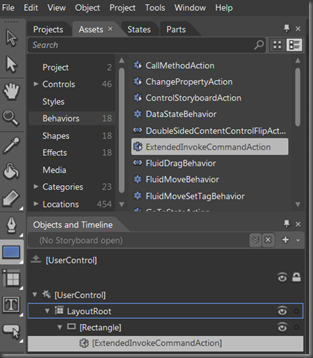
3、为对象添加Behavior
在我的这个例子中,我对Rectangle添加新建的类ExtendedInvokeCommandAction(即Behavior)
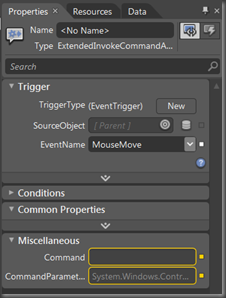
4、在ViewModel层把这个Behavior绑定到Command上,在这Command上选择一个事件,通过Comman调用这个事件
在我这个例子中,在ViewModle层我把MouseMove事件绑定到MouseMoved Command上,另外,如果需要的话,可以把任何对象绑定到CommandParameter,在我这个例子中,我把此View(变量名为userControl)绑定到了CommandParameter(不是必须的)
1
2 <Rectangle Fill="#FF9B9BC5" Height="200" Stroke="Black" Width="200">
3 <i:Interaction.Triggers>
4 <i:EventTrigger EventName="MouseMove">
5 <local:ExtendedInvokeCommandAction
6 Command="{Binding MouseMoved}"
7 CommandParameter="{Binding ElementName=userControl}"/>
8 </i:EventTrigger>
9 </i:Interaction.Triggers>
10 </Rectangle>
11
5、在ViewModel层处理事件,代码如下
1 public class MainPageViewModel : INotifyPropertyChanged
2 {
3 public MainPageViewModel()
4 {
5 MouseMoved = new MainPageCommand(this); //initialize the Command
6 }
7
8 //gets the position of the mouse
9 private void OnMouseMove(ExtendedCommandParameter commandParameter)
10 {
11 MouseEventArgs eventArgs;
12
13 //cast the EventArgs to the type you expect, according to the event you handle
14 //f.e. MouseMove Event gets you MouseEventArgs
15 // Click Event gets you RoutedEventArgs
16 if (commandParameter.EventArgs.GetType() == typeof(MouseEventArgs))
17 {
18 eventArgs = commandParameter.EventArgs as MouseEventArgs;
19 if (commandParameter.Parameter != null)
20 {
21 var view = commandParameter.Parameter as UIElement;
22 MousePosition = eventArgs.GetPosition(view).ToString();
23 }
24 }
25 }
26
27 public MainPageCommand MouseMoved { get; set; }
28 private string _mousePosition;
29 public string MousePosition
30 {
31 get { return _mousePosition; }
32 set { _mousePosition = value; OnPropertyChanged("MousePosition"); }
33 }
34
35 #region INotifyChanged Members
36
37 public event PropertyChangedEventHandler PropertyChanged;
38 internal void OnPropertyChanged(string propertyName)
39 {
40 if (this.PropertyChanged != null)
41 {
42 this.PropertyChanged(this, new PropertyChangedEventArgs(propertyName));
43 }
44 }
45
46 #endregion
47
48 #region command class
49
50 public class MainPageCommand : ICommand
51 {
52 public MainPageCommand(MainPageViewModel view)
53 {
54 _view = view;
55 }
56
57 private MainPageViewModel _view;
58
59 #region ICommand Members
60
61 public bool CanExecute(object parameter)
62 {
63 return true;
64 }
65
66 public event EventHandler CanExecuteChanged;
67
68 public void Execute(object parameter)
69 {
70 //call the method to handle the event
71 _view.OnMouseMove(parameter as ExtendedCommandParameter);
72 }
73
74 #endregion
75
76 }
77 #endregion
78
79 }
如果需要,可以为每一个EventArgs建一个Behavior,只要把它绑定到Command上,然后Command代码中处理EventArgs就可以了
另外还有一篇英文的文章,和这篇文章差不多,但是写的更好,而且程序写的也很好,如果有兴趣的话,也看一下。文章地址为http://blog.roboblob.com/2010/01/26/binding-ui-events-from-view-to-commands-in-viewmodel-in-silverlight-4/
此内容由惯性聚合(RSS阅读器)自动聚合整理,仅供阅读参考。 原文来自 — 版权归原作者所有。