





VTL语法
注释
单行注释以##开始,多行注释以#*开始,以*#结束。注释的内容不会出现在输出中
属性
属性引用以$符号开始。属性可以是服务器端C#代码设置的,也可以在NVelocity模板中定义属性,比如下面语句在NVelocity模板中定义一个属性
#set (#msg="this variable is defined in NVelocity.")
NVelocity中定义的属性一般为字符串值,赋值时可以使用单引号将字符串值括起来,也可以使用双引号,他们的区别是:如果字符串值中有用到其他变量,使用单引号时该变量名字直接作为字符串的值处理,而使用双引号时该变量名字将使用属性的值进行替换(可以设置NVelocity关闭这个选项)
在模板中如果需要输出以$符号开始的文本(非变量),有2种处理方式。如果他不会作为属性赋值,则可以直接输出,因为NVelocity对没有赋值的属性,直接输出属性名字(包括$符号);如果他是一个已经赋值的属性,则需要在$符号前面添加一个转义用的反斜杠\符号
对于非字符串类型的属性,NVelocity调用属性的ToString()方法转换为字符串输出
对于对象类型的属性,可以使用类似$contact.Name方式,NVelocity目前的版本已经支持属性名称非大小写敏感
控制指令
条件指令:
NVelocity中的控制指令基本上就2个:条件指令和循环指令。NVelocity对宏的支持不太好
#if($score>1000) Expert #elseif($score>500) Senior #else Junior #endif
与Velocity不一样的地方:NVelocity不支持#{else}这个语法,#else、#endif指令必须与前后的内容空格分开
循环指令:
NVelocity的循环指令,每个指令必须单独占用一行,不能有注释、输出内容等
NVelocity对Velocity的循环指令做了扩展,加入了Fog Creek的Fancy Loops
基本语法如下:
#foreach($i in $items)
#each
(this is optional since its the default section)
text which appears for each item
#before
text which appears before each item
#after
text which appears after each item
#between
text which appears between each two items
#odd
text which appears for every other item, including the first
#even
text which appears for every other item, starting with the second
#nodata
Content rendered if $items evaluated to null or empty
#beforeall
text which appears before the loop, only if there are items
matching condition
#afterall
text which appears after the loop, only of there are items
matching condition
#end
Fancy Loops指令非常实用,例如在StringTemplate中想要类似的效果就比较麻烦
其他还有#include、#parse、#stop指令,详细的语法参考VTL Reference
基本用法
下载Castle NVelocity项目,建一个测试用的web site,引用NVelocity.dll,引用的命名空间如下:
using System;
using System.Collections.Generic;
using System.Data;
using Commons.Collections;
using NVelocity;
using NVelocity.App;
using NVelocity.Runtime;
建立一个NVelocity模板,内容如下:
<div class="query-form">
    <table>
        <tr>
            <td>姓名:</td>
            <td><input type="text" id="txtQryName" class="text" value="$qryName" /></td>
            <td>地址:</td>
            <td><input type="text" id="txtQryAddress" class="text" value="$qryAddress" /></td>
            <td><input type="button" id="btnQuery" value="查询" /></td>
        </tr>
    </table>
</div>


<h2>Contact List</h2>
<div class="contact-list">
#foreach($c in $contacts)
#beforeall
    <table>
        <tr class="list-header">
            <td>姓名</td>
            <td>邮箱</td>
            <td>地址</td>
            <td>会员等级</td>
        </tr>
#odd
        <tr class="list-odd">
#even
        <tr class="list-even">
#each
            <td>$c.set_Name("$c.name - W") $c.get_Name()</td>
            <td><a href="mailto:$c.EMail">$c.EMail</a></td>
            <td>$c.Address</td>
            <td>#if($c.TotalOrderAmt>1000)钻卡会员
    #elseif($c.TotalOrderAmt>200)金卡会员
    #else Standard#end</td>
#after
        </tr>
#afterall
    </table>
#nodata
    No contacts found!
#end
</div>
页面.cs代码如下:
public class Contact
{
    public string Name { get; set; }
    public string EMail { get; set; }
    public string Address { get; set; }
    public decimal TotalOrderAmt { get; set; }
}


protected void Page_Load(object sender, EventArgs e)
{
    VelocityEngine engine = new VelocityEngine();
    ExtendedProperties prop = new ExtendedProperties();
    prop.AddProperty(RuntimeConstants.FILE_RESOURCE_LOADER_PATH, Server.MapPath("./"));
    prop.AddProperty(RuntimeConstants.ENCODING_DEFAULT, "utf-8");
    engine.Init(prop);
    Template template = engine.GetTemplate("contact-list.vm");
    VelocityContext context = new VelocityContext();
    context.Put("contacts", new List<Contact>()
    {
        new Contact() {
            Name="Richie Liu", TotalOrderAmt=180,
            EMail="RichieLiu-test@gmail.com",
            Address="上海徐汇区钦州路" },
        new Contact() {
            Name="Kevin Zhang",TotalOrderAmt=0,
            EMail="KevinZhang-test@gmail.com",
            Address="苏州新区" },
        new Contact() {
            Name="Eric Wong", TotalOrderAmt=626,
            EMail="EricWong-test@gmail.com",
            Address="厦门海沧" },
        new Contact() {
            Name="RicCC", TotalOrderAmt=2080,
            EMail="RicCC-test@gmail.com",
            Address="上海徐汇区钦州路" }
    });
    context.Put("qryName", "Ric");
    context.Put("qryAddress", DateTime.Now);


    template.Merge(context, this.Response.Output);
}
则页面运行结果:
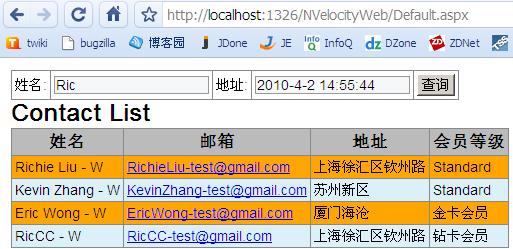
上面的代码中,演示了在NVelocity模板中调用对象的方法,比如$c.get_Name()通过getter方法读取属性值;$c.set_Name("$c.name - W")为每个contact的名字添加一个-W后缀
如果$contacts集合中没有记录,则只会输出No contacts found!文本,不会输出任何table信息,包括#beforeall、#afterall指令中的内容也不会输出
接下来测试一下#foreach指令能够支持的集合类型以及用法(只要支持IEnumarable接口的都可以使用#foreach指令)
NVelocity模板如下:
<br />
<h2>Item List - Array</h2>
<div>
#foreach($item in $items1)
#each
    $item
#between
    ,
#end
</div>


<br />
<h2>Item List - List</h2>
<div>
#foreach($item in $items2)
#each
    $item.ToString("yyyy-MM-dd")
#between
    ,
#end
</div>


<br />
<h2>Item List - Dictionary</h2>
<div>
#foreach($item in $items3)
#each
{ $item.Key - $item.Value }
#between
,#end
</div>


<br />
<h2>Item List - DataTable</h2>
<div>
#foreach($item in $items4.Rows)
{ $item.Key - $item.Value }
#between
,
#end
</div>
服务器端设置属性的代码如下:
context.Put("items1", new string[] { "AAA", "BBB", "CCC" });
context.Put("items2", new List<DateTime> { new DateTime(1979, 1, 1), new DateTime(2010, 4, 1) });


IDictionary<string, decimal> dic = new Dictionary<string, decimal>();
dic.Add("AAA", 111M);
dic.Add("BBB", 222M);
dic.Add("CCC", 333M);
context.Put("items3", dic);


DataTable table = new DataTable();
table.Columns.Add(new DataColumn("Key", typeof(string)));
table.Columns.Add(new DataColumn("Value", typeof(int)));
DataRow row = table.NewRow();
row["Key"] = "item 1";
row["Value"] = 111;
table.Rows.Add(row);
row = table.NewRow();
row["Key"] = "item 2";
row["Value"] = 222;
table.Rows.Add(row);
context.Put("items4", table);
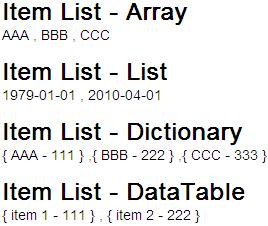
页面运行效果如下:
此内容由惯性聚合(RSS阅读器)自动聚合整理,仅供阅读参考。 原文来自 — 版权归原作者所有。