





IdentityServer document is not write clear on this part. so it really confuse me and put me on several hours to resovle this problem.
1. 我的Identity Server Config
public class Config
    {
        public static IEnumerable<IdentityResource> GetIdentityResources()
        {
            return new List<IdentityResource>
            {
                new IdentityResources.OpenId(),
                new IdentityResources.Profile(),
            };
        }

        public static IEnumerable<ApiResource> GetApiResources()
        {
            return new List<ApiResource>
            {
                new ApiResource("Library.Api","Library Api")
                {
                    ApiSecrets = {new Secret("secret".Sha256())} ,
                    Scopes = { new Scope("api1")}

                }
            };

        }

        // clients want to access resources (aka scopes)
        public static IEnumerable<Client> GetClients()
        {
            // client credentials client
            return new List<Client>
            {
                #region ClientCredentials
                // machine to machine client
                new Client
                {
                    ClientId = "client.identity",
                    ClientSecrets = { new Secret("secret".Sha256()) },

                    AllowedGrantTypes = GrantTypes.ClientCredentials,
                    // scopes that client has access to
                    AllowedScopes = { "api1" }
                },
                #endregion

                #region  ResourceOwnerPassword
                // resource owner password grant client
                new Client
                {
                    ClientId = "password.identity",
                    AllowedGrantTypes = GrantTypes.ResourceOwnerPassword,
                    AccessTokenLifetime = 2592000,          //15天
                    //AccessTokenLifetime = 60,          //测试60秒过期
                    SlidingRefreshTokenLifetime = 2592000,  //30天
                    AllowOfflineAccess = true,              //返回refreshToken
                    AlwaysSendClientClaims = true,          //
                    UpdateAccessTokenClaimsOnRefresh = true,
                    AbsoluteRefreshTokenLifetime = 0,       // refreshToken不过期
                    RefreshTokenExpiration = TokenExpiration.Sliding,
                    AlwaysIncludeUserClaimsInIdToken = true,
                    ClientSecrets ={
                        new Secret("secret".Sha256())
                    },
                    AllowedScopes = {
                        "api1",
                        StandardScopes.OfflineAccess, //如果要获取refresh_tokens ,必须在scopes中加上OfflineAccess
                        StandardScopes.OpenId,//如果要获取id_token,必须在scopes中加上OpenId和Profile,id_token需要通过refresh_tokens获取AccessToken的时候才能拿到(还未找到原因)
                        StandardScopes.Profile//如果要获取id_token,必须在scopes中加上OpenId和Profile
                      },
                },
                #endregion

            };
        }

    }
2. 直接调用 /connect/introspect
官网文档:
POST /connect/introspect
  Authorization: Basic sValue

  token=<token>
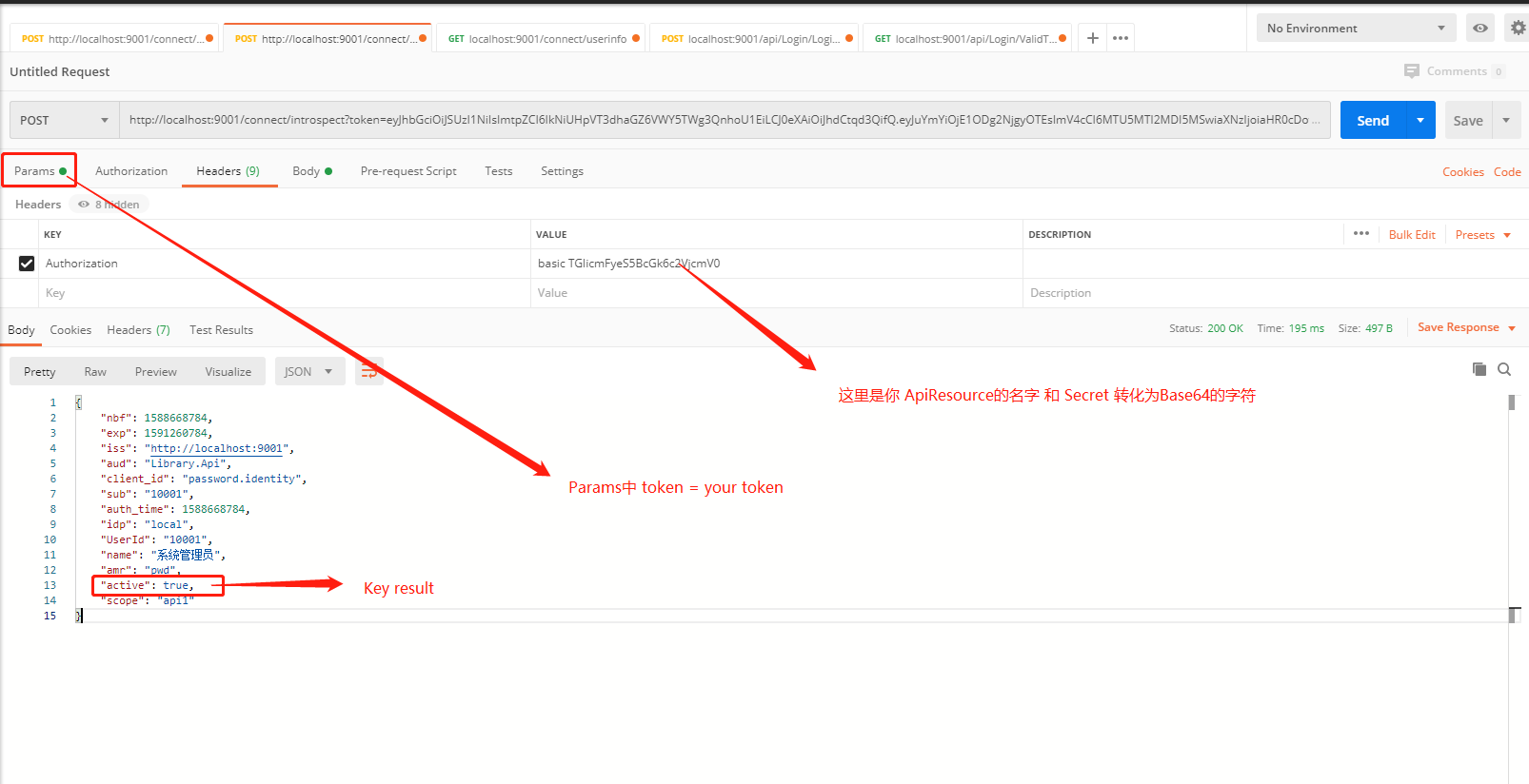
主要问题就是 sValue是你定义的Api Resource的名字和ApiSecrets. 但是需要将他们转成Base64的字符
var sValue = Convert.ToBase64String(Encoding.UTF8.GetBytes(string.Format("{0}:{1}", "Library.Api", "secret")));
这样你就可以在Postman上进行调用
2. 通过代码调用
        public async Task<ActionResult> ValidToken(string token)
        {
            ApiResultModel apiResult = new ApiResultModel();

            var CurrentRequest = httpContextAccessor.HttpContext.Request;
            string sUrl = CurrentRequest.Scheme + "://" + CurrentRequest.Host.Value;

            var client = new HttpClient();

            var disco = await client.GetDiscoveryDocumentAsync(sUrl);

            var result = await client.IntrospectTokenAsync(new TokenIntrospectionRequest
            {
                Address = disco.IntrospectionEndpoint,

                ClientId = "Library.Api", // this is your APi Resource name
                ClientSecret = "secret",  // this is your APi resource secret
                Token = token
            });

            if (result.IsError)
            {
                apiResult.Code = ResultCode.Error;
                apiResult.Data = result.Error;
                return new JsonResult(apiResult);
            }

            apiResult.Code = ResultCode.Success;
            apiResult.Data = result.IsActive;
            return new JsonResult(apiResult);

        }
public class ApiResultModel
    {
        public ResultCode Code { get; set; }
        public string Message { get; set; }
        public object Data { get; set; }

        public ApiResultModel() { }
        public ApiResultModel(ResultCode code,string message,object data)
        {
            Code = code;
            Message = message;
            Data = data;
        }
    }

    public enum ResultCode
    {
        Success = 0,
        Error = 1,
    }
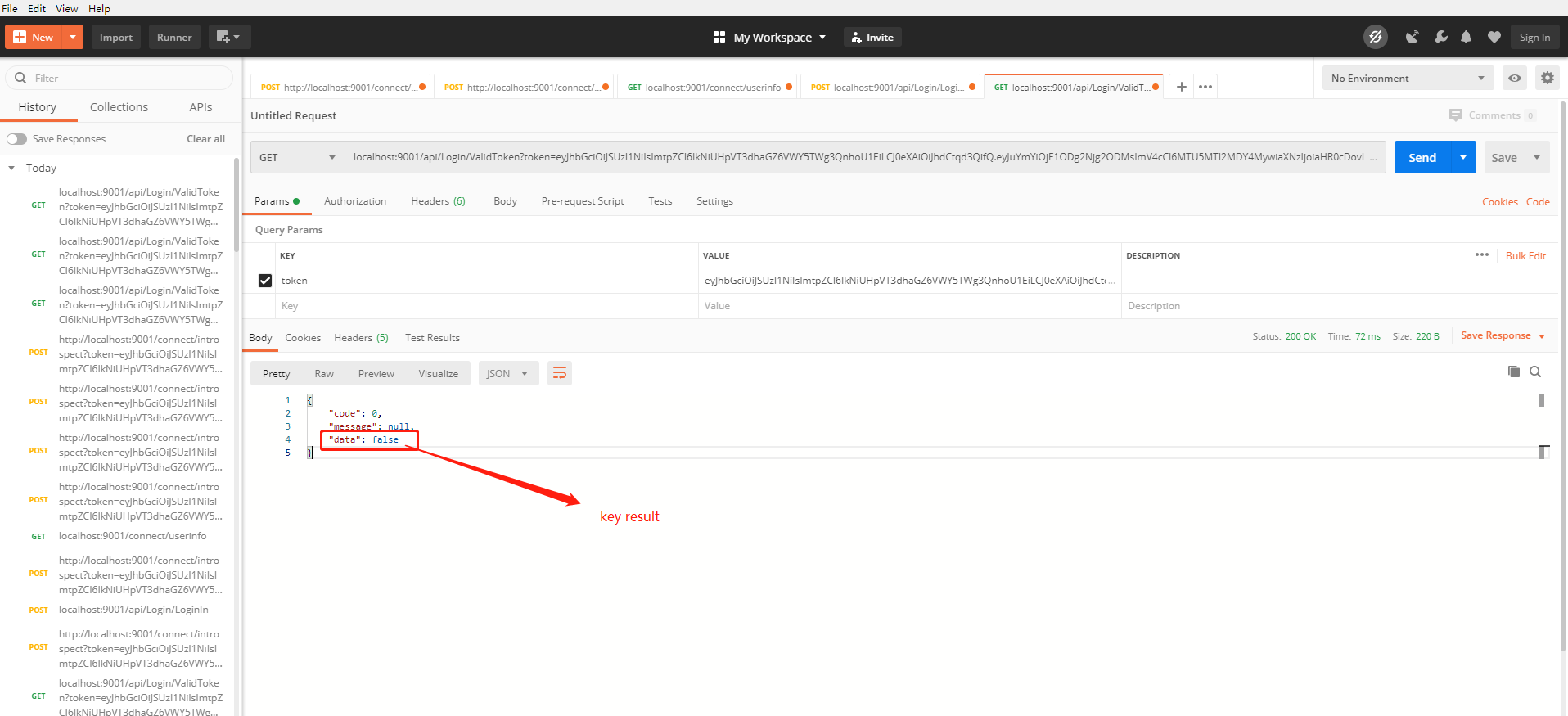
Postman 测试
此内容由惯性聚合(RSS阅读器)自动聚合整理,仅供阅读参考。 原文来自 — 版权归原作者所有。