










当ERP的财务模块与生产,供应链模块集成时,这些模块过帐时会产生会计凭证。如果能在产生会计凭证前可预览一下凭证,那对用户而言是一个很友好的设计。如下图所示,贷项通知单过帐前,可通过预览凭证,知晓即将产生的会计凭证。

点击预览凭证按钮,可看到即将产生的会计凭证:
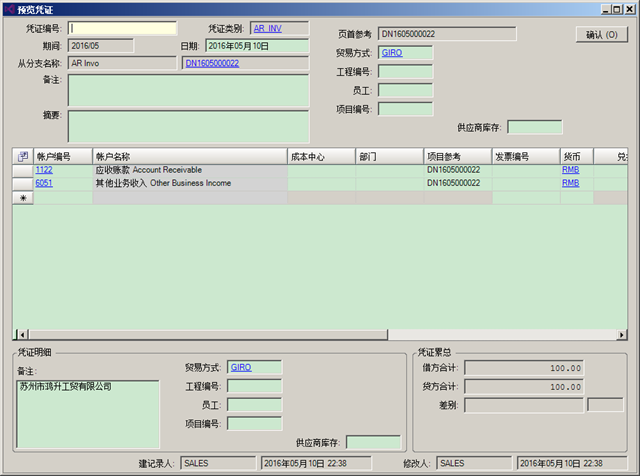
为达到此目的,分享一下对系统的修改。
首先是业务单据重写按钮事件,
protected override void OnPreviewVoucher(Dictionary<string, VoucherEntity> voucherList){base.OnPreviewVoucher(voucherList);if (_expenseRemibursementEntity.Amount > 0){VoucherEntity voucher = _expenseRemibursementManager.CreateExpenseRemibursementVoucherForPreview( _expenseRemibursementEntity);if (voucher != null)voucherList.Add(VOUCHER_KEY, voucher);}}
通过重写这个方法,基类可获取当前业务单据产生的会计凭证。产生会计凭证的方法原型如下:
public VoucherEntity CreateExpenseRemibursementVoucherForPreview(ExpenseRemibursementEntity ExpenseRemibursement){VoucherEntity voucher = null;using (DataAccessAdapter adapter = GetCompanyDataAccessAdapter(sessionId)){try{adapter.StartTransaction(IsolationLevel.ReadCommitted, "CreateExpenseRemibursementVoucherForPreview");ExpenseRemibursementEntity clonedAdjustment = (ExpenseRemibursementEntity)Shared.CloneEntity(ExpenseRemibursement);IFiscalPeriodManager fiscalPeriodManager = ClientProxyFactory.CreateProxyInstance<IFiscalPeriodManager>();ExcludeIncludeFieldsList fieldsList = new ExcludeIncludeFieldsList(false);fieldsList.Add(FiscalPeriodFields.Period);fieldsList.Add(FiscalPeriodFields.FiscalYear);fieldsList.Add(FiscalPeriodFields.PeriodNo);FiscalPeriodEntity fiscalPeriod = fiscalPeriodManager.GetValidFiscalPeriod(sessionId, clonedAdjustment.AppliedDate, fieldsList, true);clonedAdjustment.Period = fiscalPeriod.Period;clonedAdjustment.FiscalYear = fiscalPeriod.FiscalYear;clonedAdjustment.PeriodNo = fiscalPeriod.PeriodNo;voucher=GenerateVoucher(sessionId, clonedAdjustment);}finally{adapter.Rollback();}}return voucher;}
这里有一个细节是并没有对当前的业务实体(business object)直接操作,而是对它的一个深拷贝进行操作。这样对这个拷贝的对象进行的操作都不会影响到原来的业务实体。
其次,需要增加一个MDI界面,主界面用于承载会计凭证界面,子窗体为会计凭证界面。为达到这个目的,我们将会计凭证界面作为子窗体载入到一个新创建的MDI主窗体界面中:
standardFunctionForm = null;Form form = ComponentCommon.MainForm.GetStandardFunctionForm(primaryKeys[0]);if (form != null)standardFunctionForm = form as FunctionFormBase;standardFunctionForm.Owner = this;standardFunctionForm.TopLevel = false;standardFunctionForm.AutoScroll = true;standardFunctionForm.HideBindingNavigator = true;standardFunctionForm.HideStatusStrip = true;standardFunctionForm.AllowAdd = false;standardFunctionForm.AllowDelete = false;standardFunctionForm.AllowEdit = false;standardFunctionForm.AllowPost = false;standardFunctionForm.SupportAdd = false;standardFunctionForm.SupportDelete = false;standardFunctionForm.SupportEdit = false;standardFunctionForm.SupportApproval = false;standardFunctionForm.SupportPost = false;standardFunctionForm.SupportImport = false;standardFunctionForm.SupportExport = false;standardFunctionForm.Show();standardFunctionForm.SaveLayoutOnClose = SaveLayouts.Never;Dictionary<string, string> refNo = new Dictionary<string, string>();refNo.Add(primaryKeys[1], RefNo);standardFunctionForm.FindAndLoadData(refNo);
这里面可以看到,为什么要用一个MDI主界面来载入会计凭证窗体,是为了在不破坏原有功能的情况下,可定制它的部分功能。比如这个预览凭证窗体,不需要保存数据或过帐等操作,于是看到上面的代码中,我们将SupportEdit=false表示不需要编辑功能。
最后三句是MDI子窗体载入数据,通过传入键值对来完成数据的加载。FindAndLoadData方法会调用内部LoadData:
protected override EntityBase2 LoadData(Dictionary<string, string> refNo){base.LoadData(refNo);string RefNo = string.Empty;if (refNo.TryGetValue("RefNo", out RefNo)){IPrefetchPath2 prefetchPath = new PrefetchPath2((int)EntityType.ExpenseRemibursementEntity);prefetchPath.Add(ExpenseRemibursementEntity.PrefetchPathExpenseRemibursementDetail);_expenseRemibursementEntity = _expenseRemibursementManager.GetExpenseRemibursement(Shared.CurrentUserSessionId, RefNo, prefetchPath);}else{_expenseRemibursementEntity = new ExpenseRemibursementEntity();}return _expenseRemibursementEntity;}这样我们就完成了财务模块的凭证预览功能。
此内容由惯性聚合(RSS阅读器)自动聚合整理,仅供阅读参考。 原文来自 — 版权归原作者所有。