







因每次发布版本的时候,都需要打开vs项目,然后进行编译。如果刚好手里有文件在修改,就需要先签入之类的。所以想找个可以实现自动编译的工具。
在网上查询了不少资料,终于基本上实现了自动编译的功能。因为自动部署涉及到服务器管理,本人也不熟悉,就不讨论了。
1. 我这边使用的是git,也可以用svn之类的其他版本控制器。git服务器用的是gitlab.
2. 下载git windows客户端,在自动编译服务器上安装。
3. 下载TortoiseGit windows客户端, 安装。
4. 在任意目录上右键,选择Git Bash here, 输入ssh-keygen, 一直默认回车。 之后会在用户目录(c:\user\你的系统用户名\.ssh)下生成2个文件: id_rsa和id_rsa.pub.
5. 打开开始菜单,打开TortioseGit里面的PuTTYGen 。 点击Conversion下的Import Key, 打开之前生成的id_rsa(不带后缀的)。复制输入框中的ssh-rsa那一大串文字到gitlab里面的ssh keys. 点击Save private key, 保存文件为id_rsa.ppk。
6. 下载jenkins安装。需要安装的插件:git plugin, msbuild plugin, credentials binding plugin, Parameterized trigger plugin.
7. 下载nuget.exe.
1. 新建一个空解决方案Lake, 里面有Lake.Web这个web项目。
2. 在解决方案根目录增加一个文件: build.msbuild。

<?xml version="1.0" encoding="utf-8"?>
<Project ToolsVersion="4.0" DefaultTargets="Build-Release" xmlns="http://schemas.microsoft.com/developer/msbuild/2003">
    <ItemGroup>
        <BuildArtifactsDir Include="BuildArtifacts\" />
        <Solution Include="$(MSBuildThisFileDirectory)Lake.Web\Lake.Web.csproj">
            <Properties>
              Platform=Any CPU;
              Configuration=Release;
              DeployOnBuild=True;
              DeployTarget=Package;
              _PackageTempDir=$(OutDir);
              AutoParameterizationWebConfigConnectionStrings=false;
              UseWPP_CopyWebApplication=true;
              PipelineDependsOnBuild=false;
              OutputPath=..\Published\Lake.Web
            </Properties>
        </Solution>
    </ItemGroup>
    <PropertyGroup>
        <Configuration Condition=" '$(Configuration)' == '' ">Release</Configuration>
        <BuildPlatform Condition=" '$(BuildPlatform)' == '' ">Any CPU</BuildPlatform>
        <OutDir>$([MSBuild]::GetDirectoryNameOfFileAbove($(MSBuildThisFileDirectory), common.targets))\release\Lake.Web</OutDir>
    </PropertyGroup>
    <Target Name="Build-Release" BeforeTargets="BeforeBuild"
            AfterTargets="AfterBuild"
            DependsOnTargets="Init">
        <MSBuild Projects="@(Solution)"
                 Targets="Rebuild">
            <Output TaskParameter="TargetOutputs" ItemName="Assemblies"  />
        </MSBuild>
    </Target>
    <Target Name="CopyContentFiles" AfterTargets="Build">
    </Target>
    <Target Name="Clean">
      <RemoveDir Directories ="$(MSBuildThisFileDirectory)..\Published\Lake.Web" />
      <RemoveDir Directories="$([MSBuild]::GetDirectoryNameOfFileAbove($(MSBuildThisFileDirectory), common.targets))\release\Lake.Web" />
    </Target>
    <Target Name="Init" DependsOnTargets="Clean">
        <!-- <MakeDir Directories="@(BuildArtifactsDir)" />  -->
    </Target>
    <Target Name="RunUnitTests" DependsOnTargets="Compile">
        <Exec Command='"@(NUnitConsole)" @(UnitTestsDLL) /xml=@(TestResultsPath)' />
    </Target>
    <Target Name="BeforeBuild">
        <Message Text="%(AssembliesBuiltByChildProjects.Identity)" />
    </Target>
    <Target Name="AfterBuild">
        <Message Text="after build" Importance="high" />
    </Target>
</Project>
msbuild
这里面有几个目录:
$([MSBuild]::GetDirectoryNameOfFileAbove($(MSBuildThisFileDirectory), common.targets))\release\Lake.Web 这个是表示从当前目录,一直往上找,找到一个common.targets的文件,最终的的发布文件会在这个目录里面的release\Lake.web下。
..\Published\Lake.Web 这个目录表示编译后的输出目录。
3. 签入提交到git.
1. 打开Manager Jenkins/Configure System, 点击Home directory 下的Advanced..., 其中Workspace Root Directory就是以后所有的git repoistory放置的目录。
我这里设置的是: D:\git/${ITEM_FULLNAME} .
然后在这个目录下(d:\git)新建一个空文件: common.targets.
把之前下载的nuget.exe也复制到这里。
2. Manager Jenkins/ Global Tool Configuration
Git-Path to Git executable, 这个是你的git安装地址: C:\Program Files\Git\bin\git.exe
MSBuild-> MSBuild installations: Name:Dotnet4.0, Path to MSBuild: C:\Program Files (x86)\MSBuild\14.0\Bin\ 注: 这个path是看你安装的.net版本.
1. New Item
Enter an item name, 然后选择Freestyle project.
2. Git
Repositoryies: git@192.168.1.8:.net/Lake.git (git里面可以查看到)
Credentials: 点击Add, 在key里面输入之前id_rsa.ppk内容。
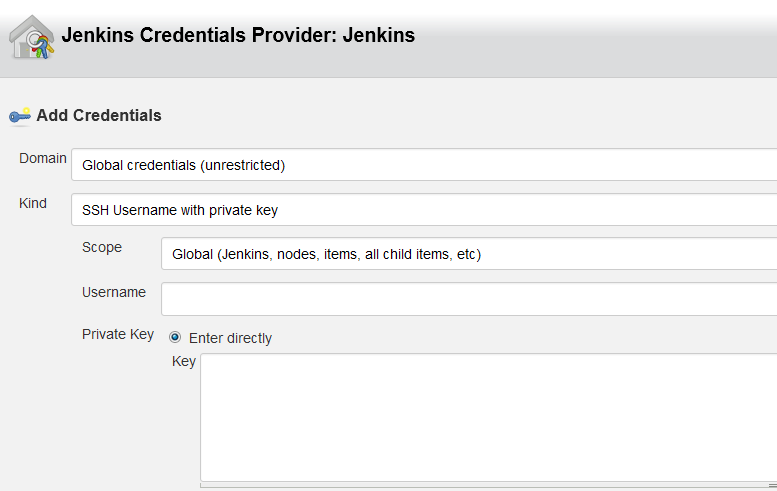
Repository browser: gitlab
version: 6.5
3. Build: Add build step -> Build a Visual Studio project or solution using MSBuild
MSBuild Version: 之前MSBuild输入的Dotnet4.0
MSBuild Build File: D:\git\Lake\build.msbuild
4. 如果这个任务依赖于别的任务,在此项目之前,必须编译另外一个任务,在Add build step里面选择Trigger/call builds onother projects. 然后输入另外一个Projects的名称。 勾选Block until.
5. 还原Nuget包
Add build step -> Execute Windows batch command.
输入: d:\git\nuget.exe restore "D:\git\Lake\Lake.sln"
6. Post-build Actions
Archive the artifacts(这个主要是为了nuget下载的包,每次编译之前保留)
File to archive: packages/**
7. 如果有时候提示git没有权限,则进入服务,切换Jenkins的运行在为当前用户。
8. Build Now, 可以看到成功还是失败。
9. 所有的编译文件,都在之前build.msbuild里面的release\Lake.web
1. 用MSBuild和Jenkins搭建持续集成环境(1)
此内容由惯性聚合(RSS阅读器)自动聚合整理,仅供阅读参考。 原文来自 — 版权归原作者所有。