








在此之前已经写过一篇关于“.net导出word、excel等文件操作类“的文章详见:http://www.cnblogs.com/dreamof/archive/2008/06/24/1229069.html
本文的目的主要是讲讲.net导出excel的技巧及解决以下问题:
(1)出现导出长串数据(如身份证)到EXCEL中后显示为科学计数法的格式,或者报表中显示为001的数据导出到Excel后成了1的格式;
(2)列宽自适应;
涉及到的技巧如下:
(1) 新建一个最原始的DataGrid,对其设置如下:Visible=false,AllowPaging=false;
(2) 导出数据之前将要导出的数据绑定到DataGrid中;
(3) 对长数据如身份证、或类似001的数据库进行格式化,转换为文本格式;
(4) 调用操作类获取DataGrid控件的数据并导出,此时你会发现导出的数据解决了问题(1)并且数据列宽自适应了;
.net导出excel文件操作类如下:
 .net导出excel文件操作类
using System;
using System.Data;
using System.Web;
using System.Text;
using System.IO;namespace GZPI.Service.AgenciesChannel
{
/// <summary>
/// ExportData 的摘要说明。
/// </summary>
public class ExportData
{
public ExportData()
{
//
// TODO: 在此处添加构造函数逻辑
//
}
/// <summary>
///
/// </summary>
/// <param name="dt"></param>
/// <param name="strFileName">含.xls</param>
public static void ExportDataToExcel(DataTable dt, string FileName)
{
try
{
StringWriter sw = new StringWriter();
string colstr = "";
foreach (DataColumn col in dt.Columns)
{
colstr +=col.ColumnName + "\t";
}
sw.WriteLine(colstr);foreach (DataRow row in dt.Rows)
{
colstr = "";
foreach (DataColumn col in dt.Columns)
{
colstr +=row[col.ColumnName].ToString() + "\t";
}
sw.WriteLine(colstr);
}
sw.Close();
HttpContext.Current.Response.AppendHeader("Content-Disposition", "attachment;filename=" + HttpUtility.UrlEncode(FileName+ ".xls", System.Text.Encoding.UTF8));
HttpContext.Current.Response.ContentType = "application/ms-excel";
System.Web.HttpContext.Current.Response.ContentEncoding = System.Text.Encoding.Default;
System.Web.HttpContext.Current.Response.Write(sw);
System.Web.HttpContext.Current.Response.End();
}
catch (Exception ex)
{
throw ex;
}
}public static void ExportDataToExcelByWeb(DataTable dt,System.Web.UI.WebControls.DataGrid DGOutPut,string FileName)
{
try
{
DGOutPut.Visible=true;
DGOutPut.DataSource=dt;
DGOutPut.DataBind();
System.Web.HttpContext.Current.Response.Clear();
System.Web.HttpContext.Current.Response.Buffer = true;
System.Web.HttpContext.Current.Response.Charset = "GB2312";
System.Web.HttpContext.Current.Response.AppendHeader("Content-Disposition", "attachment;filename="+FileName+".xls");
System.Web.HttpContext.Current.Response.ContentEncoding = System.Text.Encoding.GetEncoding("GB2312");//设置输出流为简体中文
System.Web.HttpContext.Current.Response.ContentType = "application/ms-excel";//设置输出文件类型为excel文件。
DGOutPut.EnableViewState = false;
System.Globalization.CultureInfo myCItrad = new System.Globalization.CultureInfo("ZH-CN", true);
System.IO.StringWriter oStringWriter = new System.IO.StringWriter(myCItrad);
System.Web.UI.HtmlTextWriter oHtmlTextWriter = new System.Web.UI.HtmlTextWriter(oStringWriter);
DGOutPut.RenderControl(oHtmlTextWriter);
System.Web.HttpContext.Current.Response.Write(oStringWriter.ToString());
System.Web.HttpContext.Current.Response.End();
DGOutPut.Visible=false;
}
catch (Exception ex)
{
throw ex;
}
}
}
}
实例如下
1、前台代码:
<asp:DataGrid id="DGOutPut" runat="server" Visible="False"></asp:DataGrid>
2、后台代码:
后台代码
private void DGOutPut_ItemDataBound(object sender, System.Web.UI.WebControls.DataGridItemEventArgs e)
{
if (e.Item.ItemType == ListItemType.Item || e.Item.ItemType == ListItemType.AlternatingItem)
{
e.Item.Cells[1].Attributes.Add("style", "vnd.ms-excel.numberformat:@");
}
}private void BtnOutPut_Click(object sender, System.EventArgs e)
{
DataTable dt=_da.ExecuteDataTable(sql);
GZPI.Service.AgenciesChannel.ExportData.ExportDataToExcelByWeb(dt,DGOutPut,"续办人事代理业务信息");
}
效果图: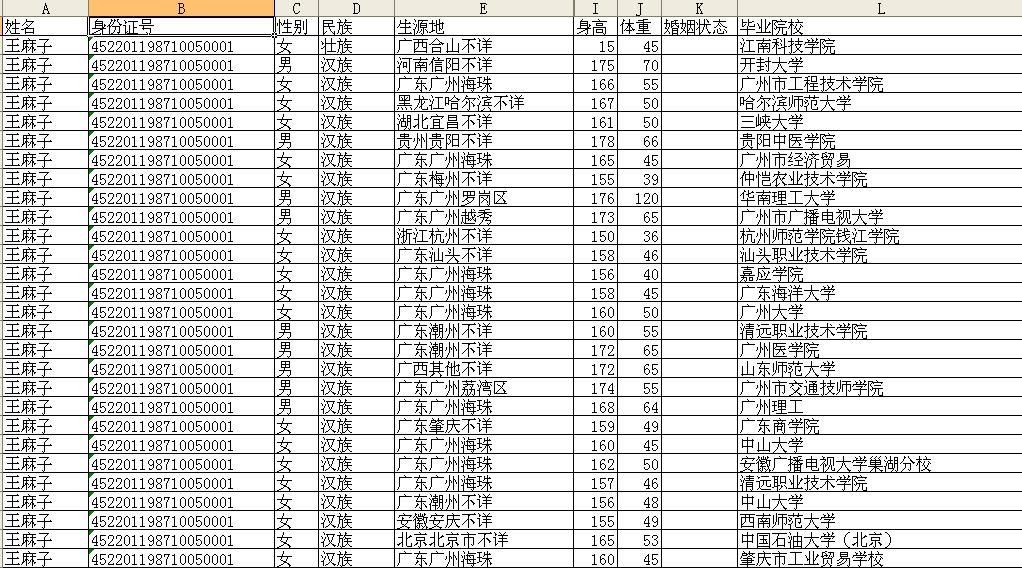
此内容由惯性聚合(RSS阅读器)自动聚合整理,仅供阅读参考。 原文来自 — 版权归原作者所有。