





在第一部分中实现的将附件显示成图片的方式,只能是在列表所在的站点中,跨站(Cross-site)的时候就不能显示了.我经过很长时间的尝试后发现,AttachmentField在跨转的时候,其内部的ItemContext只能是当前访问站点的Context,所以会在当前站点下去查找相应的List与Field,这导致了根本就找不到,所以也就什么也显示不出来了.
在确定了不可能使用AttachmentField进行跨站显示附件后,我重新写了一个控件来模拟生成与AttachmentField一模一样的输出.
using System; using System.Collections.Generic; using System.Linq; using System.Text; using System.Web.UI; using System.Web.UI.WebControls; using Microsoft.SharePoint; using System.Web.UI.HtmlControls; using Microsoft.SharePoint.Security; using System.Web; using System.Security.Permissions; namespace Only.SPLibraryExtend.WebControls { /// <summary> /// 用来显示附件列表 完全模拟SharePoint的AttachmentField的输出 /// </summary> [SharePointPermission(SecurityAction.InheritanceDemand, ObjectModel = true), AspNetHostingPermission(SecurityAction.InheritanceDemand, Level = AspNetHostingPermissionLevel.Minimal), SharePointPermission(SecurityAction.LinkDemand, ObjectModel = true), AspNetHostingPermission(SecurityAction.LinkDemand, Level = AspNetHostingPermissionLevel.Minimal)] public class AttachmentsField:Control { public int ItemId { get; set; } public string ListName { get; set; } public string WebUrl { get; set; } protected override void CreateChildControls() { base.CreateChildControls(); SPSite site = SPContext.Current.Web.Site; using (SPWeb web = site.OpenWeb(WebUrl)) { SPList list = web.Lists[ListName]; SPListItem item = list.GetItemById(ItemId); HtmlTable table = new HtmlTable(); table.Attributes["id"]="idAttachmentsTable"; table.Border = 0; table.CellSpacing = 0; table.CellPadding = 0; foreach (String attachmentname in item.Attachments) { String attachmentAbsoluteURL = item.Attachments.UrlPrefix + attachmentname; HtmlTableRow tr = new HtmlTableRow(); tr.Attributes["id"]=Guid.NewGuid().ToString(); HtmlTableCell cell = new HtmlTableCell(); cell.Attributes["class"] = "ms-vb"; HtmlGenericControl span=new HtmlGenericControl("Span"); span.Attributes["dir"]="ltr"; HtmlGenericControl A=new HtmlGenericControl("a"); A.Attributes["tabIndex"] = "1"; A.Attributes["onmousedown"] = @"return VerifyHref(this, event, '0', 'SharePoint.OpenDocuments.3', '');return false;"; A.Attributes["onclick"] =@"DispDocItemExWithServerRedirect(this, event, 'FALSE', 'FALSE', 'FALSE', 'SharePoint.OpenDocuments.3', '0', '');return false;"; A.Attributes["href"] = attachmentAbsoluteURL; A.InnerText = attachmentname; span.Controls.Add(A); cell.Controls.Add(span); LiteralControl nbsp = new LiteralControl(" "); cell.Controls.Add(nbsp); tr.Cells.Add(cell); table.Rows.Add(tr); } this.Controls.Add(table); } } } }
这个控件需要配置ItemId,WebUrl以及ListName,以便能够找到相应的Item.这三个属性在配置DataFormWebPart进行跨转显示数据的属性是一样的,当然这三个属性在DataFormWebPart进行跨站时是配置在SPDataSource对象的参数上的.要将这个控件嵌入到DataFormWebPart中,需要
【原创】如何在DataFormWebPart中嵌入自定义控件[How to embeded custom control in DFWP]这篇文章中的相应内容,所以在DataFormWebPart中加入
<xsl:element name="Only:AttachmentsField">
    <xsl:attribute name="runat">server</xsl:attribute>
    <xsl:attribute name="ListName">园区企业</xsl:attribute>
    <xsl:attribute name="WebUrl">/admin</xsl:attribute>
    <xsl:attribute name="ItemId"><xsl:value-of select="@ID" /></xsl:attribute>
</xsl:element>
在配合了相应的CSS的的最终显示效果是
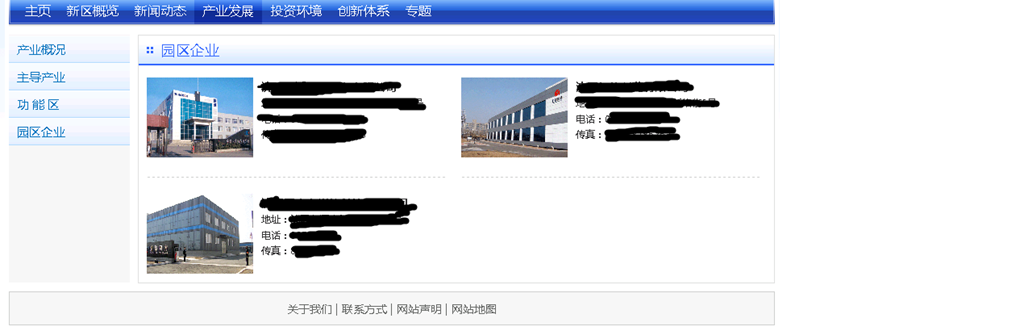
一点说明:为什么在标题中要嵌入英文?原因是为了能够让国外的网友能查询到这篇文章。平常在Google上查资料的时候,经常参考国外网友的博客,帮助我解决了很多问题,所以我也想让他们能够参考我写的内容。当然文中我不可能全部译为英文,所以我尽量把代码粘全,靠代码说话吧。
此内容由惯性聚合(RSS阅读器)自动聚合整理,仅供阅读参考。 原文来自 — 版权归原作者所有。