
惯性聚合 高效追踪和阅读你感兴趣的博客、新闻、科技资讯
阅读原文 在惯性聚合中打开

推荐订阅源

P
Proofpoint News Feed
V
V2EX
WordPress大学
WordPress大学
Google DeepMind News
Martin Fowler
Martin Fowler
小众软件
小众软件
Blog — PlanetScale
Blog — PlanetScale
月光博客
月光博客
The Cloudflare Blog
T
Tailwind CSS Blog
H
Help Net Security
腾讯CDC
爱范儿
爱范儿
人人都是产品经理
人人都是产品经理
H
Hackread – Cybersecurity News, Data Breaches, AI and More
The GitHub Blog
The GitHub Blog
Microsoft Security Blog
Stack Overflow Blog
Stack Overflow Blog
D
DataBreaches.Net
C
Check Point Blog
量子位
酷 壳 – CoolShell
酷 壳 – CoolShell
美团技术团队
让小产品的独立变现更简单 - ezindie.com

博客园 - Yuejun Sun

Office 365 Certificate Exam Resources How to: Grant Permission on Development Severs as Batch for Windows Authentications Step By Step Guide to configure the “Replicating directory changes” for SharePoint 2010 and 2013 分享:Windows Azure 电子书 Sharepoint 2013配置失败:SQL 实例没有将“MaxDegree of Parallelism”设置为1 免费注册Sharepoint 2013 站点 巧用Discussions列表归档Outlook邮件 Special Offer: Watch Three In-Depth SQL Server Courses by SQLskills (FREE) Forward:Stale statistics on a newly created temporary table in a stored procedure can lead to poor performance 续:有关SQL SERVER分布统计的问题 有关SQL Server分布统计的问题 第三章:分析基本查询的文本和XML执行计划 续第二章:分析基本查询的图形执行计划--表连接 第二章:分析基本查询的图形执行计划 第一章:执行计划基本知识--文本执行计划和XML执行计划 第一章:执行计划基本知识--范例入门 第一章:执行计划基本知识 免费下载:Inside the SQL Server Query Optimizer(查询优化器内幕) 查询优化器如何使用统计—Part I
How to: Database Service fails to start due to log full o...
Yuejun Sun · 2012-04-27 · via 博客园 - Yuejun Sun

today I got an issue reported by our partners, their database server could not start due to log full of model database, after research, I worked out a solution and wrote it down to look in futher as shown below:

Symptom:

Due to log full of model database, the database engine service could not start.

Resolution:

1. Go to cmd prompt and issue NET STOP MSSQLSERVER

2. Start SQL server in single user mode / maintenance mode with the following trace flags

NET START MSSQLSERVER /c /m /T3608

clip_image002

3. Now connect to the SQL engine with ‘sqlcmd’ console and issue the following command

clip_image004

4. Next, issue the follow command and uncomment the rest of the parameters and use the best one for your scenario

clip_image006

USE master;

GO

ALTER DATABASE model

MODIFY FILE

(

    NAME = modellog,

FILENAME = 'C:\Program Files\Microsoft SQL Server\MSSQL10.MSSQLSERVER\MSSQL\DATA.ldf',

    SIZE = 50MB)

--MAXSIZE = 100MB,

--FILEGROWTH = 5MB

4. Now run the following command to stop&start your SQL server

Net stop mssqlserver && net start mssqlserver
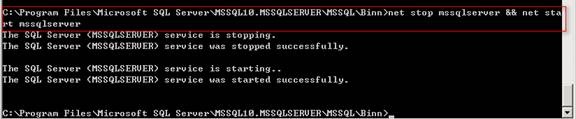
clip_image008

Hope it helps the guys need help.