惯性聚合 高效追踪和阅读你感兴趣的博客、新闻、科技资讯
阅读原文 在惯性聚合中打开

推荐订阅源

宝玉的分享
宝玉的分享
NISL@THU
NISL@THU
E
Exploit-DB.com RSS Feed
L
LINUX DO - 热门话题
L
Lohrmann on Cybersecurity
K
Kaspersky official blog
Project Zero
Project Zero
Cisco Talos Blog
Cisco Talos Blog
T
The Exploit Database - CXSecurity.com
P
Palo Alto Networks Blog
C
CXSECURITY Database RSS Feed - CXSecurity.com
T
Threatpost
S
Schneier on Security
G
GRAHAM CLULEY
The Hacker News
The Hacker News
T
Threat Research - Cisco Blogs
Scott Helme
Scott Helme
Threat Intelligence Blog | Flashpoint
P
Privacy & Cybersecurity Law Blog
C
Cyber Attacks, Cyber Crime and Cyber Security
Cyberwarzone
Cyberwarzone
C
CERT Recently Published Vulnerability Notes
T
Tor Project blog
AWS News Blog
AWS News Blog
Simon Willison's Weblog
cs.CL updates on arXiv.org
爱范儿
爱范儿
P
Privacy International News Feed
云风的 BLOG
云风的 BLOG
P
Proofpoint News Feed
S
Securelist
G
Google Developers Blog
The Last Watchdog
The Last Watchdog
Google Online Security Blog
美团技术团队
F
Fortinet All Blogs
小众软件
小众软件
Recorded Future
Recorded Future
V
Visual Studio Blog
B
Blog RSS Feed
H
Help Net Security
CTFtime.org: upcoming CTF events
Google DeepMind News
Blog — PlanetScale
Blog — PlanetScale
博客园 - 聂微东
Stack Overflow Blog
Stack Overflow Blog
Martin Fowler
Martin Fowler
Latest news
Latest news
Spread Privacy
Spread Privacy
H
Heimdal Security Blog

博客园 - qy

枚举 Duwamish7资料收集- [] 学习Duwamish7的MSDN说明及相关技术策略 Duwamish7学习笔记(七) Duwamish7学习笔记(六) Duwamish7学习笔记(五) Duwamish7学习笔记(四) Duwamish7学习笔记(三) Duwamish7学习笔记(二) Duwamish7学习笔记(-) jQuery介绍及语法----转载 浅谈.net事件机制 跟踪用户会话 按钮确认(js与C#交互) 3-28学会的几句sql语句 Visual Studio 2003/Visual Studio 2005常用快捷键 ----转 最优化javascript自定义对象 BOM 关于用div实现table的效果
使用EditPlus2编写C#代码
qy · 2007-08-22 · via 博客园 - qy

挂笔了几个月,今天又开始写文章了。

“微软的vs.net是好用,可很多时候我们只是写一些小东西就需要打开vs.net,还需要建个项目,感觉有些大材小用”

相信这是大家遇到过的问题,前几天我和我的一位朋友 果果er 发现其实使用

EditPlus2只需要配置几个参数便可以用来编译c#代码,很方便,我现在把配置的方法公布出来与大家分享。

1.在

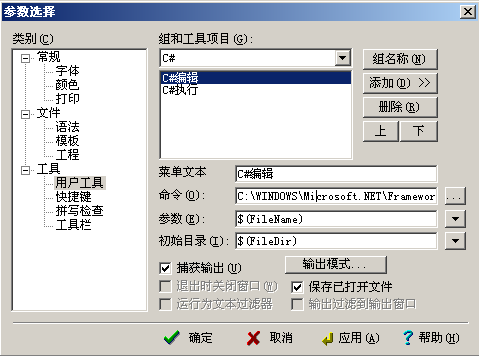
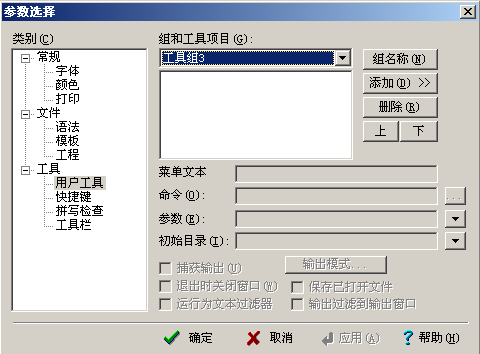
EditPlus2中的菜单栏--->工具--->参数选择,然后选择工具下的用户工具 如图:
  111.bmp

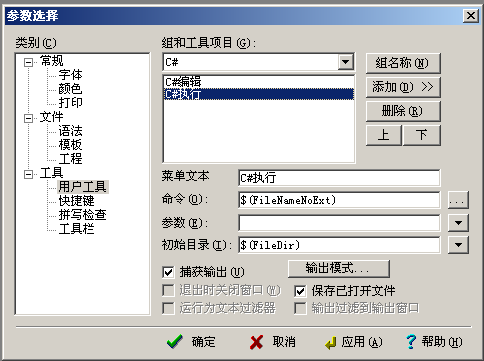
2.点击添加,添加两个应用程序,分别配置如下两图所示
  222.bmp
        
        命令那里是你的编译器csc.exe的位置,我的是.net1.1 是在C:\WINDOWS\Microsoft.NET\Framework\v1.1.4322\csc.exe
  
  333.bmp

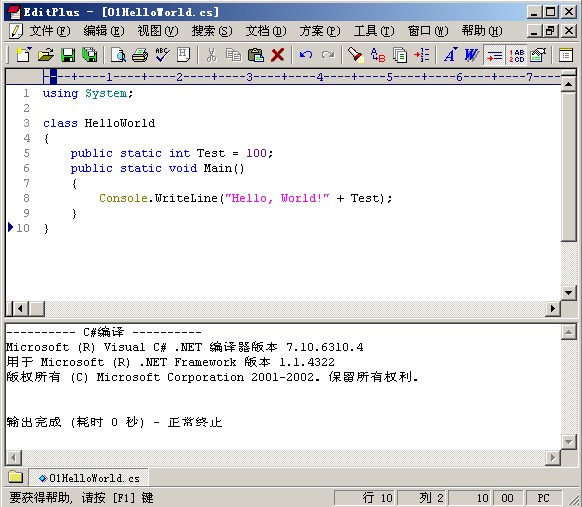
  最后我连这个工具的名字都改成C#了, 呵呵,editPlus已经默认为这部操作设置了快捷键,ctrl+1是编译代码,ctrl+2是运行代码

3.OK,快试试用新的编译器写C#代码
 新建--〉C#--〉code--〉ctrl+1
444.jpg

好了,大功告成

个人认为在下面可以使用editPlus来编写C#代码
 *.调试某些C#的书籍上的例子,如:李建中李老师译的.net框架程序设计
 *.学习掌握C#一些新的特性的时候
 *.对于英语不好的,可以借此来熟悉关键字,背单词,呵呵