







现在浏览器一般都支持gzip,deflate压缩协议 , 也就是说当服务器返回的是用gzip或deflate协议进行压缩过的内容, 浏览器将自动的进行解压缩 . 这样做可以节省大量的网络带宽,负面影响是加重了服务器的负担.
我们只是对aspx页面进行压缩 ,当然也可以压缩js和css . 但你也想用来对图片也进行压缩的话就错了 ,效果和用winzip压缩图片一样, 只能增大体积.
首先来看看一个实例 aspx页面压缩前和压缩后的页面信息
压缩前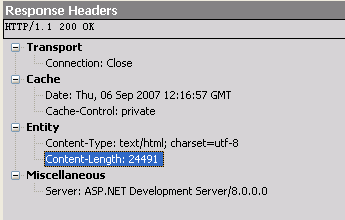
压缩后
可以看到压缩到原来页面大小的27% 效果还是可以的.
看看具体代码

#region Usingusing System;
using System.Web;
using System.IO.Compression;#endregionnamespace BlogEngine.Core.Web.HttpModules
{
/// <summary>
/// Compresses the output using standard gzip/deflate.
/// </summary>
public class CompressionModule : IHttpModule
{#region IHttpModule Members/// <summary>
/// Disposes of the resources (other than memory) used by the module
/// that implements <see cref="T:System.Web.IHttpModule"></see>.
/// </summary>
void IHttpModule.Dispose()
{
// Nothing to dispose;
}/// <summary>
/// Initializes a module and prepares it to handle requests.
/// </summary>
/// <param name="context">An <see cref="T:System.Web.HttpApplication"></see>
/// that provides access to the methods, properties, and events common to
/// all application objects within an ASP.NET application.
/// </param>
void IHttpModule.Init(HttpApplication context)
{
if (BlogSettings.Instance.EnableHttpCompression)
context.BeginRequest += new EventHandler(context_BeginRequest);
}#endregion#region Compressionprivate const string GZIP = "gzip";
private const string DEFLATE = "deflate";/// <summary>
/// Handles the BeginRequest event of the context control.
/// </summary>
/// <param name="sender">The source of the event.</param>
/// <param name="e">The <see cref="System.EventArgs"/> instance containing the event data.</param>
void context_BeginRequest(object sender, EventArgs e)
{
HttpApplication app = sender as HttpApplication;
//压缩aspx页面
if (app.Request.Url.OriginalString.ToUpperInvariant().Contains(".aspx"))
{
//是否支持压缩协议
if (IsEncodingAccepted(DEFLATE))
{
app.Response.Filter = new DeflateStream(app.Response.Filter, CompressionMode.Compress);
SetEncoding(DEFLATE);
}
else if (IsEncodingAccepted(GZIP))
{
app.Response.Filter = new GZipStream(app.Response.Filter, CompressionMode.Compress);
SetEncoding(GZIP);
}
}
}/// <summary>
/// Checks the request headers to see if the specified
/// encoding is accepted by the client.
/// </summary>
private static bool IsEncodingAccepted(string encoding)
{
return HttpContext.Current.Request.Headers["Accept-encoding"] != null && HttpContext.Current.Request.Headers["Accept-encoding"].Contains(encoding);
}/// <summary>
/// Adds the specified encoding to the response headers.
/// </summary>
/// <param name="encoding"></param>
private static void SetEncoding(string encoding)
{
HttpContext.Current.Response.AppendHeader("Content-encoding", encoding);
}#endregion
}
}
此内容由惯性聚合(RSS阅读器)自动聚合整理,仅供阅读参考。 原文来自 — 版权归原作者所有。