
惯性聚合 高效追踪和阅读你感兴趣的博客、新闻、科技资讯
阅读原文 在惯性聚合中打开

推荐订阅源

P
Privacy & Cybersecurity Law Blog
V
V2EX
月光博客
月光博客
奇客Solidot–传递最新科技情报
奇客Solidot–传递最新科技情报
The Register - Security
MongoDB | Blog
MongoDB | Blog
P
Privacy International News Feed
The Last Watchdog
The Last Watchdog
Security Archives - TechRepublic
美团技术团队
Stack Overflow Blog
Stack Overflow Blog
博客园 - 司徒正美
博客园 - 三生石上(FineUI控件)
V
Visual Studio Blog
cs.CV updates on arXiv.org
K
Kaspersky official blog
S
Secure Thoughts
T
Tenable Blog
Security Latest
Security Latest
The Cloudflare Blog
S
Security @ Cisco Blogs
H
Heimdal Security Blog
aimingoo的专栏
aimingoo的专栏
TaoSecurity Blog
TaoSecurity Blog
Blog — PlanetScale
Blog — PlanetScale
Microsoft Security Blog
Schneier on Security
Webroot Blog
Webroot Blog
G
Google Developers Blog
www.infosecurity-magazine.com
Scott Helme
Scott Helme
IT之家
IT之家
Latest news
Latest news
The Hacker News
The Hacker News
C
Check Point Blog
T
The Exploit Database - CXSecurity.com
H
Hackread – Cybersecurity News, Data Breaches, AI and More
腾讯CDC
C
CERT Recently Published Vulnerability Notes
NISL@THU
NISL@THU
N
News | PayPal Newsroom
Forbes - Security
Forbes - Security
P
Palo Alto Networks Blog
S
Security Affairs
S
Securelist
Google Online Security Blog
WordPress大学
WordPress大学
Last Week in AI
Last Week in AI
C
Cybersecurity and Infrastructure Security Agency CISA
A
About on SuperTechFans

博客园 - 青松阳光

SharePoint 2013 & Office 365 新版本功能列表 Windows PowerShell for SharePoint Command Builder SharePoint Server 2013 RTM 开发测试虚拟机部署文档 SharePoint Reaches RTM! SharePoint 2013 Designer 去掉Design View的原因,官方有了正式的解释 Office 365 Enterprise Preview SharePoint Server 2013 Preview 新变化 SharePoint Server 2013 Preview虚拟机安装步骤文档 Office 2013 和 SharePoint 2013开发学习视频 彻底解决SharePoint开发Debug中弹出的IIS Ping超时问题 推荐两本SharePoint2010开发必看的书籍 Office Web App 安装完之后发现在线查看Word或者PPT发生错误解决方案 MSDN针对SharePoint 2010提供了101个解决方案示例代码供下载 2010 Information Worker Demonstration and Evaluation Virtual Machine (SP1) 提供下载 使用XSLT和XML创建Excel 在SharePoint中服务器端使用Word编程模型转换PDF遇到的问题以及解决方法 Thinkpad T410 安装Windows Server 2008 R2 启用Hyper-v蓝屏故障解决方法 Visual Studio 2008 Extensions for Windows SharePoint Services 3.0(VSeWSS) 1.3版本发布 SPDisposeCheck 工具新版本发布
开发自定义字段时一定要注意复合控件的ID问题
青松阳光 · 2012-04-16 · via 博客园 - 青松阳光

在项目开发的时候,会开发一些自定义字段,这些字段在编辑的时候可能包含一些复合控件,例如有文本框,隐藏域等。如果一个列表中只创建一个该类型字段实例时还不会有什么大的问题。但是如果创建了两个以上该字段实例的时候,如果复合控件的ID处理不当,里面又加上了js操作控件处理逻辑,将会出现问题。

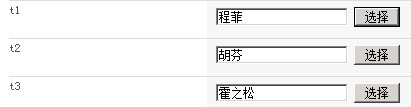
例如我在项目中,开发了单一选择用户的自定义字段,见下图所示,
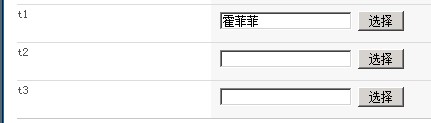
字段中包含了js处理文本框和隐藏域,再有两个以上的该字段实例的时候,给第二个字段选择人员时点击确定,将会填充到第一个字段中,也就是说第二个字段以后将不好使。用developer tool工具查看前两个文本框的ID,竟然是一样的,见下图所示

其原因是自定义字段中对复合控件的ID没有任何处理,这些控件是在RenderingTemplate中声明的,如下图
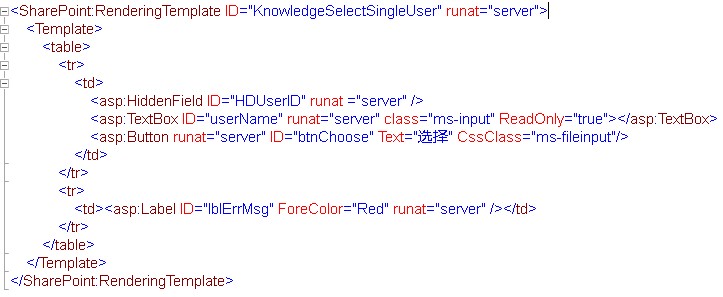
这里声明文本框ID和隐藏域ID是不可能改成不一样的,那么我们可以从继承自

BaseFieldControl的类中,将以上控件的字段ID改掉,加入一个不同的前缀,最理想的前缀就是用与之关联的Field的InternalName了,如下图
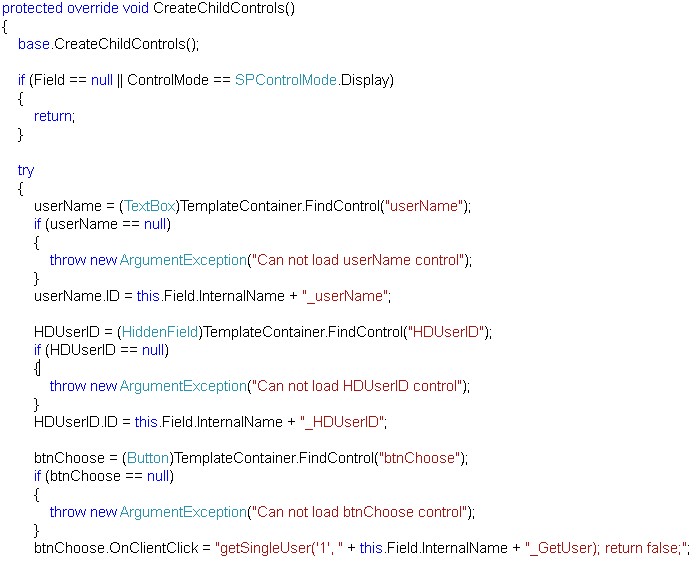
然后再hook的js中修改一下
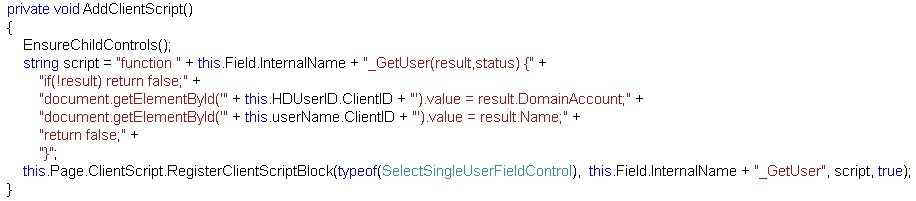
重新部署之后,就会解决找不到相应文本框的问题了,如下图
希望这种解决方案可以给大家带来帮助。