惯性聚合 高效追踪和阅读你感兴趣的博客、新闻、科技资讯
阅读原文 在惯性聚合中打开

推荐订阅源

腾讯CDC
Schneier on Security
B
Blog RSS Feed
aimingoo的专栏
aimingoo的专栏
P
Proofpoint News Feed
A
About on SuperTechFans
Recorded Future
Recorded Future
Recent Announcements
Microsoft Security Blog
L
LangChain Blog
Hugging Face - Blog
Hugging Face - Blog
The GitHub Blog
The GitHub Blog
Google DeepMind News
T
Tailwind CSS Blog
Vercel News
Vercel News
H
Hackread – Cybersecurity News, Data Breaches, AI and More
MyScale Blog
MyScale Blog
V2EX - 技术
V2EX - 技术
N
Netflix TechBlog - Medium
F
Fortinet All Blogs
V
Visual Studio Blog
Martin Fowler
Martin Fowler
K
KPMG report finds enterprise disconnect between AI and its ROI | CIO
博客园 - Franky
freeCodeCamp Programming Tutorials: Python, JavaScript, Git & More
T
The Exploit Database - CXSecurity.com
F
Full Disclosure
Scott Helme
Scott Helme
H
Heimdal Security Blog
博客园 - 叶小钗
Google DeepMind News
Cyberwarzone
Cyberwarzone
Application and Cybersecurity Blog
V
Vulnerabilities – Threatpost
Blog — PlanetScale
Blog — PlanetScale
Security Latest
Security Latest
WordPress大学
WordPress大学
Cyber Security Advisories - MS-ISAC
T
Troy Hunt's Blog
S
SegmentFault 最新的问题
Forbes - Security
Forbes - Security
Jina AI
Jina AI
S
Securelist
小众软件
小众软件
Simon Willison's Weblog
J
Java Code Geeks
AWS News Blog
AWS News Blog
N
News and Events Feed by Topic
博客园 - 三生石上(FineUI控件)
量子位

博客园 - 青松阳光

SharePoint 2013 & Office 365 新版本功能列表 Windows PowerShell for SharePoint Command Builder SharePoint Server 2013 RTM 开发测试虚拟机部署文档 SharePoint Reaches RTM! SharePoint 2013 Designer 去掉Design View的原因,官方有了正式的解释 Office 365 Enterprise Preview SharePoint Server 2013 Preview 新变化 SharePoint Server 2013 Preview虚拟机安装步骤文档 Office 2013 和 SharePoint 2013开发学习视频 开发自定义字段时一定要注意复合控件的ID问题 推荐两本SharePoint2010开发必看的书籍 Office Web App 安装完之后发现在线查看Word或者PPT发生错误解决方案 MSDN针对SharePoint 2010提供了101个解决方案示例代码供下载 2010 Information Worker Demonstration and Evaluation Virtual Machine (SP1) 提供下载 使用XSLT和XML创建Excel 在SharePoint中服务器端使用Word编程模型转换PDF遇到的问题以及解决方法 Thinkpad T410 安装Windows Server 2008 R2 启用Hyper-v蓝屏故障解决方法 Visual Studio 2008 Extensions for Windows SharePoint Services 3.0(VSeWSS) 1.3版本发布 SPDisposeCheck 工具新版本发布
彻底解决SharePoint开发Debug中弹出的IIS Ping超时问题
青松阳光 · 2012-04-09 · via 博客园 - 青松阳光

当我们调试SharePoint2010开发代码时候,经常会遇到讨厌的界面,如下
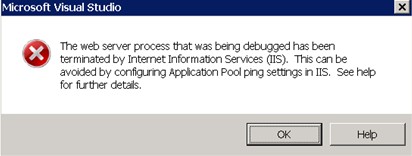
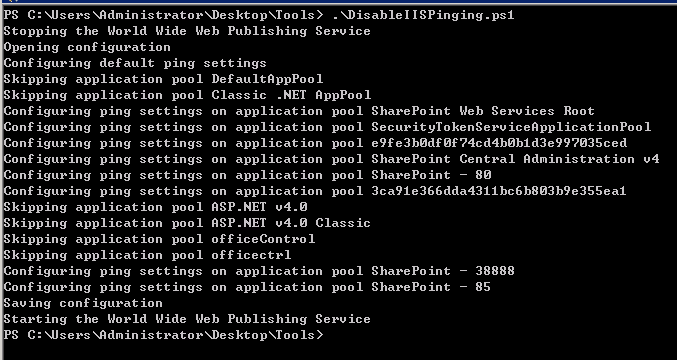
一般的做法,是找到SharePoint站点所用到的应用程序池,在高级设置中将Enable Ping改为false。然后如果你创建了多个web应用程序,需要手工的将每一个应用程序池设置都改一遍。将来新建的时候还需要手工改。现在给大家推荐一个powershell脚本,一个老外写的,其原理是从根子上在iis配置信息中将Enable Ping改为false,这样不管是现在的应用程序池,还是将来有可能新添加的应用程序池都不用担心调试带来的骚扰问题了。运行结果截图