惯性聚合 高效追踪和阅读你感兴趣的博客、新闻、科技资讯
阅读原文 在惯性聚合中打开

推荐订阅源

P
Privacy International News Feed
I
Intezer
T
Tenable Blog
S
Schneier on Security
Project Zero
Project Zero
G
GRAHAM CLULEY
酷 壳 – CoolShell
酷 壳 – CoolShell
小众软件
小众软件
Know Your Adversary
Know Your Adversary
博客园 - 司徒正美
The Cloudflare Blog
Recent Commits to openclaw:main
freeCodeCamp Programming Tutorials: Python, JavaScript, Git & More
N
News and Events Feed by Topic
博客园 - 叶小钗
宝玉的分享
宝玉的分享
L
LINUX DO - 热门话题
aimingoo的专栏
aimingoo的专栏
S
Secure Thoughts
Forbes - Security
Forbes - Security
T
The Exploit Database - CXSecurity.com
D
Darknet – Hacking Tools, Hacker News & Cyber Security
OSCHINA 社区最新新闻
OSCHINA 社区最新新闻
博客园 - 【当耐特】
罗磊的独立博客
IT之家
IT之家
H
Hacker News: Front Page
I
InfoQ
云风的 BLOG
云风的 BLOG
S
Security Affairs
M
MIT News - Artificial intelligence
GbyAI
GbyAI
Jina AI
Jina AI
Help Net Security
Help Net Security
Engineering at Meta
Engineering at Meta
大猫的无限游戏
大猫的无限游戏
Webroot Blog
Webroot Blog
L
Lohrmann on Cybersecurity
A
About on SuperTechFans
Attack and Defense Labs
The Register - Security
V
V2EX
G
Google Developers Blog
D
DataBreaches.Net
Apple Machine Learning Research
C
Cybersecurity and Infrastructure Security Agency CISA
J
Java Code Geeks
W
WeLiveSecurity
Cloudbric
Cloudbric
T
Tor Project blog

博客园 - 独孤雁

在win2008中安装vs2005 【转】NPOI 单元格级别应用 [转]google hosts 2015 [转] C#反射设置属性值和获取属性值 [转]Visual Studio技巧之打造拥有自己标识的代码模板 [转]VS2005/2008过期之后简单实用的升级方法 【转】在web 项目使用了ReportViewer时出错 使用NPOI导出excel .NET中TextBox控件设置ReadOnly=true后台取不到值的解决方法 window.location 对象所包含的属性 【原】提交按钮被隐藏,回车一样提交表单 【转】Eclipse安装SVN插件 [转]listview学习 安卓App程序访问网络 需要配置权限(java.net.SocketException: Permission denied) 【转】Android模拟器怎么配置网络连通 【转】Adobe Dreamweaver CS5序列号 【转】HTML特殊符号对照表 【转】ScriptX打印问题 Android SDK Manager无法更新的解决
【转】mysql如何跟踪执行的sql语句
独孤雁 · 2014-12-07 · via 博客园 - 独孤雁

转自http://blog.csdn.net/testcs_dn/article/details/18791815

在SQL SERVER下跟踪sql采用事件探查器,而在mysql下如何跟踪sql呢?

其实方法很简单,开启mysql的日志log功能,通过查看跟踪日志即可。

开启mysql的日志log方法:

windows环境下的配置方法:

我使用的版本:Version: 5.0.37-community-nt-log (MySQL Community Edition (GPL))

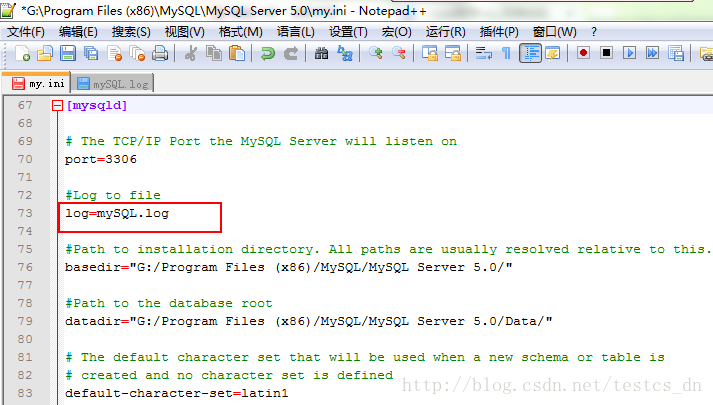
找到my.ini,我的是在“G:\Program Files (x86)\MySQL\MySQL Server 5.0”目录下,

找到[mysqld],在下面添加:     


 log=存放日志的路径/my.log

我的配置值:


保存文件,重启服务之后,在“G:\Program Files (x86)\MySQL\MySQL Server 5.0\data”目录下可以找到“mySQL.log”文件。

linux下的配置方法:

修改/etc/my.cnf,找到[mysqld],在下面添加:

log=存放日志的路径/my.log

修改完后,记得重启mysql服务哦。