惯性聚合 高效追踪和阅读你感兴趣的博客、新闻、科技资讯
阅读原文 在惯性聚合中打开

推荐订阅源

V
Visual Studio Blog
Recent Announcements
有赞技术团队
有赞技术团队
The GitHub Blog
The GitHub Blog
N
Netflix TechBlog - Medium
腾讯CDC
A
About on SuperTechFans
博客园 - 叶小钗
大猫的无限游戏
大猫的无限游戏
小众软件
小众软件
D
DataBreaches.Net
D
Docker
宝玉的分享
宝玉的分享
量子位
Microsoft Azure Blog
Martin Fowler
Martin Fowler
博客园 - 三生石上(FineUI控件)
Jina AI
Jina AI
freeCodeCamp Programming Tutorials: Python, JavaScript, Git & More
V
V2EX
Last Week in AI
Last Week in AI
H
Help Net Security
Hugging Face - Blog
Hugging Face - Blog
M
MIT News - Artificial intelligence

博客园 - hzwang

Administering your Windows Internal Database (MICROSOFT##SSEE) instance(转) learning F#(1):编程环境 learning F#: 开篇 Tip for using Fiddler on localhost (转载)ASP.NET MVC – Add CSS class Attribute I will write at least one blog every week 使用位逻辑运算来实现位向量 对象判等 sql bcp Utility工具使用 C# 3.0 —— 扩展方法 读代码随笔(一):using语句的使用 visitor(访问者)模式 - hzwang - 博客园 抽象类与接口(转) 在 C# 中实现 Singleton (转) 设置VSS2005使支持通过Internet访问 VSS使用手册 ASP.NET Forms 身份验证控制流 Cookie使用总结 不断努力,不断学习
VS 2008如何连接TFS 2010
hzwang · 2010-04-06 · via 博客园 - hzwang

首先我们要打两个补丁包

Microsoft Visual Studio 2008 Service Pack 1

Visual Studio Team System 2008 Service Pack 1 Forward Compatibility Update for Team Foundation Server 2010

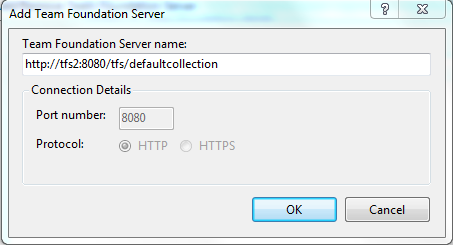
剩下的连接工作相当简单,按照如下的格式填写Team Foundation Server name: http://[tfsserver]:[port]/[vdir]/[projectCollection]
image

看起来有些复杂,其实还是很好理解的。

TFS 2010有个新特性,可以指定一个虚拟目录(virtual directory),默认情况下是tfs。如果你的TFS服务器的名字是tfs2,使用默认的虚拟目录:tfs。端口默认是8080。TFS 2010下可以管理很多个collection,默认的名字是defaultcollection。

如果大部分都使用默认值的话,这个“连接字符串”可以写为:http://tfs2:8080/tfs/defaultcollection。

VS2005无法连接到TFS 2010,所以如果使用VS2005做为开发工具,且没有升级的要求,就不要升级到TFS 2010。

在从VS 2008 连接到TFS 2010 过程中,可能会产生一些错误,大部分是因为没有安装好补丁包导致的。这里列举两个我曾遇到的问题:
  1. 当填好Server Name之后,点击确定。提示如下错误:TF30335: The server name cannot contain the characters '/' or ':' or start with 'http://' or 'https://。这是因为没有安装Microsoft Visual Studio 2008 Service Pack 1。也有一种可能是先装的SP1,然后再安装的Team Explorer,这种情况下需要重新安装SP1。
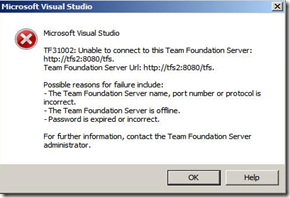
  2. 同样的Server Name,提示不同的错误:TF31002: Unable to connect to this Team Foundation Server: http://tfs2:8080/tfs. Possible reasons for failure include:
    • The Team Foundation Server name, port number or protocol is incorrect.
    • The Team Foundation Server is offline.
    • Password is expired or incorrect.

image 

这是因为没有安装Visual Studio Team System 2008 Service Pack 1 Forward Compatibility Update for Team Foundation Server 2010,相信安装好后,能成功连接。