




惯性聚合 高效追踪和阅读你感兴趣的博客、新闻、科技资讯
阅读原文 在惯性聚合中打开

推荐订阅源

J
Java Code Geeks
博客园 - 司徒正美
博客园 - 【当耐特】
爱范儿
爱范儿
OSCHINA 社区最新新闻
OSCHINA 社区最新新闻
IT之家
IT之家
人人都是产品经理
人人都是产品经理
雷峰网
雷峰网
酷 壳 – CoolShell
酷 壳 – CoolShell
freeCodeCamp Programming Tutorials: Python, JavaScript, Git & More
大猫的无限游戏
大猫的无限游戏
月光博客
月光博客
宝玉的分享
宝玉的分享
V
V2EX
S
SegmentFault 最新的问题
V
Visual Studio Blog
阮一峰的网络日志
阮一峰的网络日志
Martin Fowler
Martin Fowler
Jina AI
Jina AI
让小产品的独立变现更简单 - ezindie.com
博客园_首页
L
LangChain Blog
D
Docker
腾讯CDC

博客园 - 三胖他爹

VC CUtilityLZW 效率还行的LZW压缩算法,随机数加密 VC CQHashNTBuffer 牛逼的Hash表 UINT32 VC CHashBuffer 牛逼的hash表算法,字符串查找块了100倍 关闭Fedora防火墙 gnome 屏幕截图 zynq -- arm-xilinx-eabi-路径 Fedora 14安装出现的错误 fedora19安装后,需要安装的一些必备的软件包 zynq -- cannot find -lxil Zynq -- 启动过程 OTG: On-The-Go MarshalHelper iec61850采样协议(9-1、9-2)解析(二) 找不到/dev/input/event的原因 iec61850采样协议(9-1、9-2)解析(一) C语言项目常用的头文件声明及相关宏定义 TTY头文件注释 设置和取得串口参数 程序调用shell设置ip地址
Zynq --- SDK - Cannot compile ARM application on Windows ...
三胖他爹 · 2013-09-03 · via 博客园 - 三胖他爹

If I attempt to compile any application on a Zynq device in SDK, the following error occurs on the console:

Running libs - 'make -s libs "COMPILER=arm-xilinx-eabi-gcc"
"ARCHIVER=arm-xilinx-eabi-ar" "COMPILER_FLAGS= -O2 -c"
"EXTRA_COMPILER_FLAGS=-g"'.
"Compiling common"
process_begin: CreateProcess(NULL, arm-xilinx-eabi-gcc -O2 -c -g -I../../../include *.c, ...) failed.
make (e=2): The system cannot find the file specified.

This is a known issue, the nt64/lin64 folder has been removed in the EDK install directory.

To work around this issue, avoid using the Launch SDK option in the PlanAhead or Vivado tools.

Instead, launch SDK manually using one of the following options:

  • Launch SDK directly from the installation directory  <install_dir>\14.4\ISE_DS\EDK\bin\nt64\xsdk.exe (or)
  • Launch SDK from the Desktop Shortcut (or)
  • Launch SDK from the Start Menu Shortcut (or)
  • Launch SDK after sourcing the environment
    • Open a Command Prompt
    • Source the settings file (<install_dir>\14.4\ISE_DS\settings64.bat)
    • Launch SDK using the xsdk command

Or, you can copy the nt/lin folder at: <install_dir>\14.4\ISE_DS\EDK\gnu\arm
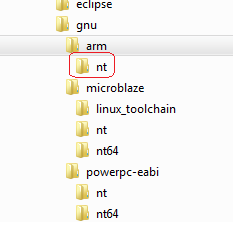
Paste it, and rename it to nt64/lin64:
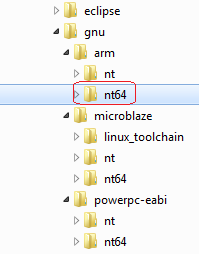
Then, run the application again and it should compile correctly.

posted on 2013-09-03 17:39  三胖他爹  阅读(457)  评论()    收藏  举报