


晚上闲来无事,研究了一下最近很火的MongoDB。感受只有一个:“自由”。
闲话略过,先让MongoDB在Win7 64下跑起来:
1. MongoDB主页
2. 下载
http://downloads.mongodb.org/win32/mongodb-win32-x86_64-1.8.1.zip
3. 解压
e.g. H:\mongodb-win32-x86_64-1.8.1
4. 准备目录
e.g. H:\mongo\data --保存数据库文件 H:\mongo\logs --保存log,在此目录下手动创建一个log.txt
5. 安装
Win键,输入cmd,右键-Run as Administrator
cd H:\mongodb-win32-x86_64-1.8.1\bin
H:
mongod --bind_ip 127.0.0.1 --logpath H:\mongo\logs\log.txt --logappend --dbpath H:\mongo\data --directoryperdb –install
net start “MongoDB”
成功。
6. 测试安装
在之前的CMD窗口中输入:mongo
应该能无异常进入query界面
输入一个3+3,应该能得到6
关掉cmd,这玩意儿没用了。
7. 下载.Net Connector
https://github.com/mongodb/mongo-csharp-driver/archives/master
解压
打开CSharpDriverSetup-2010.sln
Build
失败
删除DriverSetup中对CHM的引用
重新编译,成功
右键DriverSetup – Install
下一步下一步下一步。。。
8. 创建Asp.Net MVC3 Empty project
若无,请自行安装MVC3的TOOL
9. Add ConnectionString in web.config
<connectionStrings>
<add name="MongoDB" connectionString="mongodb://localhost/test"/>
</connectionStrings>
10. Add Controller
Controller with empty read/write actions
11. Access to the DB
private MongoDatabase GetDB()
{
return MongoDatabase.Create(ConfigurationManager.ConnectionStrings["MongoDB"].ConnectionString);
}
12. Create Action
[HttpPost] public ActionResult Create(FormCollection collection)
{
try
{
var db = GetDB();
foreach (var key in collection.AllKeys)
{
db["testTable"].Insert(new MongoDB.Bson.BsonDocument{
{key, collection[key]}
});
}return RedirectToAction("Index");
}
catch
{
return View();
}
}
13. Index Action public ActionResult Index()
{
try
{
var db = GetDB();
var testTable
= db["testTable"].FindAll();
var result = new StringBuilder();
foreach (var testData in testTable)
{
foreach (var property in testData.Names)
{
result.AppendFormat("{0}:{1} ", property, testData[property]);
} result.Append(
"<br />");
}return Content(result.ToString());
}
catch
{
return View();
}
}14. Create Views under Views/Home/
Create.cshtml:
@{
    ViewBag.Title = "Create";
    Layout = "~/Views/Shared/_Layout.cshtml";
}<h2>Create</h2><form method="post" action="/Home/Create">
    Name:
    <input name="name" type="text" /><br />
    Age:
    <input name="age" type="text" /><br />
    Gender:
    <input name="gender" type="text" /><br />
    Married:
    <input name="married" type="text" /><br />
    <input type="submit" value="Add" />
</form>
Index.cshtml
@{
    ViewBag.Title = "Index";
    Layout = "~/Views/Shared/_Layout.cshtml";
}<h2>Index</h2>
<a href="Create">Create New</a>
15. Modify Global.asax.cs
            routes.MapRoute(
                "Default", // Route name
                "{controller}/{action}/{id}", // URL with parameters
                new { controller = "Home", action = "Create", id = UrlParameter.Optional } // Parameter defaults
            );
11. Build & Run

Press Add
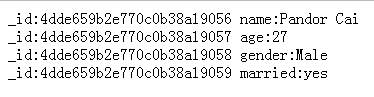
All Done. Happy and enjoy.
补上项目下载:
https://files.cnblogs.com/pandora/MvcApplication1.zip
此内容由惯性聚合(RSS阅读器)自动聚合整理,仅供阅读参考。 原文来自 — 版权归原作者所有。
