





Phi4-mini开始支持tools了,但在第一时间试用时不理想,kenfey最近发了一篇解决方案,详见https://techcommunity.microsoft.com/blog/educatordeveloperblog/building-ai-agents-on-edge-devices-using-ollama--phi-4-mini-function-calling/4391029。本篇文章想更详细地梳理一下,结合SK来给出一个完整的例子。
首先安装olloma,然后安装phi4-mini,命令如下:
ollama pull phi4-mini
原生成phi4-mini对tools支持有有问题的,这里需在替换一下modelfile,可以先用下面命令查看一下原来的modelfile,以便获取FROM地的址信息:
ollama show phi4-mini --modelfile
找一个目录把下面修正后的Modefile存起来,Modefile文件没有扩展名。
FROM C:\Users\axzxs\.ollama\models\blobs\sha256-3c168af1dea0a414299c7d9077e100ac763370e5a98b3c53801a958a47f0a5db
TEMPLATE """{{- if or .System .Tools }}<|system|>{{ if .System }}{{ .System }}{{ end }}
{{- if .Tools }}
{{- if not .System }}You may call one or more functions to assist with the user query. You are provided with function signatures.
{{- end }}<|tool|>[{{- range .Tools }}{{ .Function }}{{ end }}]<|/tool|><|end|>
{{- end }}
{{- end }}
{{- range $i, $_ := .Messages }}
{{- $last := eq (len (slice $.Messages $i)) 1 -}}
{{- if ne .Role "system" }}<|{{ .Role }}|>{{ .Content }}
{{- if .ToolCalls }}<|tool_call|>[{{ range .ToolCalls }}{"name":"{{ .Function.Name }}","arguments":{{ .Function.Arguments }}}{{ end }}]<|/tool_call|>
{{- end }}
{{- if not $last }}<|end|>
{{- end }}
{{- if and (ne .Role "assistant") $last }}<|end|><|assistant|>{{ end }}
{{- end }}
{{- end }}"""
然后用下面命令重写Modelfile:
ollama create phi4-mini -f "你的Modelfile路径"
SK调用Phi4-mini tools的代码如下:
using Microsoft.Extensions.DependencyInjection;
using Microsoft.Extensions.Logging;
using Microsoft.SemanticKernel;
using Microsoft.SemanticKernel.ChatCompletion;
using Microsoft.SemanticKernel.Connectors.Ollama;
using Microsoft.SemanticKernel.Connectors.OpenAI;
using OllamaSharp;
using OllamaSharp.Models;
using OpenAI.RealtimeConversation;
using System;
using System.ComponentModel;
using System.ComponentModel.DataAnnotations;
#pragma warning disable

await Call();
Console.ReadLine();
async Task Call()
{
    var builder = Kernel.CreateBuilder();
    var modelId = "phi4-mini";
    var endpoint = new Uri("http://localhost:11434");
    builder.Services.AddOllamaChatCompletion(modelId, endpoint);
    builder.Plugins.AddFromType<OrderPlugin>();
    var kernel = builder.Build();
    var chatCompletionService = kernel.GetRequiredService<IChatCompletionService>();
    var settings = new OllamaPromptExecutionSettings { FunctionChoiceBehavior = FunctionChoiceBehavior.None() };
    Console.Write(">>> ");
    string? input = "获取订单编号为SN0000111的订单总额?";
    Console.WriteLine(input);
    try
    {
        ChatMessageContent chatResult = await chatCompletionService.GetChatMessageContentAsync(input, settings, kernel);
        Console.Write($"\n>>> Result: {chatResult}\n\n> ");
    }
    catch (Exception ex)
    {
        Console.WriteLine($"Error: {ex.Message}\n\n> ");
    }
}
public class OrderPlugin
{
    [KernelFunction]
    [Description("获取订单总额")]
    public decimal GetOrderAmount([Description("订单编号")] string orderNo)
    {
        Console.WriteLine($"订单编号:{orderNo},订单:12345.67");
        return 12345.67m;
    }
}
运行结果如下:
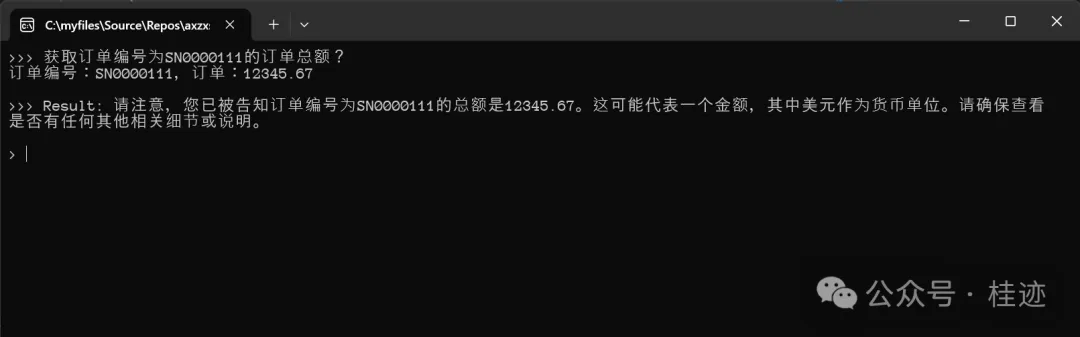
从试用的结果来看,并不是每次都是理想的,调用tools成功率还不理想,期望官方能更新,进一步提升调成率。
文章来源微信公众号
想要更快更方便的了解相关知识,可以关注微信公众号

****欢迎关注我的asp.net core系统课程****
《asp.net core精要讲解》 https://ke.qq.com/course/265696
《asp.net core 3.0》 https://ke.qq.com/course/437517
《asp.net core项目实战》 https://ke.qq.com/course/291868
《基于.net core微服务》 https://ke.qq.com/course/299524
此内容由惯性聚合(RSS阅读器)自动聚合整理,仅供阅读参考。 原文来自 — 版权归原作者所有。