










Middleware是OWIN管道的基本组成单元,最后拼接的OWIN管道来处理客户端请求,输出网页。这篇文章,首先看看Web Form, MVC, Web API如何结合OWIN使用。 然后将如何编写Middleware和编写一个具体的Cache Middleware.
阅读目录:
一. 原有的Web Form, MVC项目如何结合OWIN?
1.1 通过路由配置,将程序分成多个部分,一些部分由Asp.net Web Form或者MVC处理,另外一部分由OWIN管道处理。
二. Web API以Middleware注册到OWIN管道
1.2 在Web Form, MVC之前插入OWIN三. 自定义Cache Middleware
3.1 HelloWorld Middleware
3.2 Cache Middleware四,总结
坏消息,非常抱歉,尽管OWIN是革命性的,但是Web Form和MVC现在还不能作为一个中间件集成到OWIN管道中。原因在第一篇中Asp.net的历史中有分析过,原因就是Web Form和MVC依赖于System.Web.dll中的很多类型。而在OWIN管道中,是无法提供这些依赖的。不过好消息是,在Asp.net vNext中,将会彻底告别System.Web.dll依赖, 那个时候,Asp.net vNext将是集大成者。听说vNext项目组正在和Mono团队一起工作,使得Asp.net vNext开发的项目能够在*nix, osx系统上运行。
那么在当前的情况下,OWIN和Web Form, MVC的结合开发一般是两种形式:
1. 通过路由配置,将程序分成多个部分,一些部分由Asp.net Web Form或者MVC处理,另外一部分由OWIN管道处理。
// How to hook OWIN pipelines into the normal Asp.Net route table side by side with other components.
protected void Application_Start(object sender, EventArgs e)
{
     //owin开头的访问路径将会发送到startup.cs初始化的OWIN管道处理
     RouteTable.Routes.MapOwinPath("/owin");
     //special开头的访问路径将会由OwinApp2管道来处理

     RouteTable.Routes.MapOwinPath("/special", app =>
     {
         app.Run(OwinApp2.Invoke);
     });
}
如上面代码,在Application_Start函数或者路由配置函数中,分别为/owin路径和/special配置了不同的OWIN管道。
完整的代码,请移步这里http://aspnet.codeplex.com/sourcecontrol/latest#Samples/Katana/AspNetRoutes/Global.asax.cs
2. 在Web Form, MVC之前插入OWIN
在Web Form和MVC项目中,也可以添加Startup.cs, 指定成为OWIN的初始化类型,那么请求会先经过OWIN管道处理,最后转向Web Form或者MVC程序。这种方式,常常用来配置log, authentication, cache等等这些Middleware.
Web API由于无任何依赖于System.web.dll, 所以Web API可以作为Middleware注册到OWIN管道中。
具体方法如下:
  public class Startup
    {
        // Invoked once at startup to configure your application.
        public void Configuration(IAppBuilder builder)
        {
            HttpConfiguration config = new HttpConfiguration();
            config.Routes.MapHttpRoute("Default", "api/{controller}/{customerID}", new { controller = "Customer", customerID = RouteParameter.Optional });//定义web api route
            //xml格式输出结果
            config.Formatters.XmlFormatter.UseXmlSerializer = true;

            config.Formatters.Remove(config.Formatters.JsonFormatter);
            // config.Formatters.JsonFormatter.UseDataContractJsonSerializer = true;
            //将web api以Middleware注册到OWIN管道中
            builder.UseWebApi(config);
        }
    }
先建一个Middleware, 通过继承OwinMiddleware基类。这个Middleware的功能非常简单,就是打印当前的系统时间。
public class HelloWorldMiddleware : OwinMiddleware
{
       public HelloWorldMiddleware(OwinMiddleware next) : base(next)
       {
       }

       public override Task Invoke(IOwinContext context)
       {
           var response = "Hello World! It is " + DateTime.Now;
           context.Response.Write(response);
           return Next.Invoke(context);
       }
}
将该Middleware注册到OWIN管道后,执行得到的网页:
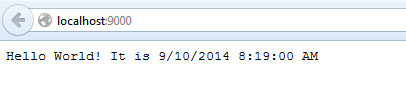
只要我们不断的刷新网页,每次显示的时间都会不同,因为每次都会重新读取系统时间,重新呈现页面。
实现cache middleware的思路比较简单,以访问的Url为key, 以输出的内容为value。第一次访问的时候,会缓存下来输出的内容,在下次访问的时候,将直接返回缓存的内容,而不是重新生成。具体代码如下:

public class CacheMiddleware : OwinMiddleware
   {
       private readonly IDictionary<string, CacheItem> _responseCache = new Dictionary<string, CacheItem>(); //Cache存储的字典

       public CacheMiddleware(OwinMiddleware next)
           : base(next)
       {
       }

       public override Task Invoke(IOwinContext context)
       {
           context.Environment["caching.addToCache"] = new Action<IOwinContext, string, TimeSpan>(AddToCache);
           var path = context.Request.Path.Value;

           //如果访问的路径没有缓存,就传递到OWIN管道的下一层中处理

           if (!_responseCache.ContainsKey(path))           {
               return Next.Invoke(context);
           }
           var cacheItem = _responseCache[path];

           //检查缓存是否到期
           if (cacheItem.ExpiryTime <= DateTime.Now)
           {
               _responseCache.Remove(path);
               return Next.Invoke(context);
           }

           //直接从缓存中输出,而不是重新render页面
           context.Response.Write(cacheItem.Response);
           return Task.FromResult(0);
       }

       //添加cache的方法,将会以委托的方式存放到OWIN管道字典中,这样任何OWIN的Middleware都能够调用,从而保存数据到缓存

       public void AddToCache(IOwinContext context, string response, TimeSpan cacheDuration)

       {
           _responseCache[context.Request.Path.Value] = new CacheItem { Response = response, ExpiryTime = DateTime.Now + cacheDuration };
       }

       private class CacheItem
       {
           public string Response { get; set; }//保存缓存的内容
           public DateTime ExpiryTime { get; set; }//确定缓存的时间
       }
   }
View Code
接下来,我们要改造HelloWorldMiddleware, 在HelloWorldMiddleware输出后,我们把输出的内容保存到Cache中。具体代码如下:
public class HelloWorldMiddleware : OwinMiddleware
   {
       public HelloWorldMiddleware(OwinMiddleware next) : base(next)
       {
       }

       public override Task Invoke(IOwinContext context)
       {
           var response = "Hello World! It is " + DateTime.Now;

           if (context.Environment.ContainsKey("caching.addToCache"))//这里直接从OWIN管道的字典中,检查是否有add cache, 如果存在,就将输出内容缓存到cache中,过期时间为10分钟。
           {
               var addToCache = (Action<IOwinContext, string, TimeSpan>)context.Environment["caching.addToCache"];
               addToCache(context, response, TimeSpan.FromMinutes(10));
           }

           context.Response.Write(response);
           return Task.FromResult(0);
       }
   }
View Code
最后,将CacheMiddleware添加到OWIN管道中发挥作用,注意注册管道的顺序问题,Middleware是一定要在HelloWorldMiddleware之前的。
public class Startup
{
    public void Configuration(IAppBuilder app)
    {
        app.Use<CacheMiddleware>();
        app.Use<HelloWorldMiddleware>();
    }
}
通过上面的示例,希望对大家如何编写Middleware有些基本的概念。
OWIN的优势在上面的例子中应该有些体现,就是Middleware之间通过数据和行为规范, 大家可以一起无缝地协同工作,任何第三方的Middleware都可以非常简单的集成到OWIN管道中,这应该是OWIN最大的魅力所在,开放的魅力。
同时, OWIN的目标是将Web Form, MVC, Web API统一到一个大的平台下,这将更加有助于混合编程。
此内容由惯性聚合(RSS阅读器)自动聚合整理,仅供阅读参考。 原文来自 — 版权归原作者所有。